Allegro fees: how the commission is calculated
Allegro's sales commission is one line out of eight kinds of charge. How the base is built, when delivery enters it, why the bill counts cycles rather than months, and how to work out whether a category pays before you enter it.
Allegro's sales commission depends on the category you list in and on the final price — there is no single rate for the whole marketplace. You read your own category's rate in Allegro's fee and commission calculator.
You will not find a rate table here, and that is deliberate. Allegro changes its rates, so any copy of the price list goes stale the day one moves.
Below: how the commission amount is built, where the delivery cost lands on the bill, which other charges exist, and how to work out whether a category pays before you enter it.
How much commission Allegro takes on a sale
Allegro names four factors: the final price, the offer's category, the number of units sold in that offer, and whether the buyer covers the shipping cost.
You set the first two when you list. The third follows from the order. The fourth depends on the buyer, and that is what usually breaks the calculation.
Where the rates actually live
Allegro publishes the per-category rates in its price list — Appendix 4 to the terms and conditions, "Fees and commissions". That is the source document and the only current one.
Allegro keeps the link to that price list in its fees FAQ. The same page points out that in some categories business accounts and regular accounts are charged different rates.
In the classified categories Allegro charges no sales commission. There you pay only to list the advert.
Those are Cars, Motorcycles and quads, Other vehicles and boats, Trailers, Agricultural machinery, Construction machinery, Real estate, Services, Holidays and Live animals.
How Allegro's commission is calculated
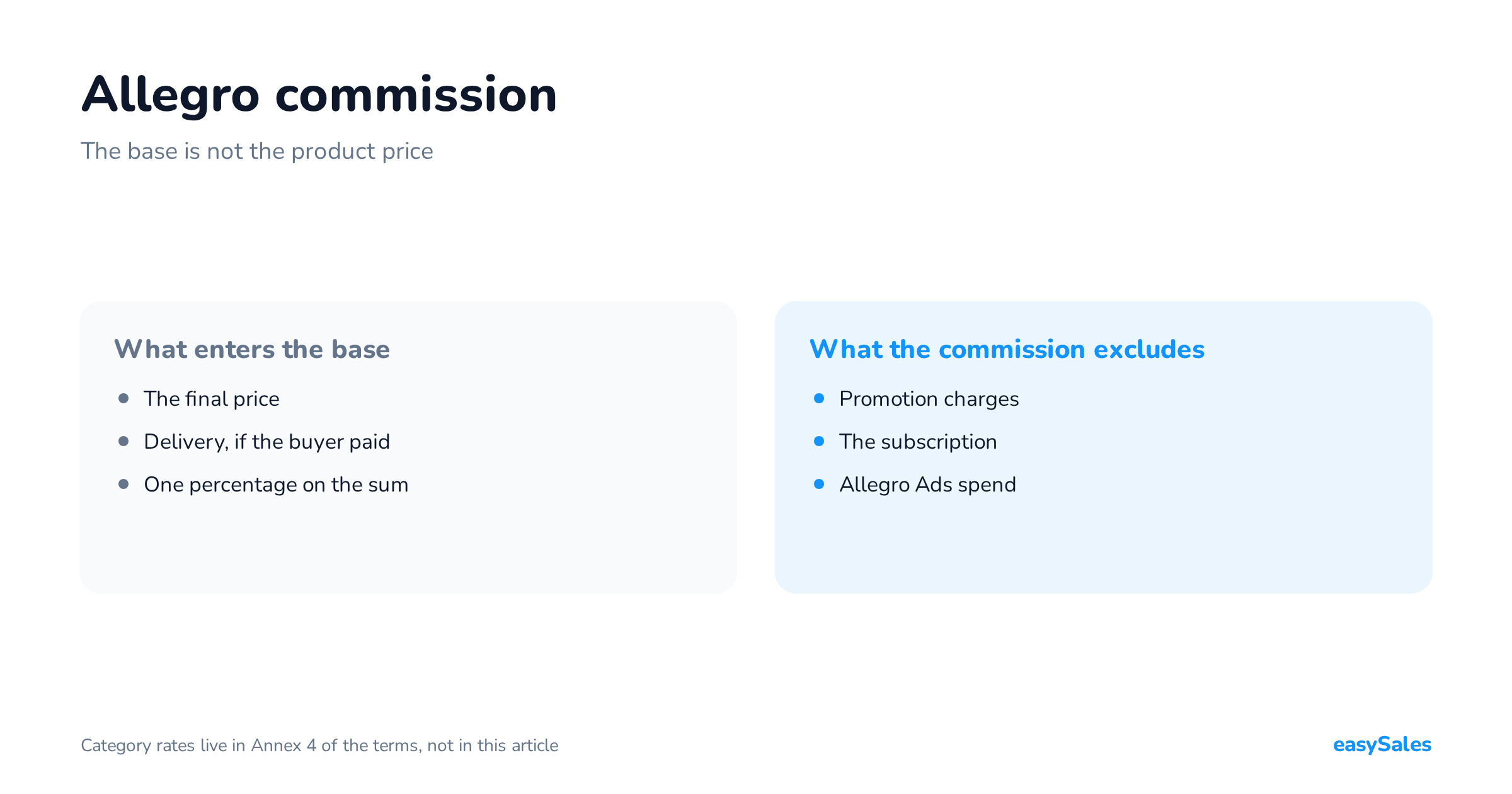
The mechanism is simple: one percentage, applied once, to a base wider than the product price.

The base is the final price together with delivery
In Allegro's own example an item sells for 100 zł in a category carrying a 6% commission. The buyer picks delivery at 18 zł, so 6% is charged on 118 zł and comes to 7.08 zł.
Six percent is the figure in that example, not your category's rate. The construction, however, is fixed: a percentage of the sum, not of the goods alone.
Several items in one order
When a buyer takes two things from different categories, Allegro spreads the delivery cost over the items and applies each category's rate to its own share.
In Allegro's example a 100 zł item at 6% and a 50 zł item at 8% split 18 zł of delivery at 9 zł each. That gives 6.54 zł and 4.72 zł — two separate commissions.
Multi-item offers work by multiplication: you multiply the commission calculated for one unit by the number of units sold.
When the commission is charged
At the moment of purchase — when the buyer wins an auction or uses buy-now. Allegro rounds it up to whole grosze.
That matters for cash flow. The charge lands on your bill before you know whether the order will be paid and whether the goods will come back.
Does commission apply to the delivery cost
Yes, when the buyer pays for delivery. Allegro states plainly that alongside the cost of the item it also takes the item's delivery cost into account.

When delivery drops out of the base
When the buyer does not pay for the parcel — because it is free or inside Allegro Smart! — Allegro does not add it. The same 100 zł item then carries commission on 100 zł.
There is one exception the other way. An Allegro Smart! buyer who chooses cash on delivery pays 4.99 zł per parcel, and Allegro includes that amount in the base.
Three cases that catch sellers out
- A failed payment retried with a different, cheaper method — the cost of the first shipping method chosen is what counts.
- The buyer types the shipping cost in by hand — commission is charged on the purchase plus that cost, and a later change of method triggers no recalculation.
- An auction left unpaid for seven days — commission then covers the item only, without delivery costs.
One consequence follows, and few sellers price it in advance: in a promoted offer the extra commission is calculated on the base commission, and that base already contains delivery.
Every charge, not just the commission
The sales commission is one line out of eight. Naming all of them is the only way the bill will not surprise you.

The listing fee and the ten-day cycle
Allegro charges the listing fee every ten days. An offer listed for twenty days is charged twice: on the first and the eleventh day it runs.
If Allegro itself removes your offer, it refunds the fee for listing and paid options in proportion to the time the offer was visible. The refund appears in your settlements within 48 hours.
Promotion: a fixed fee and an extra commission
This is the most commonly missed cost. On a Feature and a Flexible Feature Allegro charges two things: a fixed fee for the cycle and an extra commission on every sale.
That extra commission is 0.75 of the commission in force in the category, and it reaches the bill as a separate line. It is the same for regular and business accounts.
Department-page promotion carries the fixed fee only, with no extra commission. A Feature is billed in ten-day cycles, a Flexible Feature in one-day cycles.
Coins, advertising and logistics
Adding Smart! Coins to an offer costs nothing up front — Allegro charges only at the moment of sale, as the number of coins times the value of one coin, 1.23 zł as at 7 September 2026.
One offer takes coins worth at most 25% of the product price and no more than twenty of them. Five coins mean a surcharge on every purchase, not a one-off.
Allegro Ads is a separate budget, billed per click or per impression. Allegro sets the minimum cost per click, and it differs by market, placement and category.
On the logistics side come Allegro Smart! parcel charges, billed to you across five order-value bands, plus surcharges on non-standard parcels.
Allegro charges promotion fees up front for the whole cycle and describes them as non-refundable. Switching promotion off mid-cycle does not change the fee already charged.
Relisting an ended offer with promotion still switched on starts another cycle, and another fee.
Subscriptions and packages versus transaction fees
This distinction is worth drawing before your first invoice. Allegro's Subscription is one fixed fee taken every thirty days, available on a business account only, in three tiers.

What the subscription gives you
Allegro lists the tools: access to Allegro Analytics, Your Shop, a logo and banners, product series, extra options for managing orders.
Higher tiers add market and competitor data over a longer window, an automatic price converter and priority support. Bought on one market, it also applies on the other foreign markets you sell on.
What the subscription does not change
It does not change the sales commission rate, the listing fee or the promotion fees. In a calculation it is therefore not a discount on transaction charges.
Treat it as a separate monthly cost that has to pay for itself in extra sales. Work the break-even out yourself: divide the subscription fee by the margin on one order.
Commission against margin — what the platform leaves
This is the question a seller is really asking. The answer depends less on the rate than on the order in which you subtract.

The sum for one order
Start from the amount the buyer pays, delivery included — because that sum is what commission is charged on. Subtract the commission, then the cost of goods, then the real parcel cost you pay the carrier.
Spread fixed fees over the sales you expect in a cycle, not over one order. Otherwise the first sale in a cycle looks unprofitable and the tenth looks free.
Returns damage the average more than the rate
Allegro grants the transaction discount, its commission refund, once you meet the conditions, and it covers the returned items together with the matching share of delivery costs.
It does not reverse the fixed fees or the shipping you have already paid. In a category with a high return rate, that line and not the commission decides the result.
How Allegro's charges affect your own tax settlements is a question for your accountant. This article stays with the cost calculation itself.
Allegro's fee and commission calculator — how to use it
The calculator quotes fees against Allegro's current price list. You will find it in Sales Center after logging in and on a public page with no login.
- Check at the top which market you are calculating for — it defaults to your registration market.
- Pick the category: by the offer's name or from the category list.
- Fill in the product price, the delivery cost and the item's condition.
- Tick Allegro Smart! if you use it — the calculator then greys out the delivery cost you typed.
- Add promotion options, the Allegro Ads budget you plan and the number of Smart! Coins.
- Read the Summary.
What the calculator computes, and what it does not
Allegro describes the result in two parts: fees for one sold unit and recurring fees. Beside each line you see the amount and its share of the product's value.
It will not compute parcel surcharges, for non-standard dimensions for instance. Nor will it compute the price you pay the carrier when delivery is free for the buyer.
When there are several thousand offers
The calculator answers a question about one offer. Allegro also exposes fees through its API, so a system running your offers can read them offer by offer.
That is how it works in the easySales integration with Allegro as well. What such a system should watch beyond the fees, we collected in the article on what an Allegro integration must do.
Why the bill does not match your calculation
Usually not because the rate differs from what you thought. Because the bill counts cycles and moments, while your spreadsheet counts months.

Cycles, not months
The same offer appears on the bill twice in a month if it ran longer than one cycle. Allegro shows upcoming charges thirty days ahead in a separate tab.
Charges already made sit in Settlements with Allegro, under operation history. That is also where the extra commission on a Feature shows as a line beside the base commission.
A commission refund lands on the next invoice
Allegro settles the transaction discount in the month it granted it, not in the month you asked for it. The date of the request does not matter here.
In Allegro's example a request from 28 January granted on 3 February means paying the January invoice in full, with the refund visible only on February's. Allegro issues each month's invoice no later than the 15th of the following month.
What actually lowers the cost of selling, and what does not
Three groups, because sellers treat two of them as if they were the first.

Lower commission on wholesale transactions
This is the strongest lever available. Allegro sets out five conditions: a business account, the programme activated in the Discount Centre, and the offer linked to the Allegro product catalogue.
The offer also needs a VAT rate filled in and a wholesale discount of at least 5% off your base price.
For every unit sold above the category's quantity threshold — five units in most categories — Allegro cuts the sales commission by 80%.
In Allegro's example a customer buys fifteen T-shirts: full commission on five units and a fifth of it on the remaining ten.
Features at no charge
Under the "We feature good prices" programme an algorithm picks price-attractive offers every day and switches on a one-day Feature in them, with a hundred percent discount on the fee and on the extra commission.
No application is needed. Allegro considers offers you have not promoted for the last sixty days — so promoting constantly rules you out of the free option.
What you cannot lower
You will not see the subscription or manual price-list work in the cost of selling. Free delivery takes delivery out of the commission base, but the carrier's invoice stays yours.
A temporary cut is not a rate either. Allegro capped commission in selected Sports and Travel categories at 147.60 zł gross for products above 1,500 zł — from 1 September 2026 to 31 March 2027.
A line like that is a real saving today and a trap in next year's model. It has an end date, and the spreadsheet does not.
How to work out whether a category pays before you enter it
Order matters, because the first step is sometimes the only one needed. If less is left after the charges than the goods cost, no further analysis is required.
Six steps before entering a new category
- Put a real price and a real delivery cost into the calculator — not a wished-for price and not a promotional delivery.
- Add the promotion you intend to use and read the extra commission as a separate line.
- Total the recurring fees for a month and divide them by the number of orders you expect.
- Add the shipping cost you pay the carrier, including when delivery is free for the buyer.
- Subtract the return rate you expect — remembering that the transaction discount does not cover fixed fees.
- Check the wholesale programme's quantity threshold for that category if you sell to businesses.
If you sell on several platforms at once, run the same sum separately for each. What working from one catalogue across several channels looks like, we described in the article on Allegro, Empik and Erli in one panel.
At higher order volumes the cost of software joins the sum. We compared the billing models — a flat fee or a rate per order — in the article on what order handling really costs.
If you are only starting out, work through listing and account setup first. We described that step by step in the article on how to sell on Allegro, and only then come back to the calculation.