Order management software: flat fee or per-order commission
Order management software bills either a flat fee or a per-order commission. One piece of arithmetic separates them — work out your cost before growth multiplies it.
An order-management system pulls orders from every channel onto one list, keeps a single stock level, issues documents and books shipments — instead of you doing each of those separately in every panel.
Its cost looks like one of the simpler budget lines: there is an amount and there is an invoice.
It gets interesting only when sales grow — because what happens to that amount then depends entirely on the pricing model, not on how good the system is.

Order management software — two pricing models

A flat fee
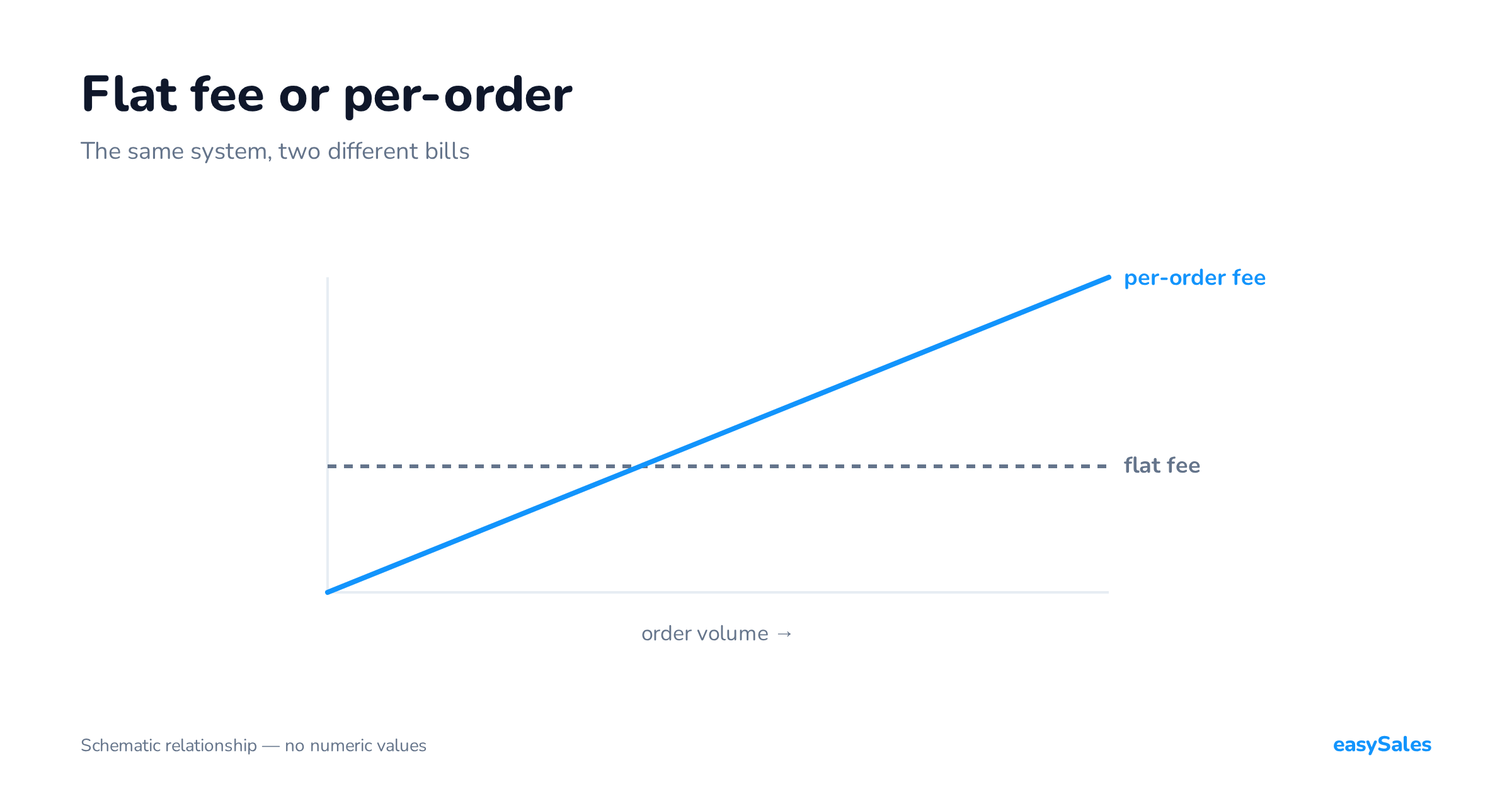
You pay a set amount monthly, usually for a package covering some order ceiling. The bill is predictable and does not move until you change package. Growth does not change the cost.
A per-order fee
You pay for each order processed, sometimes plus a subscription.
The bill is low when you sell little and grows linearly with sales — including when the order is cheap, and including when it is returned.
Neither is inherently better. They do have completely different consequences at different scales, and that is the only thing worth calculating.
Work it out on your own numbers
Three numbers and three sums
You need monthly order count, average order value, and margin. Then:
- Cost per order today. Divide what you pay monthly by your order count. On a flat model that number falls with every additional order. On a per-order model it stands still — that is the whole difference in one sentence.
- Cost at double the sales. Not "someday", but at twice what you have now. On one model the bill stays roughly the same. On the other it doubles.
- Share of margin, not of turnover. The most important of the three and the most often skipped. A per-unit fee hurts more the lower the basket value — on cheap products it can eat a visible share of what you actually earn on the transaction.
A worked example: two shops, the same turnover

Arithmetic only convinces on specifics, so take two shops with identical monthly turnover and see why the same pricing model behaves completely differently for them.
The numbers are illustrative — the point is the proportions, not a price list.
Shop A — electronics
300 orders a month, average basket 450 zł. Turnover 135,000 zł.
At a per-order fee of around 1.50 zł the system costs 450 zł a month, roughly 0.33% of turnover. Practically invisible.
Shop B — accessories and small items
3,000 orders a month, average basket 45 zł.
The same turnover: 135,000 zł. At the same rate the system costs 4,500 zł a month — ten times more, on identical turnover.
The difference does not come from shop B selling more.
It comes from the fact that a per-order fee is a fee per unit, not per value. The lower the basket, the larger that fee looms in what you actually earn on a transaction.
So the first question when choosing a model is not "how much do I sell" but "how many orders do I have, and what is one worth on average".
Two shops with the same turnover can have system costs an order of magnitude apart, and both can believe they chose sensibly — because they looked at turnover rather than order count.
The reverse case exists too and deserves to be stated fairly: a shop shipping 40 orders a month at 900 zł each is, on a flat fee, paying for capacity it does not use.
There the per-order model is simply cheaper, and there is no point pretending otherwise.

Costs that are not on the price list

Comparing headline rates can mislead, because not everything you pay appears in the pricing table. Before comparing two offers, check five things:
- Implementation and migration. Whether moving the catalogue, attaching offers and rebuilding automations are included or charged separately. With a large catalogue that can rival a year's subscription.
- Integrations charged individually. Some providers bill per channel, per courier and per accounting program. A seller with three channels, two couriers and one accounting program then pays six times rather than once.
- Limits hidden in the plan. Number of products, offers, users, API calls. A limit that looks distant today is often the nearest wall once you double.
- Support. Whether configuration help is included or sits in a higher tier. It matters mostly in the first month — but the first month decides whether the rollout succeeds.
- The cost of leaving. Whether you can export your data in a format anything else can read. Not because you plan to leave, but because a system you cannot leave stops having to try.
Check whether a returned order counts as processed. On a per-order model it usually does.
At a return rate in the teens you are paying for orders that produced no revenue — and in clothing or footwear that line can exceed the difference between two price lists.
Where each model makes sense
The per-order model makes sense when orders are few and irregular: you pay in proportion to what you actually do, and you are not funding a package you do not use.
The flat model makes sense wherever volume is predictable and growing, and especially at low unit margins — because unit cost then falls with every month of growth instead of standing still.
What to look for beyond price

The pricing model matters, but it is not the only criterion — and at similar cost everything else decides. Order management software should answer yes to five questions:
- Do orders from every channel land on one list? If each channel has its own tab, that is a channel viewer rather than an order management system. The practical test: does the person packing need to know where the order came from.
- Is there a single stock level? Shared stock read by every channel is the condition without which each additional channel increases oversell risk.
- Can you express a rule instead of clicking? Automation is the difference between a system that displays orders and one that handles them. Without rules, volume converts directly into hours.
- Are documents created where you keep your accounts? An invoice issued beside your accounting program is work moved, not work saved.
- Are couriers in the same place as orders? Label, tracking number and status should close without a trip to the carrier's panel.
A practical note: those five are tested on one order, not on a feature list. Take a specific order and take it from arrival to dispatch, counting how many times you change window.
That number tells you more than any comparison table — not least because in comparison tables everybody has everything.
Do you even need this at small scale
The honest answer is: not always.
With one channel and a dozen orders a day the platform panel is enough, and there is no point pretending otherwise.
The need appears with a second channel, or at a volume where manual retyping starts costing an hour a day.
That is the real threshold — not a particular order count on a price list.
Order management software should not replace your accounting program. The split that works: orders, stock, offers and shipping on one side; documents and accounting on the other.
A tool trying to be both usually does one of them worse.
One more situation worth calculating separately: a very uneven volume across the year.
Then what matters is how the model behaves in your peak month rather than your average one.
Calculate the bill for your best month — it sets the ceiling, and it is the one that has to fit the budget.
How to tell whether you have outgrown your plan
Whatever the model, four questions are worth asking once a quarter. It takes fifteen minutes and usually anticipates the problem by several months:
- What is my cost per order this month, and how has it moved over a year? The direction of that number matters more than its value.
- How close am I to the plan's limits? Not only orders — products, offers and users too.
- How many hours a month go on tasks the system could do itself? That is a cost which appears on no invoice and is often larger than the subscription.
- What happens to the bill if sales grow by half? In one model the answer is "nothing", in the other "it grows by half". Worth knowing before the season rather than after it.
Three things easy to miss
Returns
Check whether a returned order counts as processed. In high-return categories that is not a detail.
Cancelled and test orders — the same category of question.
Season
On a per-order model, November costs a multiple of February. That is predictable, but it needs to be in the budget in advance rather than discovered on an invoice.
The cost on no price list: your time
When comparing systems, sellers line up subscriptions. Yet at typical scale the largest cost item is not the subscription but handling time — and it decides whether the cheaper system is genuinely cheaper.
Work it out on one order. How many times do you change window between the order arriving and the parcel leaving? How often do you copy something?
How often do you type data that already exists somewhere? Multiply by your order count and by the hourly cost of whoever does it.
The typical result surprises people. At 500 orders a month and two minutes of manual work per order — an optimistic estimate — that is just under 17 hours a month.
At 2,000 orders it is 67 hours, more than three working weeks per quarter. A few hundred złoty of monthly difference between two systems disappears against a difference of ten hours of work.
So an honest comparison has two columns, not one: the cost of the billing and the cost of the handling.
A system that costs more in subscription but removes two-thirds of the manual work is cheaper in total — and conversely, the cheapest subscription combined with working across three panels can be the most expensive arrangement you have.
It is also why it pays to test on your own orders rather than on a demo. A demo shows that something is possible. Your own order shows how long it takes.
Why the bill can grow faster than sales
One last thing worth understanding about the per-order model: order count usually grows faster than turnover.
The reason is mundane. Growth rarely comes from the same customers spending more.
More often it comes from new channels, a wider range and promotions — and all three tend to lower the average basket.
A new channel attracts bargain-hunters, a wider range adds cheaper lines, a promotion sells cheaper by definition.
The effect is that turnover up by half can mean order count up by two-thirds. On a flat fee that changes nothing.
On a per-order fee the bill grows faster than revenue, precisely when you least expect it — in the month that looked like your best.
How to compare two offers fairly
The most common mistake when comparing is working from an annual average.
Take your own numbers from the last twelve months — orders month by month, not an average — and calculate the bill under both models separately for each month.
An average hides the season, and the season is where the models differ most. November on a per-order model costs a multiple of February.
Check too whether the number of integrations affects cost.
In some models every channel, every courier and every accounting program is billed separately — a seller with three channels and two couriers then pays six times rather than once.
And a last question: choose for current scale or planned growth? Current scale plus one realistic growth scenario.
Choosing for a scale that does not exist means paying for capacity instead of work — and choosing purely for today ends in a migration mid-growth.
A conclusion that is arithmetic, not ideology
If your sales are flat and small, the per-order model is cheaper and there is nothing to argue about.
If they are growing, there is a point where the two lines cross, and past it the gap widens steadily in one direction.
It is worth knowing where that point sits for you before you pass it.
Our pricing is flat: work out your cost.