Omnichannel: what it is, examples and how it differs from multichannel
Omnichannel in practice: how it differs from multichannel, which services connect your online store, marketplaces and counter, what must work underneath and where to start.
Omnichannel is a way of selling in which your online store, your marketplaces and your physical shop work as one shop: with one catalogue, one stock figure, one order list and one customer history.
A customer can start a purchase in one channel and finish it in another. They find a product on Allegro, order it in your online store, collect it at the counter and return it there too.
Below we explain how omnichannel differs from multichannel, show examples, and describe what has to work inside the company before you promise customers that convenience.
Key points
- Omnichannel is one shop across many channels: the customer moves between them without starting over.
- Multichannel is many separate channels: each has its own stock, orders and customers.
- The foundation is four shared registers: catalogue, stock, orders and customer.
- Shared stock first, services second: in-store pickup and counter returns need up-to-date availability.
- Promotions and returns have their own rules: you show the lowest 30-day price in store and online, and the statutory withdrawal right does not cover counter purchases.
Omnichannel: what is it?
The word "omnichannel" combines the Latin omnis, meaning "all", with the English word channel. In Polish it is also called all-channel or integrated selling.
What counts is how the channels are connected, not how many you have. A company with one online store and one physical shop can work omnichannel. A company with ten marketplaces may not work that way at all.
The test is simple. An online order should be visible to the salesperson at the counter, and the last unit sold in the shop should disappear from Allegro. If both hold, you are close to omnichannel.
Why customers expect it
Polish customers rarely buy in one place. According to the Polish Chamber of Electronic Commerce report "Omni-commerce. Kupuję wygodnie 2026", 65% of consumers buy the same brands online and in physical shops (ITwiz, 30 June 2026).
For 63% of respondents, a brand's availability in many channels is an important reason to choose it. Only 12% made their last purchase purely offline, and only one customer in ten completes a purchase in a single place.
Omnichannel vs multichannel: what is the difference?
Both approaches mean selling in several channels. The difference is whether the channels know about each other.
In multichannel you run each channel separately. Allegro has its own stock, the online store has its own, and the till in the shop has yet another. In omnichannel the same data serves every channel at once.
| Area | Multichannel | Omnichannel |
|---|---|---|
| Stock | separate in each channel | one, shared by all |
| Orders | in each channel's panel | in one list |
| Customer | separate in each channel | one purchase history |
| Return | where the customer bought | also in another channel |
| Promotion | set channel by channel | planned for the whole range |
| Goal | presence in many places | one purchase across many places |
Multichannel selling is the first step
Multichannel selling is not a mistake. Most companies start there: they add a marketplace to their store, or an online store to their physical shop. For an overview of the channels to choose from, see our article on marketplaces in Poland.
The trouble starts when channels multiply but the data still lives apart. Every new sale then means more manual copying of stock and orders. We described working with several marketplaces in one place in Allegro, Empik and Erli in one panel.
Omnichannel examples in e-commerce
Omnichannel shows best in services that cross two channels. Below are the four most common in small and mid-sized retail.

Click and collect: in-store pickup
The customer orders and pays online and collects the goods in your physical shop. They pay no delivery, and you ship no parcel.
This kind of pickup is gaining ground. The Chamber's report notes that parcel lockers still dominate delivery, but pickup points and click&collect services are growing in popularity.
There is one condition: the shop has to know about the order, and the goods have to be set aside right after purchase. Otherwise the customer arrives for a product someone bought at the counter an hour earlier.
Returning an online purchase in the shop
The customer brings back to the physical shop what they bought online. For them it is convenient, and for you it is a chance they pick something else on the spot.
The cashier still has to find the online order and put the goods back on the same stock they were sold from. We cover the legal rules below, in the section on returns.
One stock for the store, marketplaces and counter
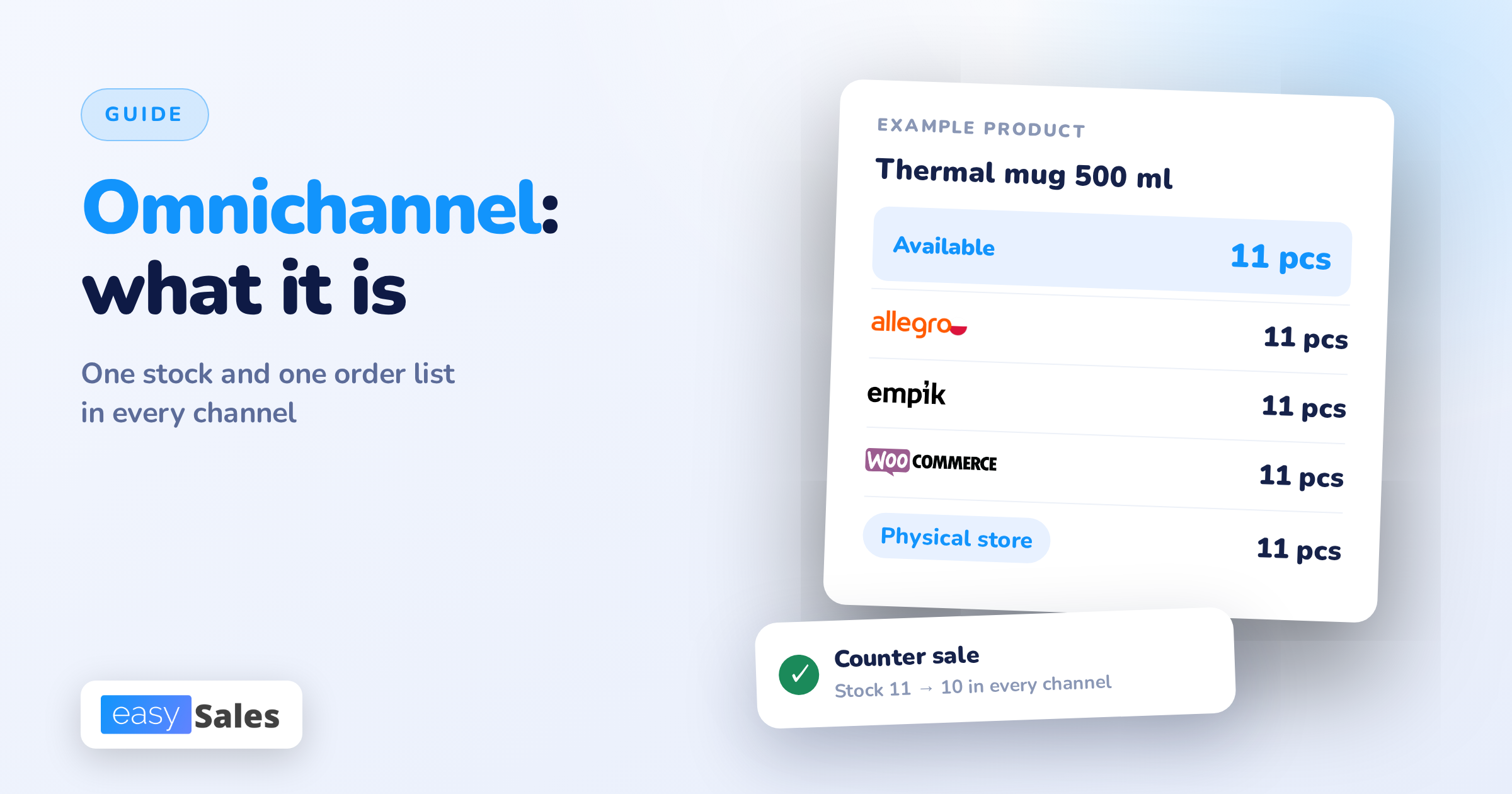
The same unit is visible in the online store, on Allegro and on the shelf. A sale in any channel lowers stock in all the others.
This is the least visible example and the most important one. Without it, the two before it do not work.
In-shop availability shown online
On the product page in the online store, the customer sees whether the item is available in the physical shop. They can come in right away instead of waiting for a courier.
That information has to be current. Showing availability that is no longer there does more harm than showing none.
What has to work underneath
Each of these services rests on four shared registers. If you keep any of them separately for each channel, customers will notice quickly.

One catalogue
Each product has one identifier that every channel uses, most often the SKU and the EAN code. You keep descriptions, images and parameters in one place, and the channels take them from there.
One stock
Stock is the number of units you can sell right now, across all channels together. An order that has arrived but has not shipped should lower that number at once.
Also decide which system is the master. If a warehouse or accounting program keeps stock, the other channels must take their figures from it, not the other way round.

One order list
Orders from marketplaces, the online store and the counter land in one place. Each shows which channel it came from and how it will be handed over: courier, parcel locker or counter.
We described how to choose a tool for this work in our guide on what order handling really costs.
One customer
The same person buys from you on Allegro, in the online store and at the counter. A shared history lets you handle a return, a complaint or a question without sending the customer to another channel.
You usually recognise a customer by phone number, e-mail address or tax ID (NIP). Not every channel passes all of these on, so part of the history may stay split.
Prices and promotions across channels
Customers compare prices between channels. Prices may differ, for example by a marketplace commission, but the difference should come from a decision, not from a forgotten update.
The lowest price in the 30 days before a discount
When you announce a discount, you show the lowest price from the 30 days before it. UOKiK explains that the rule covers in-store sales, online sales and advertising (UOKiK, information on price reductions).
For a product on sale for less than 30 days, you show the lowest price since sales began. For goods that spoil quickly, you show the price before the first reduction.
With several channels it is easy to slip, because promotions start on different days. Plan discounts in one calendar and keep a record of prices from every channel. We covered preparing for peak season in our Black Friday 2026 guide.
Returns: physical shop vs online purchase
A return at the counter is one of the most common omnichannel services. It is also where two different rights are easy to confuse.
A consumer who concluded a distance contract may withdraw from it without giving a reason, usually within 14 days. In a traditional shop that right does not exist and depends solely on the seller's will (UOKiK, withdrawal from a contract).

How to put it in your terms
If you accept returns of online purchases in the shop, say so in the online store's terms. Give the address, the opening hours and what the cashier needs: the order number or the buyer's details.
You set the return rules for counter purchases yourself, for example an exchange period. Show them at the till and keep them apart from the online store's rules, so customers do not mix them up.
A complaint about a defective product is a separate matter. The statutory warranty covers products bought in any way, including in a physical shop (European Consumer Centre).
Omnichannel in a small or mid-sized company: where to start
You do not have to roll out everything at once. The order matters, because each step rests on the one before.
- Clean up the catalogue. Give each product one SKU and fill in the EAN codes before you connect channels.
- Pick a master system for stock. One system counts stock, and the others take it from there.
- Connect the channels to the stock. Start with your best-selling channel and check that a sale there lowers stock everywhere else.
- Bring orders into one place. The shop and warehouse teams work on the same list.
- Put counter sales on the same stock. A receipt in the shop must lower stock just like an online order.
- Add your first cross-channel service. Usually that is in-store pickup or counter returns.
- Write down the rules. Terms, pickup hours, how long goods are held and how returns are accepted.
How long to hold goods for pickup
Set a fixed period, for example 3 working days, and state it in the order confirmation. After that the goods go back on stock, and you cancel the order or switch it to shipping.
When omnichannel can wait
With a few dozen orders a month and one channel, a shared system gives you little. It pays off once the same unit can be sold in two places at the same time.
How to measure omnichannel results
A single channel's report shows only its own sales. In omnichannel, part of the physical shop's work serves orders from other channels.

Track a few numbers, always over the same period, before a change and after it:
- Cancellations for lack of stock as a share of all orders. Shared stock should bring them down.
- The share of in-store pickups among online orders.
- Counter returns and how many of them end in an exchange or a new purchase.
- Customers who buy in more than one channel and the value of their purchases compared with the rest.
- Time from order to handover, separately for shipping and for in-store pickup.
Do not compare yourself with other people's results. Compare your own month with the same month a year earlier, because retail sales depend heavily on the season.
How easySales helps you sell omnichannel
easySales brings marketplaces, your online store and sales in your physical shop into one panel. Every channel works on the same products, stock and orders.

A counter sale as an ordinary order
You switch on the Physical store module in your account settings. At the counter you search for a product or scan its SKU or EAN code, and you can split payment between cash, card and gift card.
The sale is saved as an order in the same list as orders from marketplaces and the online store. The receipt is printed by a cash register connected through the easySales Fiscal app on a Windows computer.
The cash register integration carries a Beta badge in the panel, so print a test receipt before your first trading day. The guide how to connect a cash register walks you through it.
One stock for every channel
Open orders reserve stock by default, and issuing an invoice or receipt deducts it. A stock change goes into the queue that sends stock to offers on connected marketplaces, which runs every minute.
The new stock also goes back to your online store, including WooCommerce, PrestaShop, Magento and OpenCart.
If an external program that easySales only reads from keeps your stock, the next sync will overwrite a counter sale. So decide first which system is the master.
The channel shown on every order
In the order list, every order shows the name of the marketplace or store it came from, and you can filter the list by channel. The sales report also shows sales broken down by channel.
One customer card
By default, easySales groups orders from the same buyer into one customer card: private buyers by phone number, companies by tax ID. The card shows their orders, returns and total spend.
Grouping works when the channel passes on the same phone number or tax ID.
Find out more about working from one list on the order management page, and about stock on the stock control page. easySales is free for 14 days, no card needed: create an account and connect your first channel.