Black Friday 2026 guide for sellers: the marketplace calendar and how to prepare
The Black Friday 2026 calendar on eMAG, Trendyol, Fashion Days, Altex, Allegro and Amazon, and the 8 things to prepare in stock, prices and delivery before each order peak.
Last updated: 30 October 2026
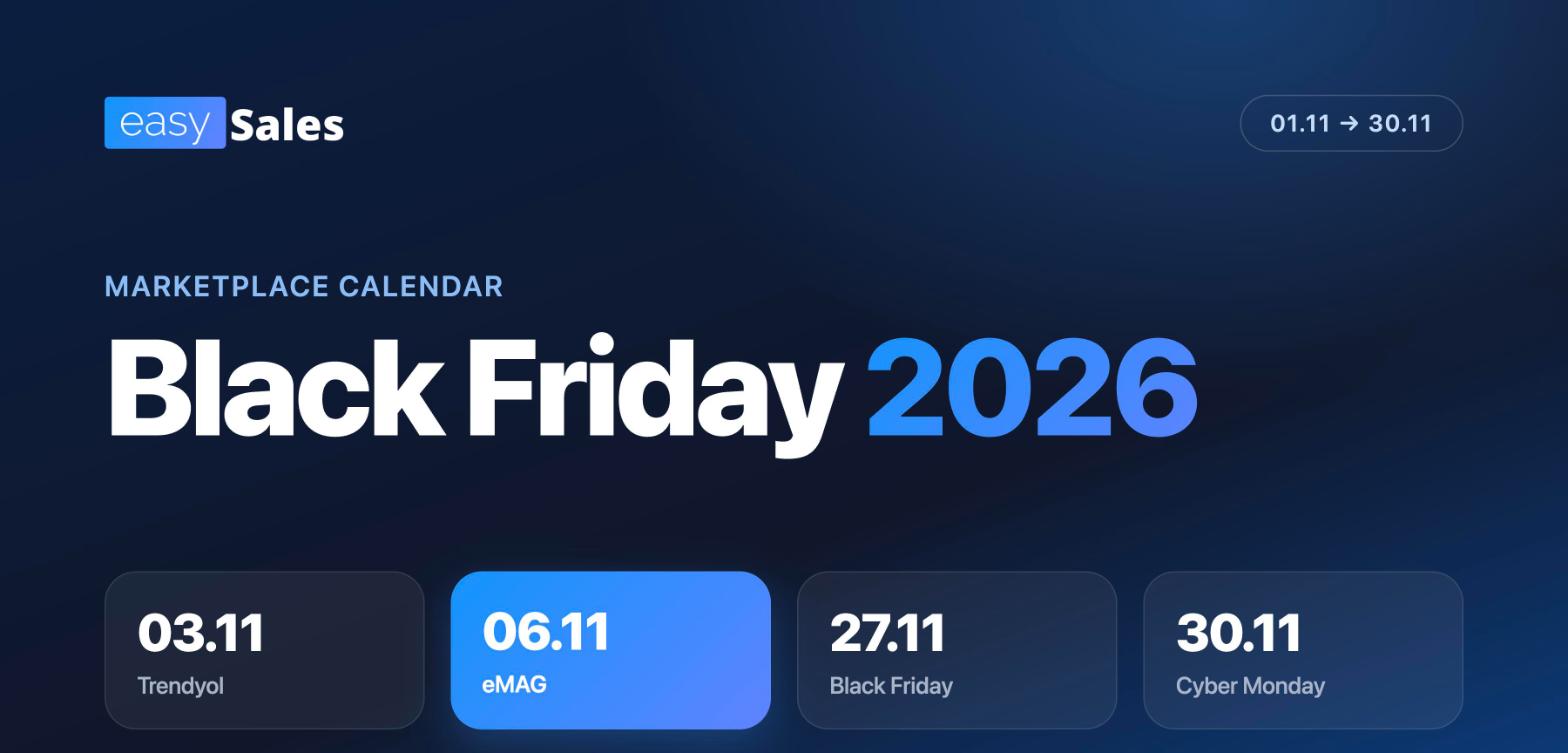
Black Friday 2026 has already started for part of the market. Fashion Days starts on 1 November, Trendyol on 3 November, eMAG has its big day on 6 November, and the last campaigns close on 30 November, Cyber Monday. If you sell on several channels, you have almost a month of order peaks on different days.
Two dates matter most: 6 November, when eMAG runs Black Friday, and 27 November, the international Black Friday, followed by Cyber Monday on 30 November.
Most Black Friday problems start after the customer places the order: products sold twice, prices stuck, shipping labels generated too slowly and customers calling to ask where their parcel is. Each one can be prevented with a setting made in advance. This guide starts with the calendar, then covers the 8 things to prepare and ends with a day-by-day plan.
Black Friday 2026 calendar by marketplace
| Marketplace / retailer | Black Friday 2026 period | Main day | Status |
|---|---|---|---|
| eMAG Romania | a single day | 6 November | Confirmed |
| Trendyol | 3 - 15 November | - | Announced |
| Fashion Days | 1 November (19:00) - 8 November | - | Confirmed |
| eMAG Bulgaria | a single day | 13 November | Announced by eMAG |
| eMAG Hungary | visible in the seller account | - | Not public |
| Temu, SHEIN | peak around 27 November | - | No dates announced |
| Altex / Media Galaxy (RO) | 29 October - 18 November, in 3 stages | - | Announced |
| Flanco (RO) | 22 October - 30 November | - | Announced by the company |
| Allegro (Black Weeks) | early November - 30 November | 27 November | Estimate |
| Amazon (Black Friday Week) | 19 - 30 November | 27 November | Estimate |
| International Black Friday | - | 27 November | Fixed date |
| Cyber Monday | - | 30 November | Fixed date |
All marketplaces in the table are integrated with easySales, so you can manage stock, prices and orders for all of them from one place.
eMAG. Black Friday at eMAG Romania takes place on Friday, 6 November 2026, in a single day. The start time has not been announced. eMAG wants every campaign order delivered before the 1 December long weekend in Romania. eMAG Bulgaria runs its Black Friday a week later, on 13 November, the first edition with all offers in euro. For eMAG Hungary, the campaign is confirmed in the seller info centre, and the date and enrolment conditions are visible after logging into the seller account.
Trendyol. The Black Friday campaign runs from 3 to 15 November, so it covers eMAG's day and the week after it. If you sell on both, your stock for the first half of November has to cover two overlapping campaigns.
Two things to know about Trendyol in easySales
- If you decouple the sale price from the catalogue price to set your Black Friday price, Trendyol keeps receiving that same price after 15 November until you change it. Write down which offers you changed.
- When Trendyol splits a package, easySales creates new orders and cancels the original one automatically. Do not process the cancelled order by hand.
Fashion Days. The campaign starts on Sunday, 1 November at 19:00, and ends on 8 November at 23:59. If you sell fashion on Fashion Days, Trendyol and eMAG, the week of 2 - 8 November will be your busiest.
Temu and SHEIN. Neither has announced a dedicated Black Friday campaign for Romania. On both, the order peak comes around 27 November.
Altex and Flanco. Both run long campaigns that have already started: Altex from 29 October to 18 November in three stages, and Flanco from 22 October to 30 November. The Altex discounts also apply to marketplace partners.
Allegro. The Black Weeks 2026 dates have not been announced. In 2025, the campaign ran from early November to 1 December. Offers only enter the campaign if they meet Allegro's qualification conditions. Watch the EU Omnibus rule too: the discount is calculated against the lowest price of the last 30 days, so a price increase in October shrinks the discount shown.
Amazon. The dates have not been announced. In 2025, Black Friday Week ran from 20 November to 1 December, and the dates were announced on 13 November. Following the same pattern, the 2026 start would be 19 November.
How to prepare: 8 things to set up before 6 November
Everything you prepare for eMAG also works for 27 November, so it is worth doing now, in this order.
1. Stock comes from a single source for each store
When you sell on eMAG, on other marketplaces and on your own website, stock has to come from one place. If you update it by hand in several places, differences appear within hours on a campaign day.
Check three things:
- Where stock comes from: your invoicing software, ERP, supplier feed or website. Pick one as the main source.
- How often it updates. A supplier feed read once a day is too slow on a campaign day.
- What happens when an order comes in. Available stock has to drop immediately, even before you issue the invoice.
In easySales: every connected store has a single stock source (the website, the invoicing software or ERP, a feed, a supplier or manual entry), and its stock reaches every channel. For suppliers you set an automatic feed import at the interval you choose. Stock reservation is on by default: an open order keeps the product reserved until you invoice or complete it.
To correct stock for the whole catalogue, export the list from Stocks, edit the stock column in Excel and import it back. If stock comes from an ERP or a feed, correct it there, because the next sync overwrites the import.
2. Offers selling what you no longer have get stopped in time
An offer that shows stock on eMAG while the product is gone from your warehouse brings orders you will cancel. Every cancellation hurts your seller rating, and on Black Friday these orders arrive within minutes.
In easySales: in Smart Reports you have the eMAG stock divergence report. It lists active offers on eMAG Romania, Bulgaria and Hungary that still show stock on the marketplace while easySales has nothing available. One button resends the correct stock for all of them. Run it on 4 or 5 November and again on the morning of 6 November.
3. Offers switched off at zero stock come back on by themselves
Altex, Flanco, some Mirakl channels and sometimes eMAG automatically disable an offer when stock hits 0. When the goods arrive again, the offer stays off. In a three- or six-week campaign, that means whole days without sales on your best-selling products.
In easySales: in the additional settings of each marketplace connection, turn on the option that automatically re-enables offers when products have stock again. It is off by default and is turned on per connection. easySales checks disabled offers every hour and re-enables the ones that have stock again.
4. Goods are ordered for both peaks
Your supplier needs a few days to deliver. If you find out on campaign day that a product is running out, it is too late to reorder.
In easySales: the reorder forecast report in Smart Reports calculates how many units to order for each SKU. It uses the sales velocity from your orders, current stock, the supplier's lead time and goods already on the way. Two settings matter for Black Friday:
- Expected growth (0% to 300%): how much you expect sales to grow during the campaign. Quantities adjust to it.
- History window: for new products or products that were out of stock for a long time, pick 30 or 60 days and turn on the option that counts only in-stock days. Otherwise sales velocity comes out lower than it really is.
Save the report under a name and use it as your working list when you place supplier orders.
5. Prices have limits set before the campaign
On Black Friday prices change often and buyers compare more than ever. If you adjust prices by hand, you risk selling below cost or losing the buy button for hours.
In easySales: Auto Price works on eMAG Romania, Hungary and Bulgaria, including FBE offers. You set a minimum and a maximum price for each offer, and easySales adjusts the price inside your range based on your position against the buy button. The offer has to be linked to a catalogue product and have both limits set.
Auto Price is included in every plan, with a number of offers that can run at the same time: 10 on Starter, 20 on Accelerator, 30 on Smart, 40 on Performer, 50 on Advanced and 60 on Pro. Above that you can buy extra tokens. Choose now the products where the price fight happens and set the limits while you have time to check margins.
Watch out for eMAG campaigns. While an offer is enrolled in an eMAG campaign, eMAG can refuse a price increase. When that happens, easySales pauses price adjustment on that offer in both directions until the next send. After the campaign, press Resend on the offer, otherwise the price stays stuck.
6. Invoices, labels and printing run on their own
At 2 minutes per order and 300 orders, you have 10 hours of work just for documents.
In easySales: automations live in Flows. For invoices and shipping labels you use two linked flows:
- The invoicing flow starts when an order comes in. You filter the channel and status, add the condition that the order has no invoice yet and the create invoice action, with the invoicing software and account selected.
- The shipping label flow starts when the invoice is created. You add the condition that the order has no label yet and the create label action, with the courier selected.
The second flow only starts once the invoice exists on the order, so the label is never generated before it. If you work with several couriers, build one flow per courier.
Flows can also print the invoice, the label or the order document automatically when an order is created, invoiced, gets a label, is picked or is packed. You need the EasySales Printer app on the computer connected to the printer.
If your invoicing software deducts stock from a warehouse, it rejects invoices for products with no stock there. Record the goods receipts in the invoicing software before 6 November.
Test the flows on 5-10 real orders this week, so you catch a missing courier account or a wrong invoice series early.
7. The warehouse works in batches
With hundreds of orders, you split them into batches: pick the products for the whole batch, pack, move to the next one.
In easySales:
- Process groups hold up to 50 orders in one batch. Picking and packing work by scanning, and an order is marked picked once all its products are scanned.
- Bulk generation of labels and invoices handles up to 50 orders per action. Each label is a separate request to the courier, so 50 labels can take a few minutes. Work in smaller batches, for example 20-25 orders, so the team can start packing while the next batch generates.
- The courier handover manifest is created and printed from easySales, for couriers that support it.
- Sub-accounts give temporary staff access, each with their own login and only the permissions they need. You can see afterwards who did each action.
- Alerts in Orders > Settings > Alerts stop you before label generation on orders that need attention, for example locker delivery or a specific payment method.
8. Customers see where their parcel is on their own
After the campaign, phones and inboxes fill up with customers asking where their order is.
In easySales: the external order page shows the customer, with no account and no password, what stage the parcel is in (created, in transit, delivered), with a map and the estimated delivery date if you turn it on. The customer can message you directly from there. Send the link in the confirmation email and in automatic customer notifications.
Your day-by-day plan
| When | What you do |
|---|---|
| By 2 November | Check the stock source and automatic imports, run the reorder forecast, order goods, test the invoice and label flows |
| 3 - 5 November | Set Auto Price and min/max limits, turn on automatic offer re-enabling, create sub-accounts, check stock in your invoicing software, run the stock divergence report |
| 6 November | Run stock divergence in the morning, process orders in batches, generate labels in smaller batches |
| 7 - 18 November | Resend Auto Price offers enrolled in eMAG campaigns, check disabled offers on Altex and Flanco, rerun the forecast with November sales and order goods for the 27th |
| 19 - 26 November | Prepare the second peak: Amazon, Allegro and your own store, run stock divergence again |
| 27 - 30 November | International Black Friday, Black Friday at easySales, Cyber Monday |
Black Friday at easySales: 27 November
Black Friday easySales
On 27 November we have our own Black Friday, with an offer for sellers who want to automate their store. We will announce the details on the blog and in the easySales newsletter before 27 November.
If this month you processed orders in Excel and updated stock by hand on every marketplace, 27 November is a good moment to move everything into one place. You have time to connect your channels and set up flows before the Christmas orders.
Two peaks, one stock source
An order you never get is a lost sale. An order you get and then cancel is a lost sale, an unhappy customer and a hit to your seller rating, right in the period when it matters most. If you do only one thing from this guide before 6 November, make it the first one: correct stock, from a single source, on every channel.
Selling on several marketplaces and updating stock by hand? Try easySales for free and keep stock, orders and shipping labels in one place through 30 November.