Warehouse management software (WMS) for online stores
Know at any moment what is on your shelves and where. Receiving, locations, stocktakes, picking and packing, connected directly to the orders from your marketplaces and your online store.
No credit card · 14-day free trial · Cancel any time
- Stock by location, across multiple warehouses
- Batch picking with scanning, in location order
- Stock synced automatically to every sales channel
HOW IT WORKS
Goods come in, get stored, ship out. All scanned.
Three stages that easySales connects to each other, without spreadsheets.
Organise your warehouse
Create your warehouses and locations, choose the type of each location and print barcode labels. If you like, draw the warehouse map too.
Receive goods
Receive with a scanner, starting from the purchase order, from a file or directly on the spot. Stock goes into the location when you confirm the delivery.
Prepare orders
Group orders into batches, pick with a scanner in location order, check each parcel at packing and create the shipping labels and invoices for the whole batch.
WMS FEATURES
Everything an eCommerce warehouse does in a day, in one system
From receiving to the parcel, every stock movement is scanned and flows automatically into the stock sent to your channels.
Locations, labels and a warehouse map
A product can sit in several locations, each with its own type: picking shelf, pallet, floor, transit, returns or storage. Print barcode labels for your locations and, if you want, build a map of the warehouse by aisles, racks, levels and positions.
Stock across multiple warehouses, with rules per channel
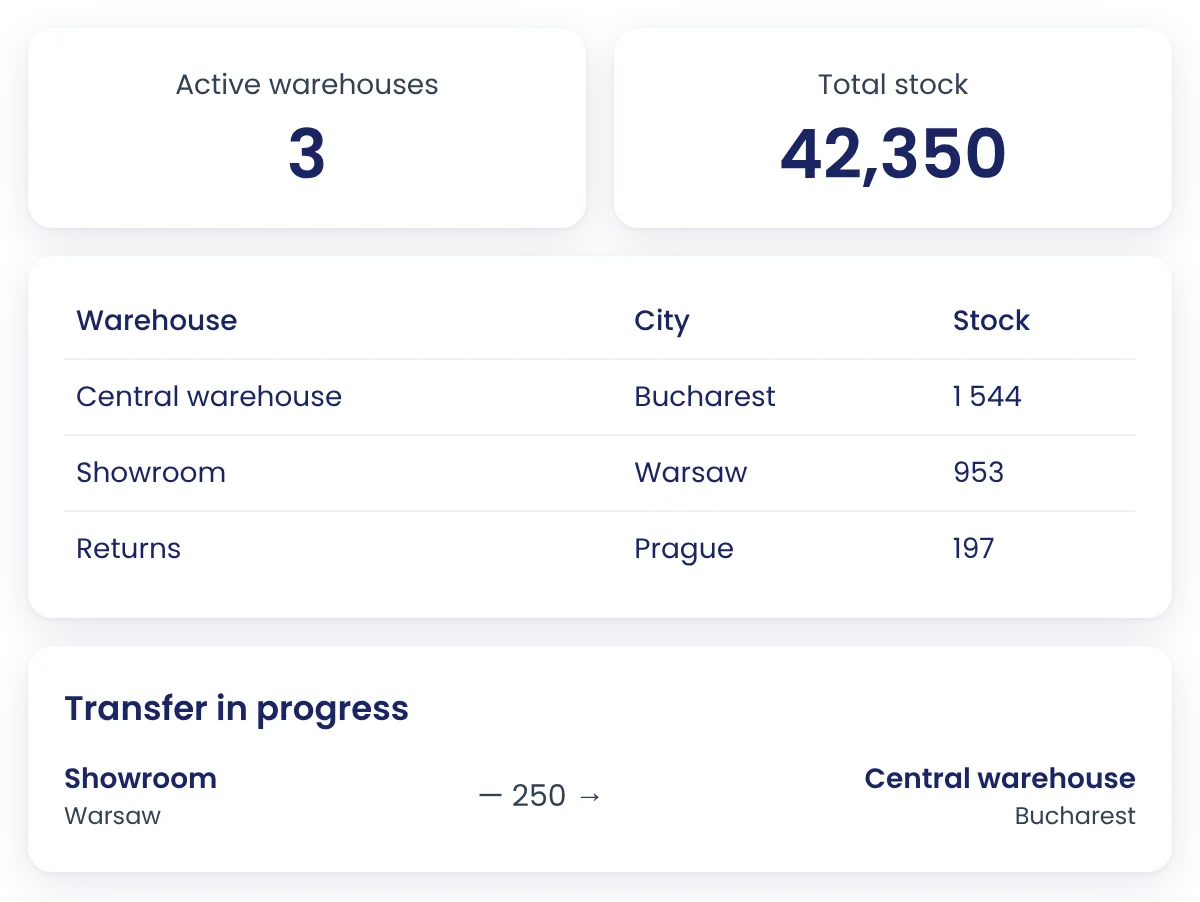
Keep track of each warehouse separately, whether you enter the stock yourself or it comes from a feed, your ERP or a supplier. For each store you choose which warehouses count towards the stock sent to your channels and which one an order reserves from first.
Scanned receiving, delivery by delivery
Create the receipt from your purchase order, from a file or directly by scanning. Each delivery is confirmed separately, and any difference from what you ordered stays visible on the receipt. You can also count blind, without seeing the expected quantity.
Set up your first warehouse during the free trial
Add your locations, print the labels and do your first receipt. No credit card required.
Stocktakes in sessions, with differences calculated for you
Start a stocktake session on a warehouse, for all stock, by category, brand or supplier, or from a file. Your team scans, and easySales compares the count with the system stock and flags shortages and surpluses against the tolerance you set.
Batch picking and packing
Group up to 50 orders into a batch, separate single-item orders and pick with a scanner, in location order. Several people can work on the same batch, and at packing every product is checked before you close the parcel.
Moves between locations and between warehouses
Scan a location label and move products, one at a time or the whole content at once. The refill list shows which picking shelves need topping up and where to take the stock from. Between warehouses, goods move through scanned transfers, with a PDF transfer note.
Warehouse stock reaches every channel on its own
What is on the shelf becomes the stock sent to Amazon, eBay, Allegro, Kaufland and your website. When an order comes in, the items are reserved in the chosen warehouse, and on completion they are deducted from the locations they were picked from. For lots with an expiry date you work FIFO or FEFO.
What sellers who work with easySales say
"Working with easySales has brought major efficiency, fast order processing and excellent organization across multiple platforms. The centralized system prevents errors. The easySales team is prompt, flexible and understands our needs, being a reliable partner for development."
Diana Vasilca
Commercial Director
"Before using easySales, we were manually managing orders from multiple marketplaces, online stores, and wasting a lot of time updating inventory. Now, everything is automated, orders are entered centrally, and we have a clear picture in real time. It was one of the best operational decisions we made."
Angela Teleptean
Sales Manager
"For us, easySales is like air – without it, we couldn’t work efficiently. easySales has given us better control over our business: we automatically and centrally manage orders from multiple marketplaces, we have real-time visibility and simplified processes. It’s a real advantage for our team."
Iulian Paraschiv
Antreprenor
The features around your warehouse
Each one has its own page with all the details.
Run your warehouse on scanners, not spreadsheets
Create your first warehouse, add your locations and do your first receipt within the 14-day free trial.
Start your 14-day free trialFrequently asked questions
Have another question? Write to us and we will be happy to help.