How to set GPSR details per brand in easySales
Enter the product safety details, manufacturer and EU representative once per brand and let easySales fill them on every product of that brand.
What a brand profile does
The EU product safety rules (GPSR) ask you to show, for each product you sell, safety information and who the manufacturer and the EU representative are. Most of the time these details are the same for every product of a brand. A brand profile lets you enter them once and easySales copies them to all the products of that brand.
Open it from Products → Online Shops → Brand GPSR profiles.
Three things to know first:
- The profile fills empty details only. A product that already has its own GPSR details keeps them.
- The profile writes to products, not straight to marketplaces. How the details reach your listings depends on the marketplace; see below.
- Changing a profile later does not change products it already filled.
Create a profile
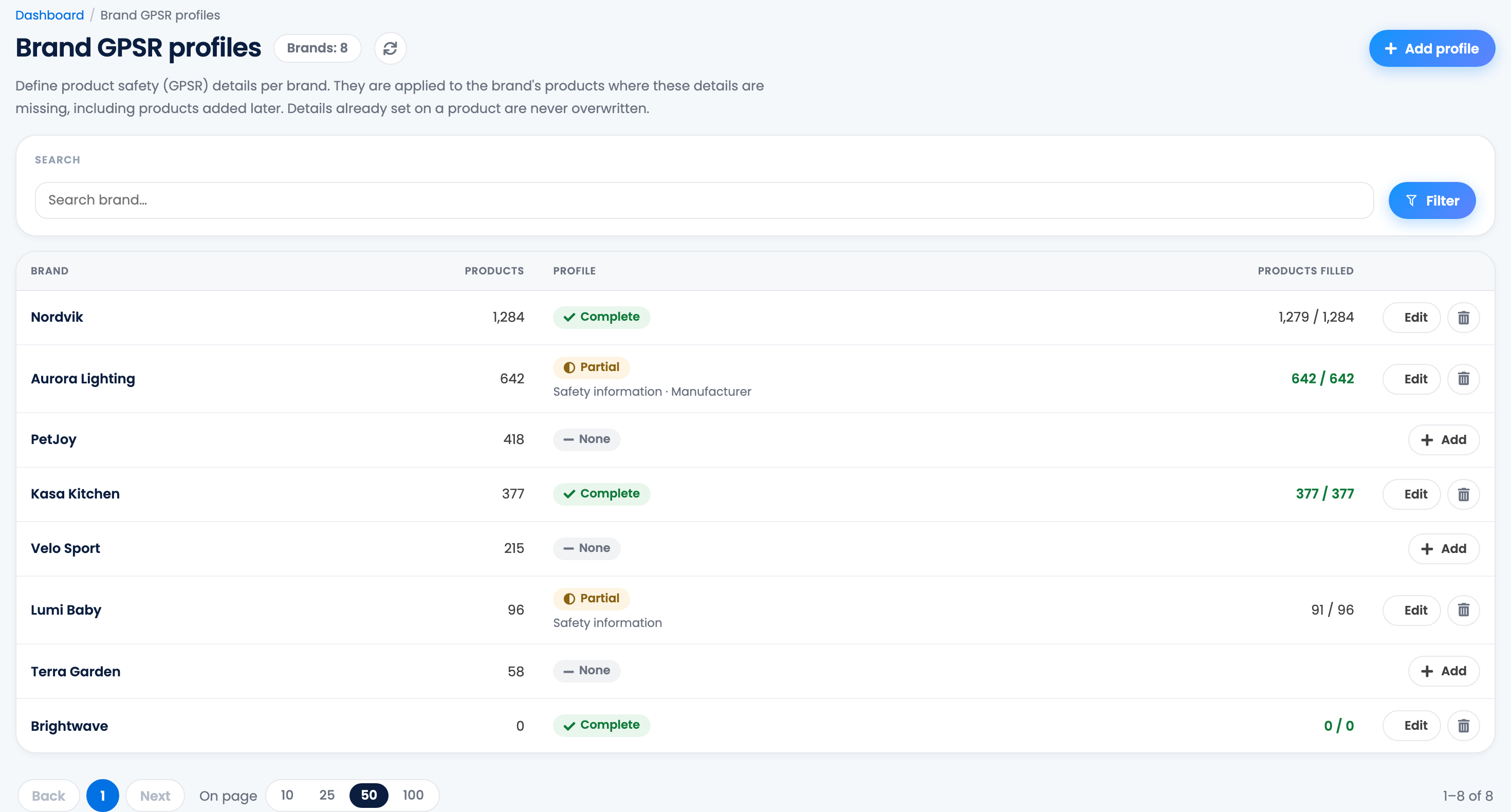
The list shows every brand in your catalogue, with its number of products, whether it has a profile and how many of its products already hold the details.
- Press Add next to the brand, or Add profile at the top and type the brand.
- Fill in Safety information, the Manufacturer and the EU representative. You can leave a part empty, but a manufacturer or an EU representative needs its name, address and e-mail together.
- Press Save.
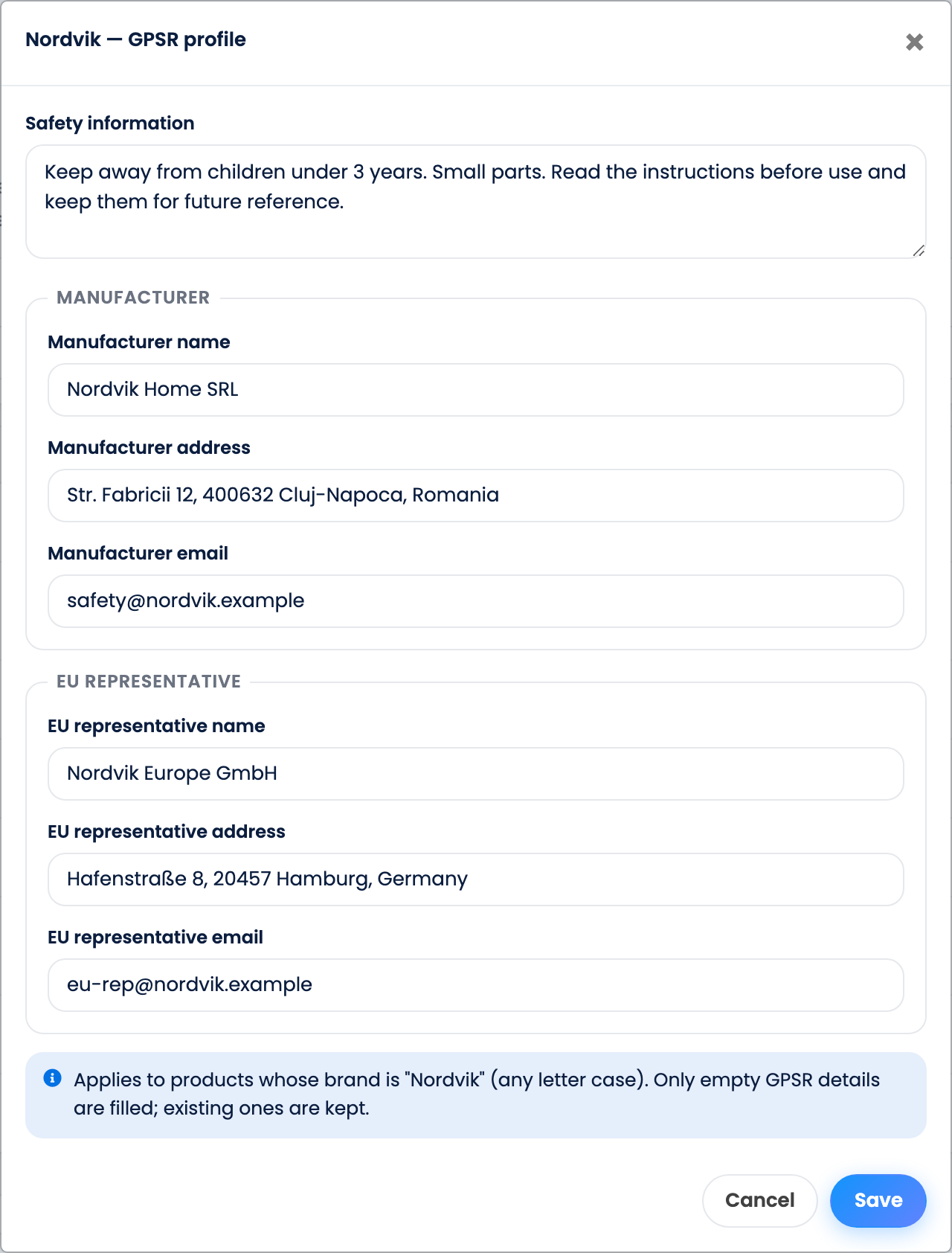
easySales then fills the products of that brand in the background. A large brand can take a few minutes.
The brand must match the one on your products. Letter case does not matter, but "Nordvik Home" and "Nordvik" are different brands.
| Column | Meaning |
|---|---|
| Profile: Complete | The profile has safety information, a manufacturer and an EU representative. |
| Profile: Partial | The profile has only some of them. The line under it says which. |
| Profile: None | The brand has no profile yet. |
| Products filled | How many products of the brand hold every part the profile has, out of all the brand's products. |
How the details are filled
The details come in three parts: Safety information, Manufacturer and EU representative. Each part is filled on a product only when that whole part is empty there.
- New products of the brand get the details as soon as they are added, from any source: your online shop, an import or by hand.
- A product whose brand changes gets the new brand's details for the parts it does not have yet.
- A part you empty on a product stays empty until the profile is saved again.
You can see and change the details of any product on its page, in Product safety (GPSR).
From the product to the marketplace
| Channel | What happens |
|---|---|
| eMAG and FashionDays | Your offers take the product's details automatically and the offers are updated on the marketplace. A manufacturer or an EU representative is sent only when its name, address and e-mail are all filled. |
| Other marketplaces | The GPSR details come from the connection settings or from the offer itself, not from the product. |
| AI offer completion | Uses the product's GPSR details when it completes new offers, so they can reach marketplaces that ask for them as characteristics. |
| Your online shop | The details are not sent to your shop, and your shop's sync does not overwrite them. |
Change or delete a profile
- Edit changes the profile. Products that had nothing get the new details; products already filled keep the old ones. Correct those on the product page or with an Excel import of your products.
- The bin deletes the profile. The products keep the details they already received.
Your team and brand profiles
Team members with the View products permission can open the page and add, change or delete profiles.
When something does not look right
| Symptom | What to do |
|---|---|
| Products filled stays below the total | Some products already had part of the details. Open one of them, complete or empty that part, then save the profile again. |
| I corrected the address but products still show the old one | A profile never overwrites details already on a product. Change them on the products, or update them with an Excel import. |
| A brand's products were not filled | Check that the brand on the products is written exactly like the profile's brand. |
| "Fill in at least one GPSR detail." | Enter at least one detail before you save. |
| eMAG still shows other details | The offer's GPSR details were changed on the offer, or the offer is attached to another seller's product page. |
| My Allegro or Kaufland listing has no new details | Those marketplaces take GPSR from the connection settings or the offer, not from the product. |