How AI offer completion works in easySales: complete new offers with AI and approve them

Let AI complete the characteristics, category, title and description of your new offers, review them before they are sent, and follow the daily AI allowance.
What AI offer completion does
When you create new offers from your products, easySales can complete them with AI before they reach the marketplace: it fills in the characteristics, picks a category when the offer has none and, if you want, improves the title and short descriptions. Then the offer waits for you to check it.
It works on eMAG, Trendyol, Allegro, OLX and Decathlon, and you switch it on for each marketplace connection separately.
Three things to know first:
- It completes new offers only. An offer is completed when it is created in easySales from one of your products. Offers that already exist, and offers imported from the marketplace, are never sent through it. For an existing offer, use Autofill values with PulseAI on the offer's page.
- Nothing goes to the marketplace until you approve it. A completed offer is held back until you approve it in Offers. The activity page shows what is waiting, but approving is done in Offers.
- It uses your daily AI allowance. Your plan includes a number of AI tokens per day. What happens when they run out is your choice: create the offer without AI, or wait for the next day's allowance.
Switch it on
Open the marketplace connection in Integrations → Sales channels → Marketplaces and choose the tab AI offer generation.
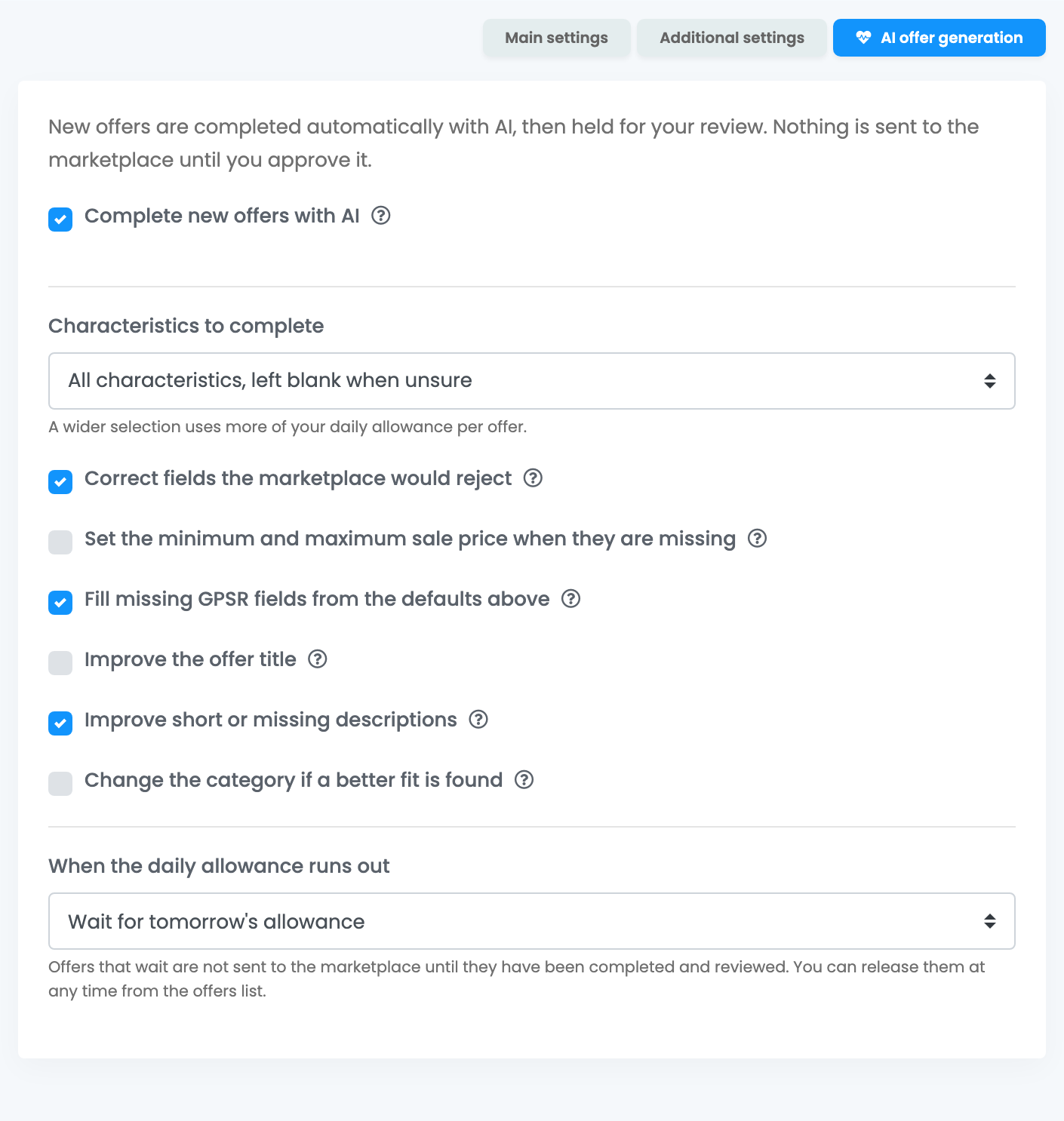
| Setting | What it does |
|---|---|
| Complete new offers with AI | Switches AI completion on for this connection. Off by default. Applies only to offers created from now on. |
| Characteristics to complete | Only the ones that block publishing, All characteristics, left blank when unsure (default) or All characteristics, always with a best guess. Characteristics that already have a value are never changed. |
| Correct fields the marketplace would reject | Fixes values the marketplace would refuse outright, such as a title longer than the marketplace allows. On by default. |
| Set the minimum and maximum sale price when they are missing | Sets the price range the marketplace requires, using Price range around the sale price. |
| Fill missing GPSR fields from the defaults above | Copies your GPSR defaults into offers that have none. These values are only copied, never generated. |
| Improve the offer title | Rewrites the title of every new offer, not only weak ones. Off by default. |
| Improve short or missing descriptions | Rewrites only descriptions that are empty or very short. Off by default. |
| Change the category if a better fit is found | Moves an offer that already has a category to a clearly better one. Off by default. |
| When the daily allowance runs out | Create the offer without AI, as usual (default) or Wait for tomorrow's allowance. |
Some options appear only for the marketplaces that need them. On Allegro, only the offers of your main Allegro marketplace are held for review; offers on your other Allegro marketplaces are sent the usual way.
Review and approve the offers
- In Offers, filter by AI generation → Waiting for my review. These offers carry the badge AI — review.
- Open an offer to check what AI filled in, and change anything you want. Saving or resending does not publish it.
- Tick the offers you checked, open the AI menu and press Approve and send. You can also approve one offer from the banner on its page.
Offers that wait to be completed show AI — queued. To list an offer as it is, without waiting for AI, choose Remove from AI queue in the AI menu.
Some offers are sent to the marketplace as they are, without waiting for your review: when there was nothing to complete, when AI could not complete the offer, when the product is already in eMAG's catalogue, or when the allowance ran out and the connection is set to create offers without AI.
The AI activity page
Reports → Activity reports → AI offer completion shows what AI is doing with your offers. It also opens from View AI activity in the AI menu of Offers.
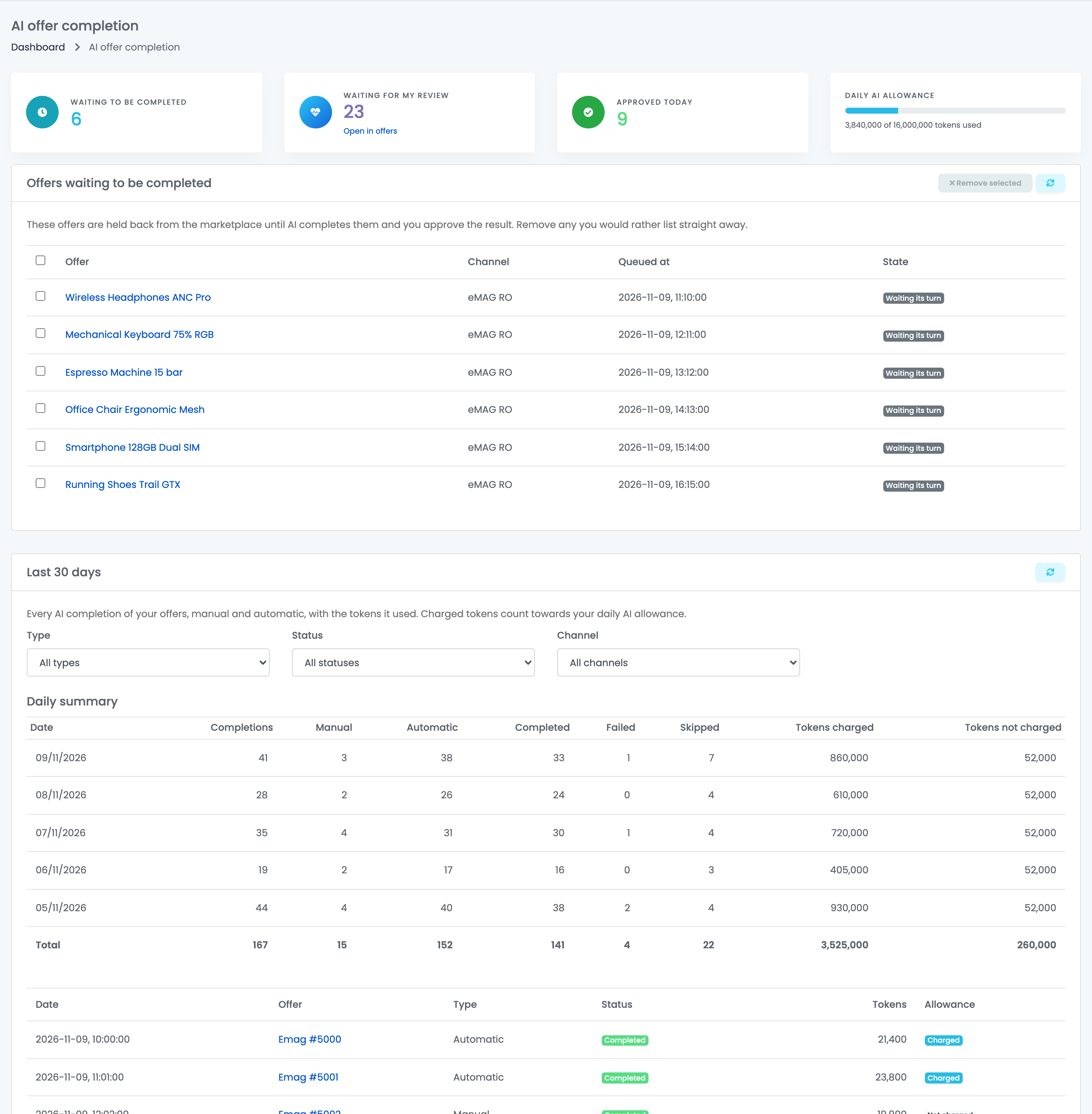
| Part | What it shows |
|---|---|
| Waiting to be completed | Offers AI has not completed yet, including those waiting for tomorrow's allowance. |
| Waiting for my review | Completed offers waiting for your approval. Open in offers takes you to Offers, where you approve them. |
| Approved today | Offers approved today. |
| Daily AI allowance | How many tokens you used today out of your allowance. |
| Offers waiting to be completed | The queue, with each offer's channel and state. Remove selected lists the chosen offers as they are, without AI. |
| Last 30 days | Every AI completion of your offers, manual and automatic, with its status and the tokens it used. Filter by type, status and channel. |
Your daily AI allowance
Your plan includes a daily allowance of AI tokens, shared by the AI features you use. It starts again every day, and tokens you did not use are not carried over. The allowance and what you used today are shown on the activity page and on Settings → Account → Subscriptions.
Each completed offer uses some of the allowance; a wider choice of characteristics uses more. When the connection is set to wait for tomorrow's allowance, waiting offers may be completed earlier when AI has spare capacity; those completions show as Not charged (idle capacity).
Switch it off
Untick Complete new offers with AI and save. New offers are then created the usual way. Offers already completed stay held until you approve them, and offers still waiting are listed without AI. To list them right away, remove them from the AI queue.
When something does not look right
| Symptom | What to do |
|---|---|
| My existing offers were not completed | Only offers created from now on are completed. For an existing offer, use Autofill values with PulseAI on its page. |
| New offers do not appear on the marketplace | They are waiting for your approval. Filter Offers by Waiting for my review and approve them. |
| Offers stay AI — queued for a long time | Large batches take time, and with Wait for tomorrow's allowance they wait for the next day. Remove them from the AI queue to list them now. |
| "This offer is held by AI offer completion and cannot be sent yet" | Approve the offer, or remove it from the AI queue. |
| I switched it off but offers are still waiting | Offers already completed stay held. Approve them, or remove them from the AI queue. |
| An offer was switched off with Auto-disabled: no AI review | Nobody approved it within 60 days. Enable the offer to approve its values and send it. |