How to manage your easySales subscription: plans, card payments, invoices and cancelling
Choose or change your easySales plan, keep your card up to date, find your invoices, and see what happens when a payment fails or you cancel.
Where you manage your subscription
Your plan, your card and your easySales invoices are on Settings → Account → Subscriptions. Only the account owner sees this page; team members cannot change the plan or the card.
The plan box at the top of every page shows your plan, the days until renewal, and how many orders and offers you have used out of your plan's limits.
Three things to know first:
- Your subscription renews by itself. On the date shown under Next payment, easySales charges the saved card for the next period.
- A renewal that cannot be charged expires your account. easySales tries the card again, and if the last attempt fails, the account expires that same day. Your data is kept, but your online shops are switched off and stay off until you turn them back on.
- Upgrades are paid in full, right away. A higher plan is charged at its full price, with no credit for the days left, and your next payment date starts again from the day you pay.
The Subscriptions page
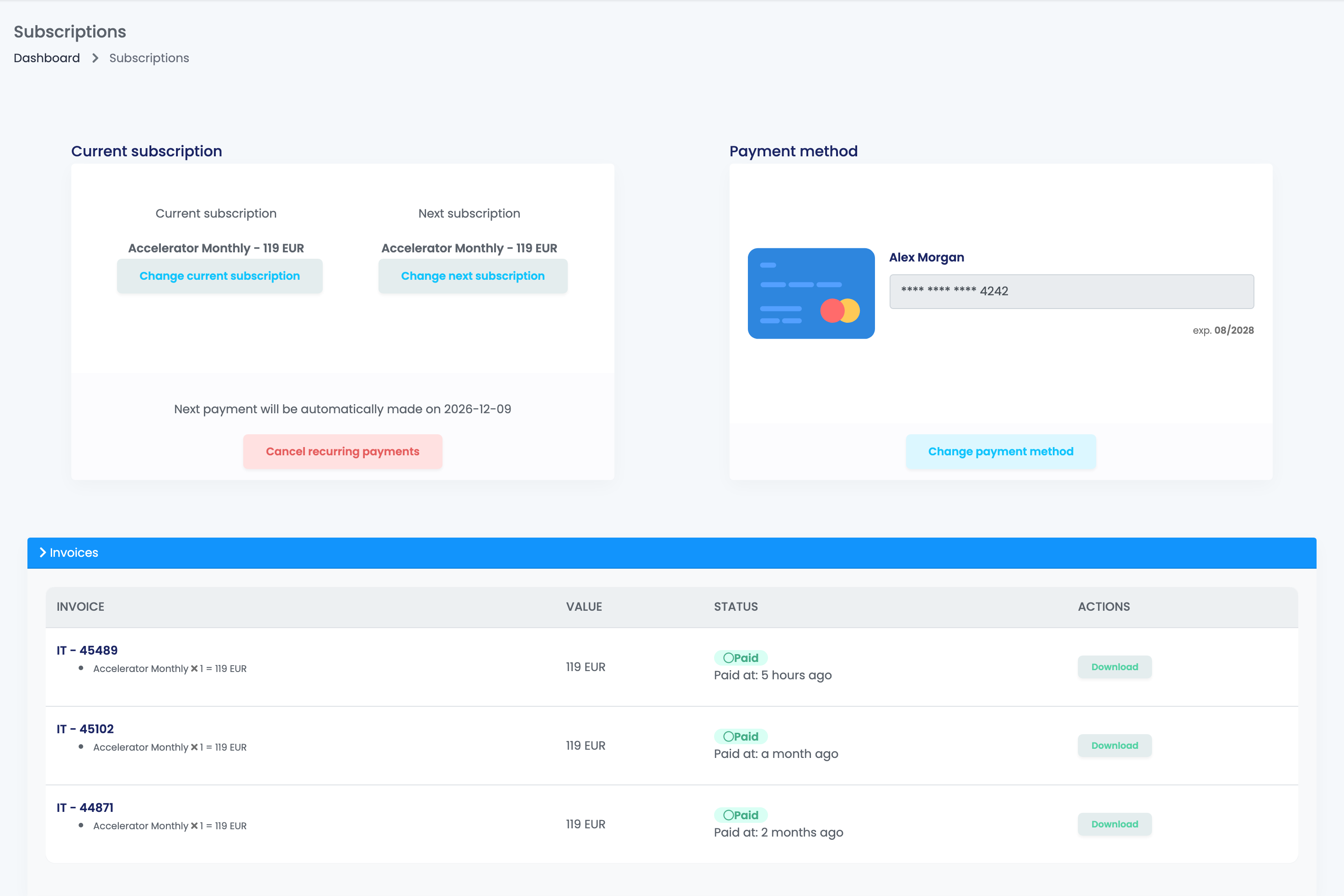
| Part | What it shows |
|---|---|
| Current subscription | Your plan and its price. Change current subscription moves you to a higher plan now. |
| Next subscription | The plan you will be charged for at the next payment. Change next subscription picks another plan or period from then on. |
| Next payment will be automatically made on … | The date of the next charge. Cancel recurring payments stops the renewals. |
| Payment method | The saved card. Change payment method replaces it. |
| Invoices | Your paid easySales invoices, each with Download. |
| Services | Add-ons bought separately: Auto Price Offers and Remove background tokens. |
| Subscriptions | Every payment made with your card, with its status: Paid, In progress, Authorization or Cancelled. |
Choose a plan
Plans are chosen on the Upgrade page. It also opens as a window from the plan box or when you reach a limit of your plan, and by itself when your trial or subscription has expired.
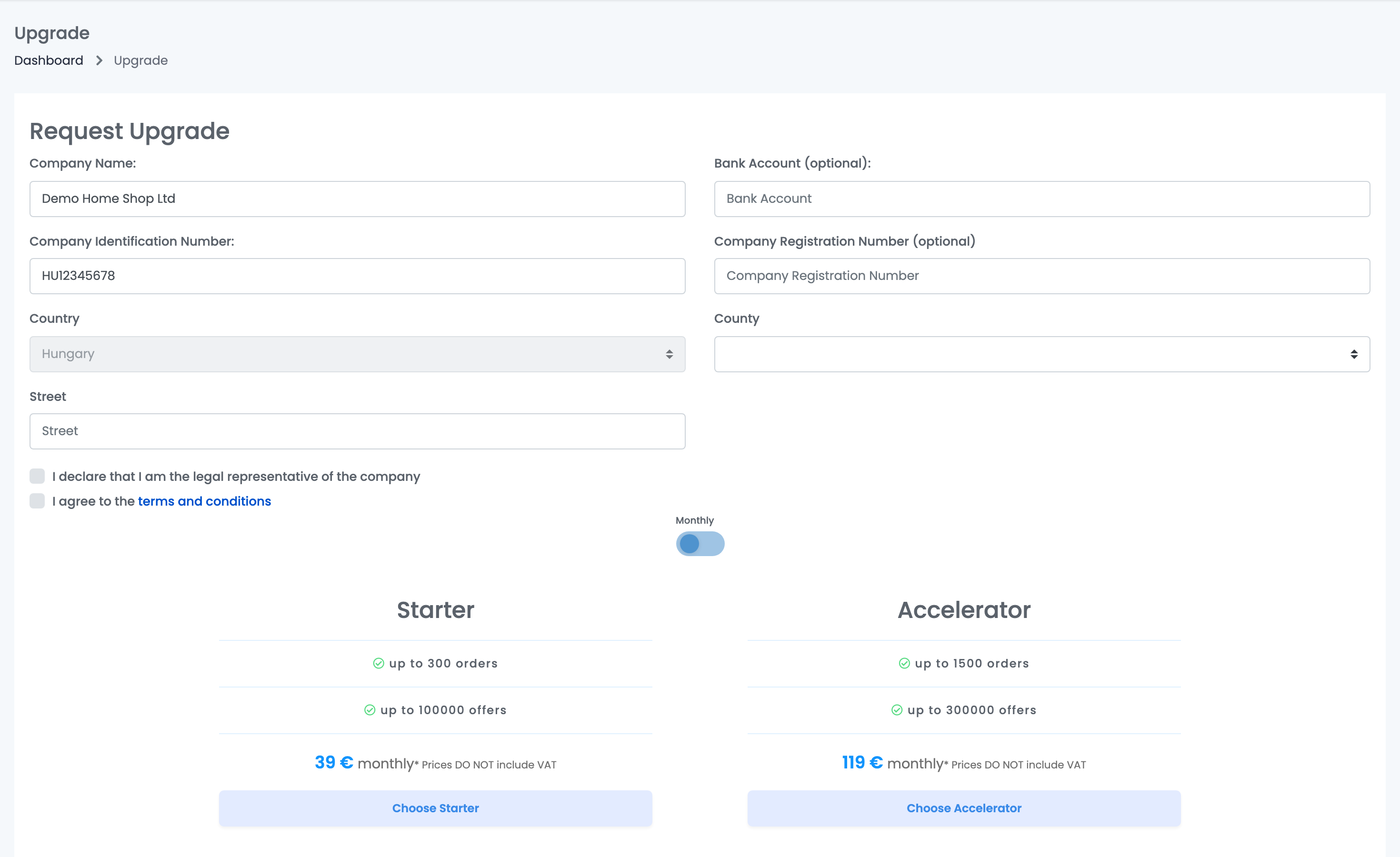
- Fill in your company details: name, company identification number, country, county and street. The country cannot be changed once it is set.
- Tick I declare that I am the legal representative of the company and the terms and conditions.
- Choose Monthly or Yearly with the switch, then press Choose on the plan you want.
- easySales shows the proforma. Pay on the payment page with Go to payment page, or with Pay with saved card if you already have a card. If you close the window instead, nothing is charged.
The prices do not include VAT. Romanian companies are invoiced in RON, with VAT. For more than the largest plan offers, press Let's talk on the Enterprise plan.
Change your plan
| You want to | How | When it applies |
|---|---|---|
| Move to a higher plan | Change current subscription (monthly plans) | Now. You pay the full price of the new plan, and your next payment date starts again from today. |
| Move to a lower plan, or switch between monthly and yearly | Change next subscription | At the end of the current billing cycle. Nothing is charged now. |
| More limits for one month on a yearly plan | Change current subscription (yearly plans): a temporary upgrade | Now, for one month, at the one-month price of the higher plan. Then your yearly plan comes back by itself, and its renewal moves to the day of the month you bought the upgrade. |
Your payment card
The card is the only payment method you can set up yourself; to pay by bank transfer, contact our team. Add payment method or Change payment method opens the payment page. To check the card, it makes a transaction of 1 RON (Romanian companies) or 1 EUR, which appears as Authorization in the list of payments.
When a payment fails
A few days before the renewal, a banner reminds you of the date, and asks you to add a card if none is saved.
If the renewal cannot be charged, you get a Failed Payment e-mail with the reason and the time of the next attempt. After the last failed attempt, the account expires at once:
To get your account back, open Subscriptions, add your card again and pay. Then switch your online shops back on in Integrations → Sales channels → Websites, with the switch next to each shop: paying does not turn them back on by itself.
Cancel your subscription
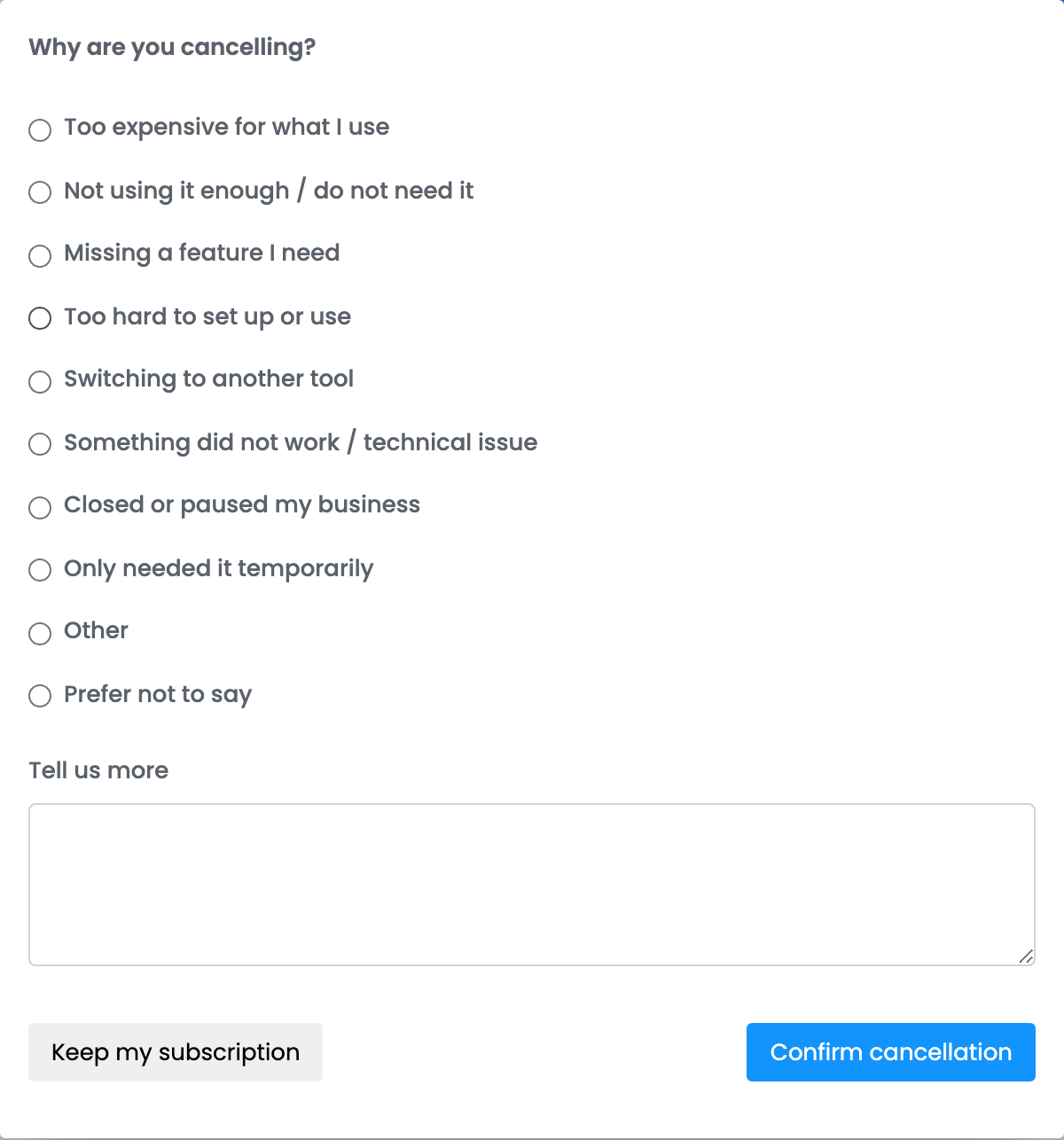
Press Cancel recurring payments, tell us why, and press Confirm cancellation. Keep my subscription closes the window without cancelling.
- Nothing more is charged, and your account keeps working until the next payment date.
- Your saved card is removed.
- After that date the account expires as described above. Your data is kept, so you can come back by choosing a plan on the Upgrade page.
Your easySales invoices
Invoices on the Subscriptions page lists every invoice you have paid, with its items and value; Download opens the PDF. An invoice appears here once it is paid.
When something does not look right
| Symptom | What to do |
|---|---|
| The upgrade was charged at the full price | That is how upgrades work: the new plan is paid in full, and the billing cycle starts again from the day you pay. |
| My account expired although I have a card | The renewal could not be charged. Add the card again on Subscriptions and pay. |
| After paying, my online shop does not sync | Shops are switched off when an account expires. Turn each one back on in Integrations → Sales channels → Websites. |
| An invoice is missing from the list | Only paid invoices are listed. A payment still in progress appears once it goes through. |
| A charge of 1 RON or 1 EUR | The check made when you add or change a card. It appears as Authorization. |
| A team member cannot see Subscriptions | Only the account owner can see the page and change the plan. |