How to connect OLX with easySales: a complete integration guide

Connect your OLX account to easySales in Romania, Bulgaria, Poland or Portugal: authorize easySales, complete your connection settings, map your categories, then publish ads and keep their stock and prices in sync. On OLX PL you can also import orders and ship with OLX Delivery, and on OLX PL and OLX RO PulseAI can complete new offers for your review.
What you can do with OLX and easySales
easySales publishes your products to OLX as ads and then keeps them current: prices and stock follow your catalog, ads come down when a product sells out, and go back up when it is restocked. On OLX PL, easySales can also import your OLX orders, and on OLX PL and OLX RO PulseAI can complete new offers for you to review before they are sent.
You maintain one catalog for every channel you sell on instead of editing each OLX ad by hand. That matters most at volume. Listing fifty products on OLX by hand is an afternoon; keeping fifty ads accurate as stock moves is a permanent job, and it is the part easySales takes over.
Four OLX marketplaces are supported, each connected separately and each with its own currency:
| Marketplace | Country | Currency | Orders in easySales |
|---|---|---|---|
| OLX | Romania | RON | No — ads only |
| OLX BG | Bulgaria | EUR | No — ads only |
| OLX PL | Poland | PLN | Yes — turn on Import orders |
| OLX PT | Portugal | EUR | No — ads only |
They are independent connections. Selling on both OLX.ro and OLX.bg means two connections, each with its own contact details, location and category mapping.
How the OLX connector works
easySales connects to OLX over OLX's own OAuth authorization — you approve easySales from inside your OLX account rather than copying an API key around, so there is no API key to store or rotate.
easySales renews that authorization automatically for as long as the connection works. There is nothing to renew by hand. Renewal stops when something changes on the OLX side — for example, access to easySales is revoked or the OLX password changes. If 28 days pass without a renewal, easySales warns you daily, by email and in the app. That is your cue to use Reauthenticate with OLX.
Your catalog always goes out to OLX as ads. Orders come back on OLX PL only: turn on Import orders and each order arrives as a normal easySales order, ready for invoicing, AWBs and automation flows. On OLX Romania, Bulgaria and Portugal the integration covers ads only, and you keep serving those buyers in your OLX account.
Before you start
An OLX account you can sign in to
You authorize easySales from inside OLX, so you need the credentials for the account that will carry the ads.
Your contact details and location decided
Contact name, phone, city and district appear on every ad. Pick the ones you want buyers to see before you connect.
Products in your easySales catalog
Ads are generated from products you already hold in easySales. Nothing publishes from an empty catalog.
An idea of your free ad allowance
OLX caps free ads per account. Knowing your ceiling tells you how much of your catalog can go live before you need to buy capacity.
Sender details, if you sell on OLX PL
Importing and auto-accepting OLX PL orders uses a sender name, address, phone and email that you enter on the connection.
Step 1 — Open the connect form and authorize easySales
In easySales go to Integrations → Marketplaces, find the OLX marketplace for your country and click Connect.
The form opens with an Authenticate with OLX button. Clicking it sends you to OLX's own sign-in and permission screen. Approve easySales there and you are returned to the connect form, now linked to that OLX account.
If you need to point the connection at a different OLX account, or easySales warns you that the authorization has stopped renewing, the same button appears as Reauthenticate with OLX. Use it rather than deleting and rebuilding the connection — re-authenticating keeps your category mapping and your linked ads.
On OLX PL and OLX RO, the connection has two tabs: Main settings and AI offer generation. The second holds the PulseAI settings described further down, and appears if your account has AI offer generation.
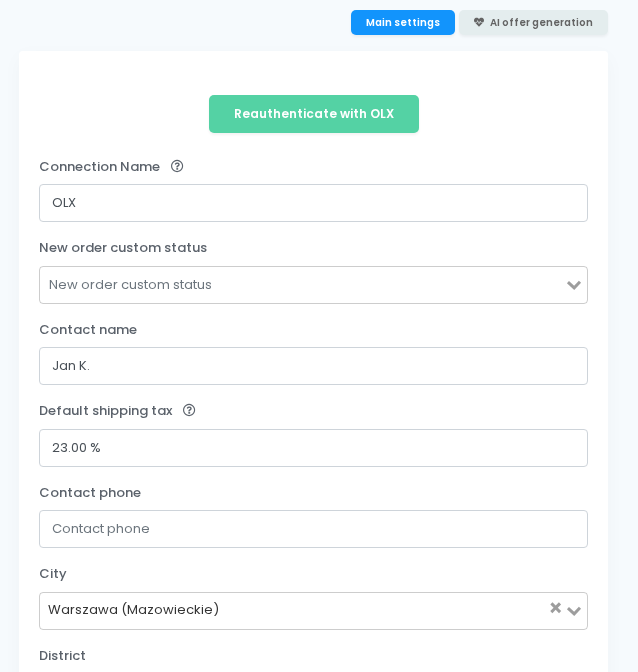
Step 2 — Complete the connection settings
Authorizing is only half of it. The form carries the settings every ad inherits. Five are required: Connection Name, Price Addition, City, Contact name and Contact phone.
Identity and location
- Connection Name — how the connection is labelled inside easySales. It is never shown to buyers, so name it for yourself: OLX Romania, OLX BG warehouse 2.
- Contact name and Contact phone — what OLX shows on the ad. This is the number buyers will call.
- City and, optionally, District — where the ad is posted. Pick the city first; the district list is filtered by it. District can be left empty.
Pricing
- Price Addition — a percentage added on top of your product price for this channel only. At 10%, a product priced 10 goes out as 11. It applies to the price easySales sends; your catalog is untouched.
- Sale price source — Catalog price by default. Choose a price group instead and your OLX offers take their price from that group; when the group's prices change, easySales re-sends them automatically. Price Addition is not applied to prices taken from a price group.
- Vat Payer — set this to Yes only if the account you registered on OLX is VAT-registered. It changes how prices are calculated, so getting it wrong shifts every ad.
Ad defaults
- Default product state — applied to ads that do not specify their own. OLX Romania offers New, Used, New with tag, New without tag, Only worn once and In good condition; OLX BG, PL and PT offer New and Used.
- Auto Refresh — republishes ads automatically when they expire. OLX ads do not run forever, and without this they lapse to the outdated status and quietly stop being seen.
- Courier delivery — Yes if you ship with a courier, No if buyers collect in person. This field is not shown on OLX PL.
- Shipping Information — appended to the end of every ad description, and counted toward OLX's description length.
Order defaults (OLX PL)
- Default shipping tax — the VAT rate applied to shipping on imported OLX PL orders.
- Implicit package type — the default AWB package type for imported orders.
- New order custom status — optional; the custom status given to imported OLX PL orders.
Stock behaviour — two toggles that decide what happens as stock moves:
- Deactivate offers when products run out of stock — takes the ad down when the product hits zero, instead of leaving it live for buyers who cannot be served.
- Automatically enable offers when products have stock — puts it back up when the product is restocked. An ad you deactivated yourself is not re-activated.
Turning both on is what makes the integration self-maintaining. Leave them off and you are back to managing availability by hand.
Step 3 — Map your categories
Ads will not publish until your categories are mapped. easySales needs to know which OLX category each of your own categories belongs in, because OLX decides what an ad may contain from its category.
Map to a leaf category — the lowest level of OLX's category tree, with nothing below it. A parent category is not enough: Phones, for example, needs the make below it. If ads are rejected right after a first publish, a mapping that stops one level too high is the usual reason.
Choose carefully: once an ad is published, OLX does not allow its category to change.
On OLX PL and OLX RO with PulseAI turned on, an offer without a mapped category still gets one: PulseAI picks a leaf category for that offer, and you check it before the offer is sent.

Step 4 — Publish your first ads
With the connection authorized and categories mapped, go to Products, select what you want listed and use Add offer on a product, or the add offers button above the list to publish several at once.
Start with a handful rather than the whole catalog. The first batch tells you whether your category mapping and your ad defaults are right, and fixing ten ads is a great deal easier than fixing a thousand.

Before a large publish, check your content against OLX's limits:
- Titles: OLX asks for 16–150 characters.
- Descriptions: at most 9,000 characters, counted the way OLX counts them: with their formatting and the Shipping Information easySales appends.
On OLX PL and OLX RO, easySales checks the category, the required characteristics and the description length before sending, and stops an offer OLX would reject — see Checks every OLX PL and OLX RO offer passes before it is sent, below.
Ad statuses you will see
After publishing, each ad carries a status in easySales that mirrors what OLX reports:
| Status | What it means |
|---|---|
| new | Created in easySales, not yet live on OLX |
| active | Live and visible to buyers |
| limited | You have used up your free ad allowance |
| moderated | Held by an OLX moderator for review |
| unconfirmed | Waiting on confirmation |
| outdated | Expired — OLX ads do not run forever |
| unpaid | A paid ad awaiting payment |
| removed_by_user | Taken down from the OLX account |
| removed_by_moderator | Taken down by OLX |
| blocked | Blocked by OLX |

limited and moderated are the two worth watching. limited means you have hit your free-ad ceiling and further ads will not go live until you buy more capacity in OLX. moderated is normal for a first publish in a new category and usually clears on its own.
OLX PL orders and OLX delivery
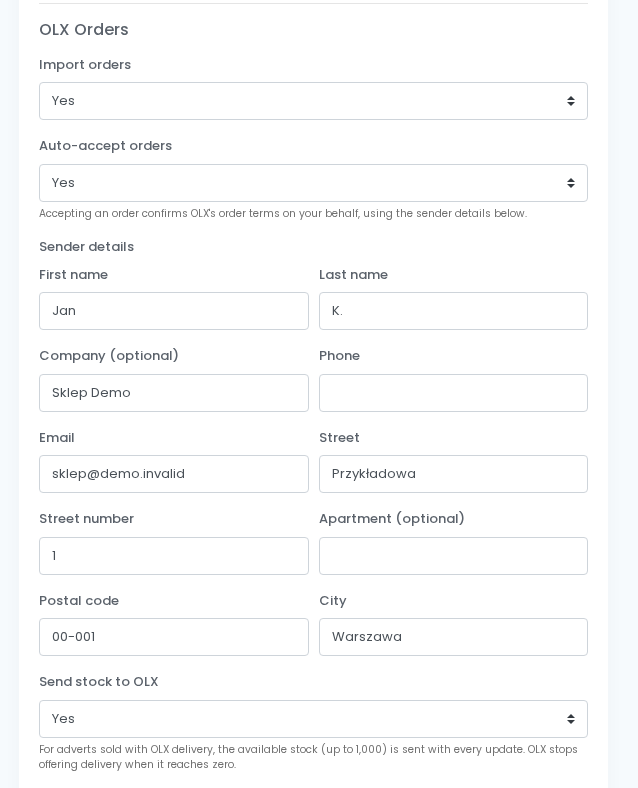
OLX PL is the OLX marketplace whose orders come into easySales. Order import is off by default and set per connection: open your OLX PL connection and, in the OLX Orders section, turn on Import orders.
An imported OLX PL order is a normal easySales order. It carries the customer, the billing and shipping addresses, the products — matched to your offer through the OLX advert — and a shipping line taxed at your Default shipping tax. It takes your New order custom status if you set one, and your automation flows run on it as on any other order.
The order page shows the order's OLX status and the deadline to confirm it. easySales maps OLX statuses to its own:
- Awaiting confirmation → New
- Confirmed or awaiting shipment → Processing
- In transit, payout or completed → Completed
- Rejected, cancelled or shipment expired → Canceled
- Shipment failed or returned → Return
Accepting orders automatically
Auto-accept orders confirms new OLX PL orders for you: "Accepting an order confirms OLX's order terms on your behalf, using the sender details below."
Sender details asks for First name, Last name, Company (optional), Phone, Email, Street, Street number, Apartment (optional), Postal code and City.
Shipping with OLX Delivery
OLX books the carrier when the order is accepted. Once OLX's label is ready, easySales downloads it and stores the carrier and tracking number on the order, and the OLX Delivery courier becomes available in the AWB picker. Pick it there to use OLX's label as the order's AWB.
Send stock to OLX
Send stock to OLX is for adverts you sell with OLX delivery packages, chosen in your OLX account. With it on, easySales sends the available stock, up to 1,000, with every advert update. As the setting notes: "OLX stops offering delivery when it reaches zero."
Invoices and cancellations
Invoice OLX PL orders through your billing software, like any other order in easySales. To cancel one, cancel it in easySales: the order is rejected or cancelled on OLX as well, and you pick the reason from OLX's list.
PulseAI on OLX PL and OLX RO: automatic offer generation
PulseAI can complete new OLX PL and OLX RO offers for you — category, characteristics, product state and, if you choose, title and description — and then hold them for your review. It is available on OLX PL and OLX RO, on every connection, and it is off by default.
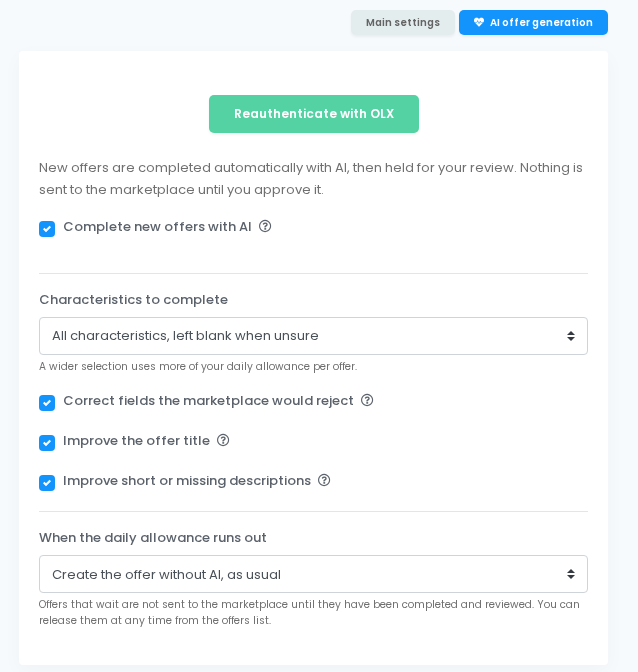
The settings live on the connection's AI offer generation tab, which sums it up: "New offers are completed automatically with AI, then held for your review. Nothing is sent to the marketplace until you approve it."
The AI offer generation settings
- Complete new offers with AI — turns the automatic pass on. It applies only to newly created offers; existing offers are not changed.
- Characteristics to complete — how far PulseAI goes: Only the ones that block publishing, All characteristics, left blank when unsure (the default) or All characteristics, always with a best guess. A wider selection uses more of your daily allowance per offer.
- Correct fields the marketplace would reject — on by default. On OLX, a title over 150 characters is shortened at a word.
- Improve the offer title — rewrites the title of every new offer within OLX's rules: 16–150 characters, not mostly capitals, no contact details. The new title is held for review with the rest of the offer.
- Improve short or missing descriptions — rewrites only descriptions that are empty or very short. OLX shows formatting only in Jobs, so the description is written as plain lines, and it fits OLX's length limit together with your Shipping Information.
- When the daily allowance runs out — Create the offer without AI, as usual, or Wait for tomorrow's allowance. Offers that wait are not sent until they have been completed and reviewed, and you can release them at any time from the offers list.
One more setting sits on the Main settings tab: PulseAI may change the product state, set to No by default.
- No — PulseAI proposes a product state only when the category does not accept the current one.
- Yes — PulseAI proposes the state (new, used, damaged…) from the product data even when the current state is valid for the category, so a used part saved as new is corrected.
It applies both to the automatic pass and to the Autofill values with PulseAI button. When nothing settles the state, the connection's Default product state is used, if the category accepts it.
What PulseAI fills on a new offer
- Category — the category from your category mapping is kept. Without one, PulseAI picks a leaf category for the offer. It never changes the category of an advert already published on OLX, because OLX does not allow it.
- Characteristics — at the level you chose. PulseAI never guesses part numbers, VINs, manufacturer codes, compatibility lists or warranty.
- Product state — as set by PulseAI may change the product state.
- Title and description — only when the matching settings are on.
Reviewing AI-completed offers
An offer PulseAI has completed shows a banner on its page: Completed by AI — waiting for your review, with the note "Check the values below, then approve to send it. Saving or resending will not publish it until you do." If PulseAI changed the product state or the category, the banner says so and names the old and new values.
An offer still in the queue shows Waiting to be completed by AI: "This offer is not on the marketplace yet. Remove it from the AI queue to list it as it is."
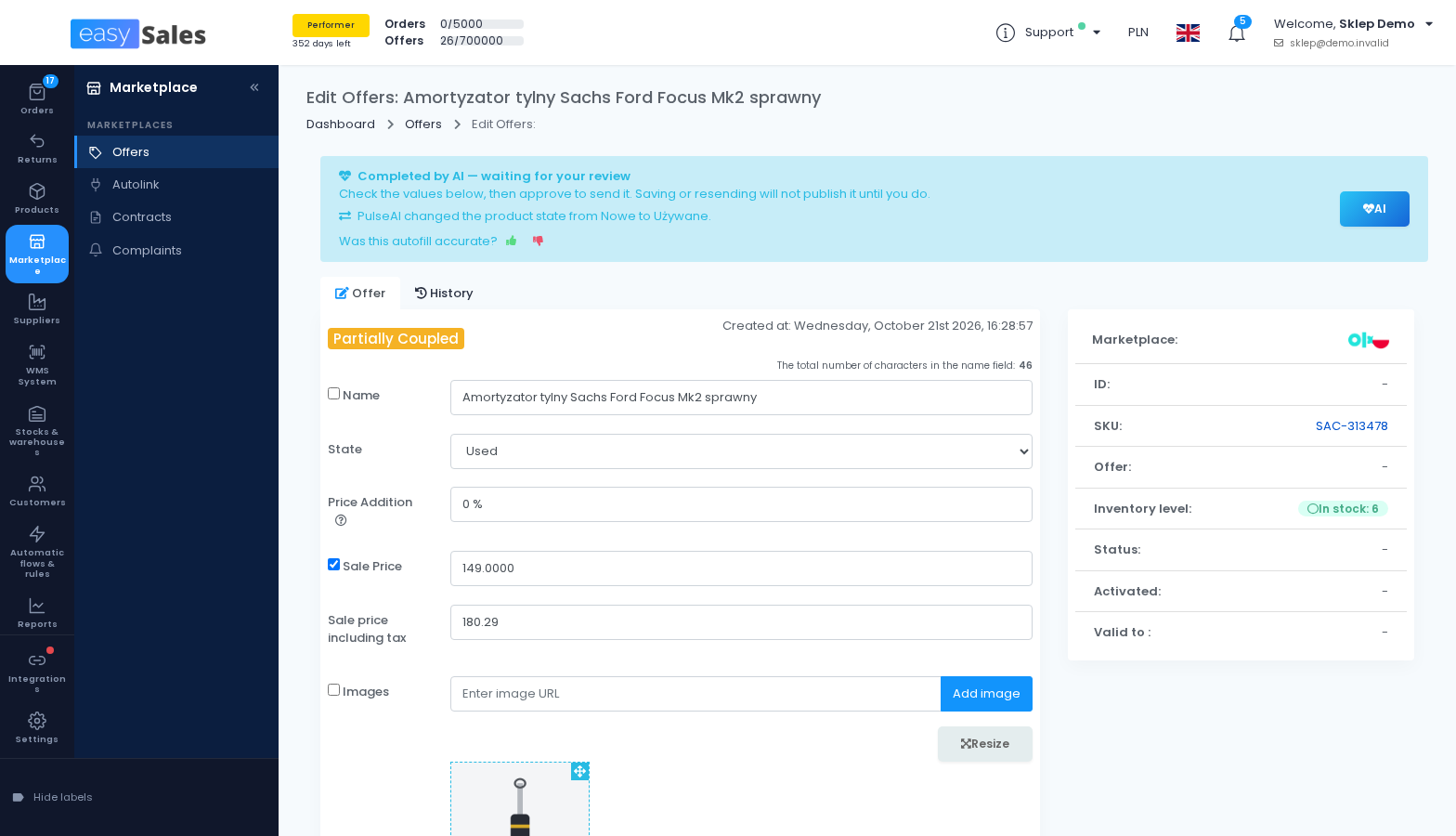
On the OLX PL and OLX RO offers lists, the AI generation filter shows Waiting for my review, Waiting to be completed or Auto-disabled: no AI review, and offers carry an AI — review or AI — queued badge. The AI actions menu holds Approve and send, Remove from AI queue and View AI activity.
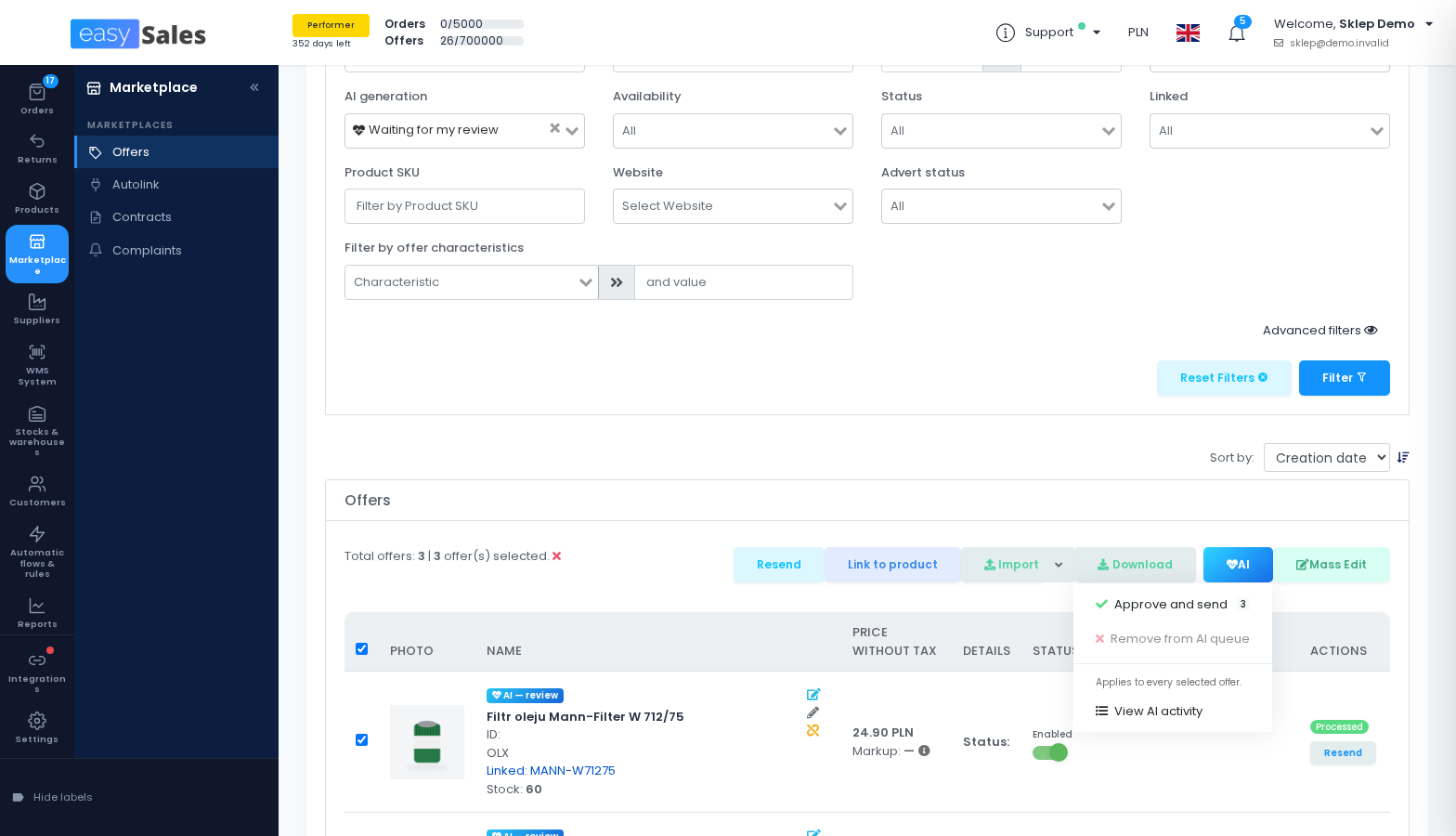
Review within 60 days. An offer not reviewed within 60 days is switched off without ever having been sent, and shows as Auto-disabled: no AI review. Enabling it approves it and sends it to OLX.
Autofill values with PulseAI, on demand
On any OLX offer, the Autofill values with PulseAI button fills the characteristics in the form and proposes the condition. Nothing is saved until you save. Filled values are marked "Filled by AI - review before saving.", and a value PulseAI could not settle is marked "PulseAI was not sure about this value. Please fill it in." A short prompt then asks: "Was this autofill accurate?"
Daily allowance
The automatic pass uses your account's daily AI allowance; the Autofill values with PulseAI button does not. What happens when the allowance runs out is your choice, through When the daily allowance runs out.
Checks every OLX PL and OLX RO offer passes before it is sent
These apply to every OLX PL and OLX RO offer, whether PulseAI completed it or not. easySales stops an offer before it reaches OLX, and shows you the reason, when:
- it has no category, or a category OLX does not list;
- the description, with its formatting and your Shipping Information, is longer than 9,000 characters;
- for a new advert only: its category is not a leaf category, a required characteristic is empty, or a value chosen from a list, or the product state, is not one OLX accepts in that category.
An advert already published on OLX is not held back for its characteristics: OLX checks those when an advert is created.
Free ad limits and promoting ads
OLX gives each account a number of free ads and charges beyond it. When you cross the line easySales shows a message and new ads take the limited status — nothing is lost, but nothing publishes until you add capacity in your OLX account.
Promotion is done in OLX, not in easySales. Bumping an ad to the front page, featured placement and paid boosts all live in your OLX account. easySales publishes and maintains the ad; how prominent it is remains an OLX decision.
If syncing stops
Almost every broken OLX connection comes down to authorization: a revoked approval or a password change on the OLX side stops the automatic renewal. Open the connection and use Reauthenticate with OLX. Your mapping and your linked ads survive it, so re-authenticating is always preferable to deleting the connection and starting again.
If ads publish but are rejected, the cause is usually the ad rather than the connection: a category that is not a leaf, a description over OLX's limit, or a required characteristic left empty. On OLX PL and OLX RO, easySales catches these before sending and shows you the reason.
If an OLX PL or OLX RO offer has not gone out, check whether PulseAI is holding it: the AI generation filter on the offers list shows every offer waiting for your review or for the AI.