KSeF token: what it is, how to generate it, how long it lasts
A KSeF token is an authentication method that carries its own scope of permissions. When you need one, how to generate and name it, how it differs from a certificate, and how long it stays valid.
A KSeF token is a string of alphanumeric characters generated by the system, tied to one specific taxpayer and one specific scope of permissions. It exists to authenticate and authorise you in KSeF.
You generate it once, after signing in with a qualified signature or seal. From then on your accounting program signs itself in with it, and you no longer sign every submission.
Below: when a token is needed, how to generate one, how to name it, how it differs from a certificate, and for how long it works.
What a KSeF token is and what it is for
A token is a tool for authentication and authorisation in KSeF. The taxpayer generates it for a declared scope of permissions, after authenticating in the system.
To generate a token you authenticate with the national node, a qualified electronic signature, a qualified electronic seal or a KSeF certificate.

The definition and that list of methods come from the Ministry's KSeF 2.0 Handbook, part I, section 2.4. A token works in both the interactive and the batch session.
KSeF has no username and password
The system runs on a credentials model. Every entry requires authentication — there is no account with a password that a program could simply remember.
A token fills exactly that gap. It replaces the repeated sign-in with a signature wherever the thing signing in is software rather than a person.
A token will not sign you in to the Taxpayer App
This is the exception that surprises people most. The KSeF Taxpayer App does not accept a token as an authentication method — a token is meant for the API.
You sign in to the app itself with the national node or a qualified certificate. The token goes into the program that sends the invoices.
Who generates the token, and whose data KSeF shows
A token can be generated for a natural person or for an entity that is not one — a company, for example.
If a company authenticates with a qualified seal and generates a token on its own permissions, the system sees the company rather than a particular human when that token signs in.
If an employee generates the token on their own PESEL number while acting in the company's context, KSeF will show that individual's data against the invoice.
For an integration this has a practical consequence: a token generated on an employee's identity stops working on the day you withdraw their permissions.
When you need a token and when you do not
A token is not mandatory. It is one of the permitted authentication methods, and you need it when a program sends the file to KSeF rather than you by hand.

If you issue invoices in the free Taxpayer App and sign in to it with a signature, a token is of no use to you.
If the invoices are sent by accounting software, an ERP or an order-management system, you need either a token or a type 1 KSeF certificate. We cover the starting point in our piece on the structured invoice.
A trusted profile is not enough in commercial software
The Trusted Profile can be used to sign in and authorise in KSeF, but only in applications built by public bodies.
In a commercial program you still have to authenticate another way: a qualified signature, a seal, a token or a KSeF certificate. The Ministry answers this directly in its KSeF 2.0 questions and answers.
How to generate a KSeF token step by step
You generate a token in the KSeF Taxpayer App or in accounting software integrated with the KSeF API. The path in the app has four steps.

First you open a session with the national node or a qualified certificate. Then you pick Tokens in the menu, and inside it Generate token.
You type a name of your own, tick the permissions and click Generate token. The number is copied from the confirmation screen.
Tokens generated in KSeF 1.0 are not compatible with KSeF 2.0 and were not migrated into it. If you set an integration up before February 2026, you had to generate a new one.
You see the token only once
For security reasons the Taxpayer App displays the generated string a single time. There is no screen where you can look it up later.
Save it immediately outside the app: in the company password manager, or straight into the configuration field of the program that will use it.
If you lose it, the only way out is to generate a new one and revoke the old one. It cannot be recovered.
How many tokens you can hold
There are no system limits on the number of tokens you hold or use.
That matters more than it sounds. It is what lets you split tokens across integrations instead of pasting the same one everywhere.
What a token looks like and how to name it
The token itself is a string of alphanumeric characters, with no punctuation. Looking at it tells you neither who it was issued to nor what for.
The only readable part is the name you type when generating it. That one field does all the housekeeping.

The token list shows the name, the token's creator, the activation date and the last-used date. It does not show which system actually holds the token.
A naming convention that survives an audit
The Ministry illustrates the mechanism with a company that generated six tokens and named them "Sales representative – region 1" and so on.
For an online seller the principle is identical, with systems in place of regions. The name has to say where the token works, what for, and since when.
A year later you then know which token to revoke after changing software vendor, and which one to leave alone.
The permission scope written into a token
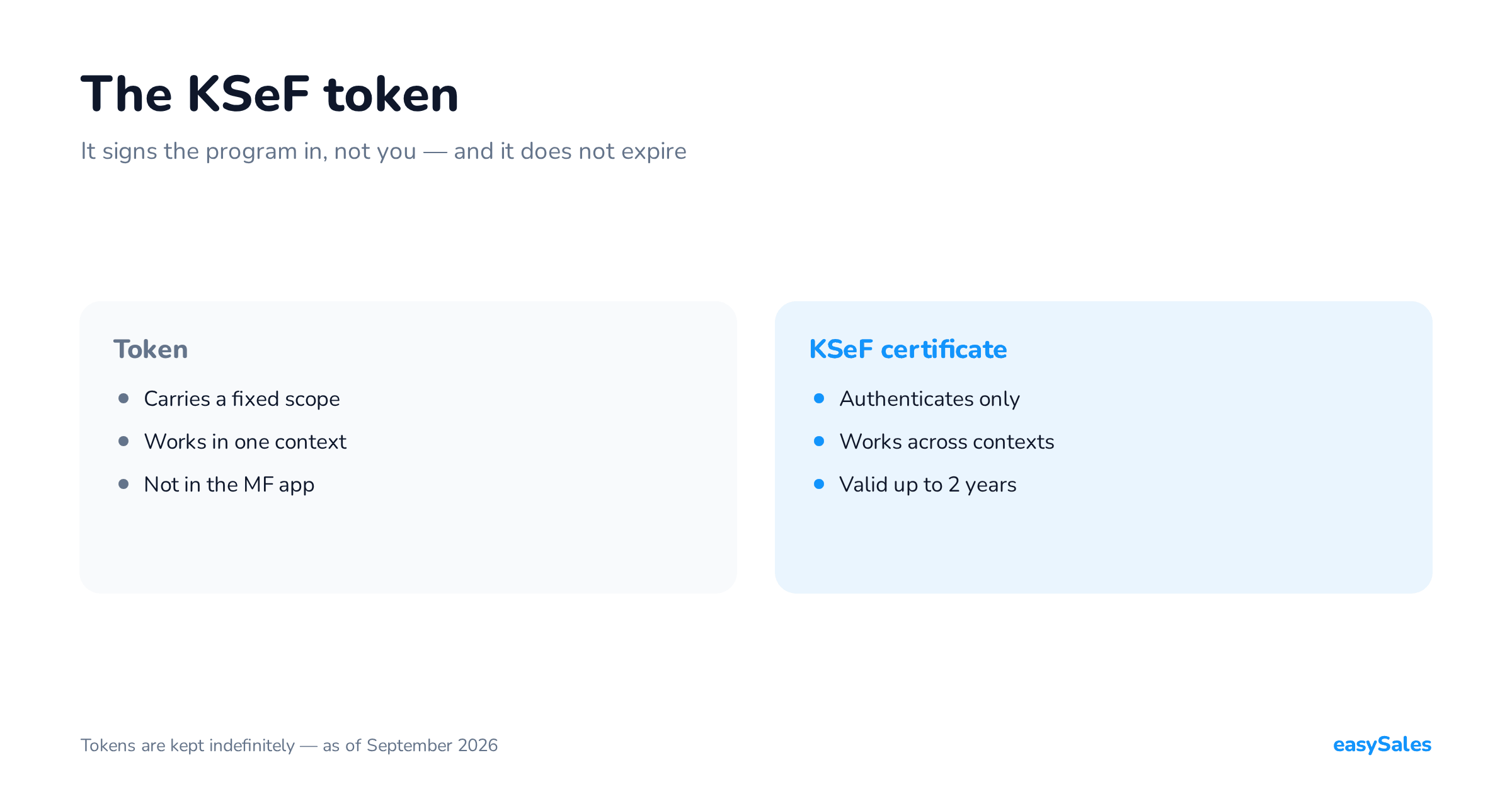
A token carries the taxpayer's permissions, declared at the moment it is generated. That is its defining feature and the source of most confusion.
The Taxpayer App offers: issuing invoices, viewing invoices, viewing permissions, managing permissions, managing subordinate units, and viewing session history.

You can generate one token for all your permissions, or several tokens each with a different scope. The decision belongs to whoever generates it.
You cannot attach a permission you do not hold at that moment. The permission model in KSeF is a subject of its own, which we take apart separately.
Permissions in KSeF are granted to specific people and entities, never to systems. That is why the unit you paste into an integration is a token, not a technical account for the program.
A token cannot be updated
Generated tokens are not subject to updating. If a token carries invoice issuing, you cannot add invoice access to it.
Two paths remain: generate a second token for the missing permission, or revoke the old one and issue a new one for the full scope.
One token, one context
A token generated in your own context works only in that context. A token generated in the context of a company that granted you permissions works only there.
An accountant serving three companies therefore needs three tokens, one per context. A certificate behaves differently here.
A token versus a KSeF certificate — the differences
Both methods run in parallel and both authenticate. They are not, however, functionally equivalent, and that is no nuance.

A token carries permissions. A type 1 certificate does not — once you sign in with it, the system reads the permissions tied to the tax identifier written on the certificate.
Two practical consequences follow. A certificate works across contexts, a token in one. A certificate has an expiry date, a token does not.
We cover both certificate types and the application path separately in our piece on the KSeF certificate.
For how long a KSeF token stays valid
This question has two answers, because it is really about two different things: the availability of the method, and the validity of one token.
Under the original plan, tokens were to be available as an authentication method until the end of 2026. The Ministry of Finance decided instead to keep them open-ended and announced that the regulation would be amended.

The Ministry's page about KSeF certificates states it, and its answer to the question of tokens expiring at the end of 2026 states it again.
For a seller this means one thing: if your integration runs on a token, there is no deadline by which you have to move to a certificate.
A single token has no expiry date
KSeF sets no period for which a token is valid. A generated token stays valid until the user revokes it.
So there is nothing to keep in the calendar the way there is with a certificate, which expires after two years at the latest.
Losing permissions is not the same as revocation
If someone's permissions written into a token are withdrawn, the system does not revoke the token itself. The effect is different: it can no longer authenticate.
Grant that permission again and the token works again. Worth knowing before anyone starts minting new tokens because "the old one died".
A token in the test environment
KSeF has separate environments: production, test and a pre-production demo. They are logically and technically separated from one another.
A token generated in the test environment will not work in production. The Ministry stresses that only keys, certificates and tokens originating in production are valid in production.
This is one of the most common causes of "the token does not work" at the start of a rollout. The symptom is technical, the cause organisational. The rules are set out in the Ministry's notice for integrators.
In the test version of the Taxpayer App you may use any fictitious data, and the data is periodically deleted. That is the right place for integration testing.
Security: storage, rotation, revocation
A token is a safe authentication method on one condition: that it is not disclosed to outsiders. The Ministry asks that it be treated like online banking credentials.
It is not acceptable for a natural person to generate a token and then hand it to other people for them to authenticate in KSeF.
Where to keep a token
A password manager, or the configuration field of the system that uses it. Never a spreadsheet, an email or a chat — the Ministry's appeal to treat tokens as particularly sensitive data sits in its notice on token generation.
You paste it into the integration once. If somebody asks you for a token "just to check something", that is the same category of request as asking for an SMS code.
Rotation without pausing submissions
Because the number of tokens is not capped, you can swap one without stopping work. Generate a new one, paste it into the integration, check one invoice, revoke the old one.
A token can be revoked by whoever generated it, or by a person holding the permission to manage permissions. It is done from the token list or through the API.
Plan a rotation for every change: someone leaving, a change of software vendor, the end of work with an accounting office.
What to do when a token stops working
A token does not expire, so "it stopped working" almost never means "it lost validity". It usually means one of five things.
Check in this order
- Whether the token comes from the production environment rather than the test one.
- Whether the context is the same — a token works only where it was generated.
- Whether the permissions written into the token have been withdrawn in KSeF.
- Whether the token was revoked — a revoked token is gone from the token list.
- Whether the scope is too narrow — issuing invoices is not access to invoices.
The last-used date on the token list settles the first doubt. If it is empty, that token has never authenticated in the system.
If none of those points explains the problem, check the KSeF technical announcements before you generate another token.
How the easySales integration authenticates
Our KSeF integration signs in with a token and submits invoices in online mode. You paste the token into the settings once and never return to it.
Match the token's scope to what the program has to do. Sending invoices is the issuing permission; fetching the UPO is session-history viewing.
The scope of our KSeF support is described on the integration page, and the numbers and receipts themselves in our piece on the KSeF number and UPO.
Whether a given obligation and mode apply to your sales is a question for your accountant. Here we describe only what a token is technically and what an integration needs.