How to connect KLG (Simplify) with easySales: a complete setup guide
Fulfil orders from KLG's Simplify warehouses with easySales: connection details from KLG, fulfilment rules, AWB and invoice, products and stock from KLG.
What connecting KLG gives you
KLG Europe Romania runs Simplify, an e-fulfilment service with warehouses in Bucharest and Cluj: KLG stores your products, picks and packs your orders and hands them to the courier. With KLG connected, easySales sends your orders and products to KLG, and reads your stock back from KLG's warehouse.
Three things to know before you begin:
- KLG gives you the connection details. The user, password, 3PL code and the two addresses come from KLG when you start working with them. Ask your KLG account manager for the easySales connection details.
- KLG takes the orders you mark for KLG. easySales keeps KLG informed about your orders; the ones marked for KLG — by a fulfilment rule, by hand or by an automation flow — are the ones KLG prepares.
- The AWB and the invoice are made in easySales. KLG ships each order with the AWB and the invoice you generate for it in easySales.
Before you start
A contract with KLG
For fulfilment from KLG's Simplify warehouses.
Your KLG connection details
User ID, password, 3PL code and the order address, from your KLG account manager.
Your KLG stock details
The stock login and KLG's base address, if you want stock from KLG.
A courier and an invoicing connection
To generate the AWB and the invoice for each order in easySales.
Step 1 — Connect KLG
Go to Integrations → Fulfillment, open the Fulfillment services tab and press Edit on the KLG card.
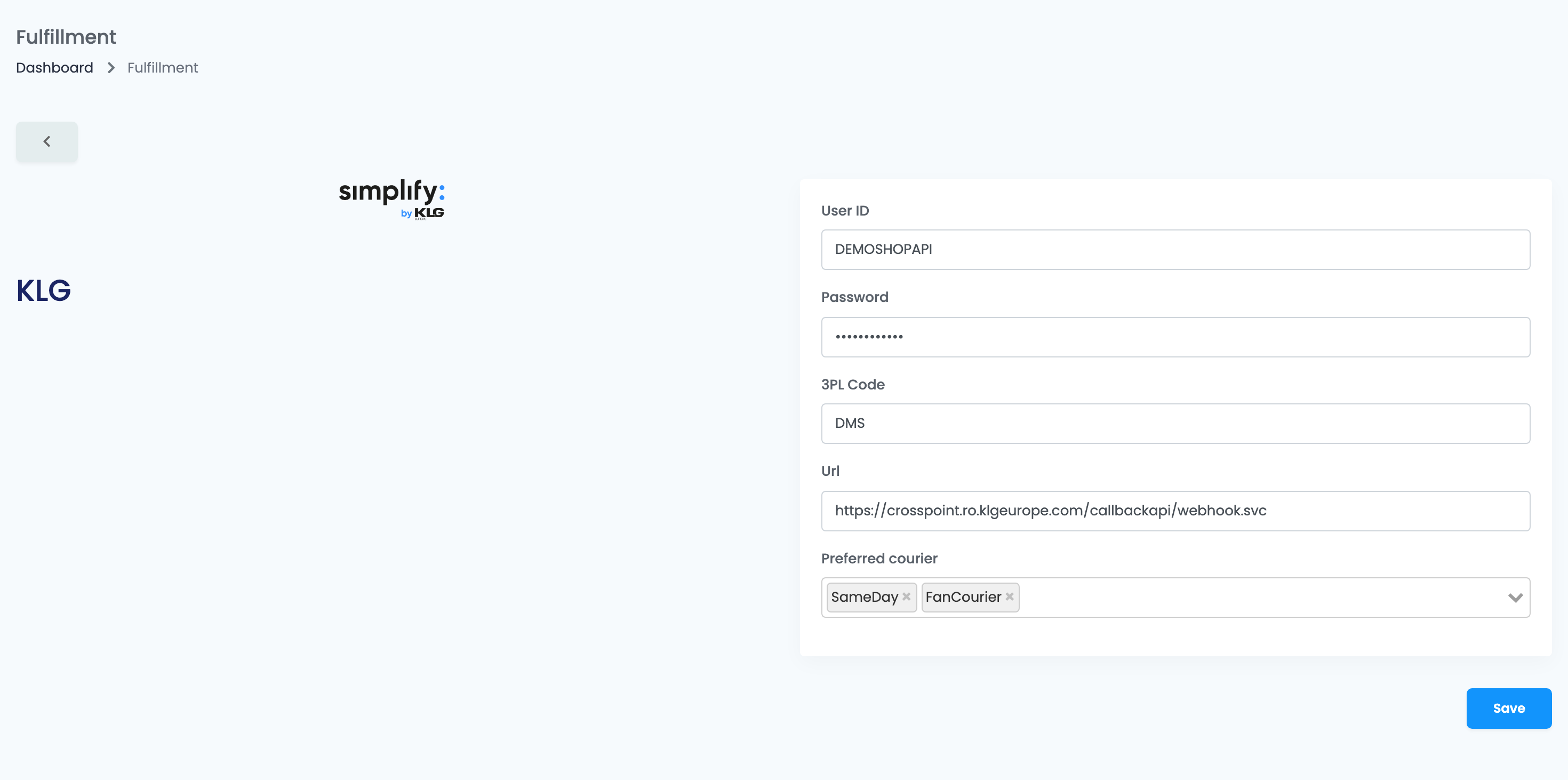
| Field | What goes in it |
|---|---|
| User ID, Password | The user and password KLG created for your easySales connection. |
| 3PL Code |
Your client code at KLG — a short code, for example DMS.
|
| Url |
KLG's order address for easySales, for example https://crosspoint.ro.klgeurope.com/callbackapi/webhook.svc.
|
| Preferred courier | Optional. The couriers you prefer KLG to use, shown to KLG with your orders. |
Press Save. easySales signs in to KLG with these details and, from then on, sends KLG your orders and products as they change.
Step 2 — Choose which orders go to KLG
Mark the orders KLG should prepare, in any of these ways:
- A fulfilment rule: on the Fulfillment Rules tab, choose KLG in Fulfillment Service, tick the sales channels whose orders KLG ships — or Apply to all — and press Save. New orders from those channels are marked for KLG as they arrive.
- By hand: in the orders list, use the Fulfillment column on an order, or select several orders and choose Bulk fulfillment.
- Automatically: add the Send order to fulfillment action with KLG to an automation flow.
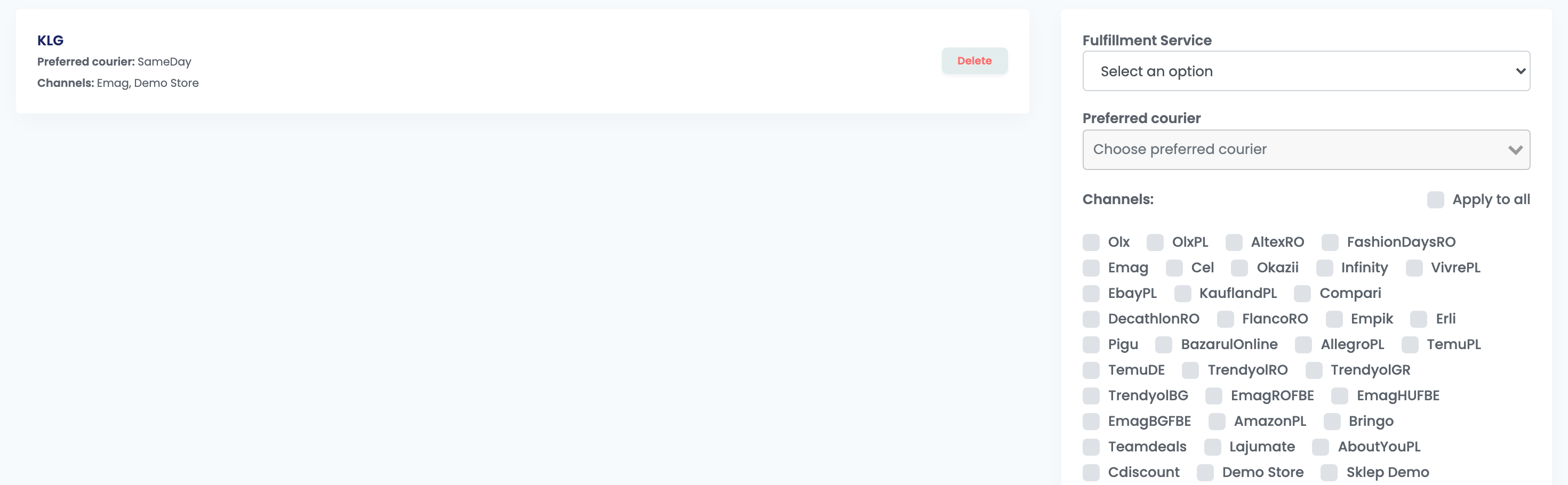
An order marked for KLG moves to Processing. Generate its AWB and its invoice in easySales as usual: KLG receives both with the order and needs the AWB to ship it.
To send an order to KLG again, mark it for KLG again or change something on it — the address, for example. Every change reaches KLG.
Products
Every product you save in easySales is sent to KLG, which creates it on its side. KLG refuses a product whose EAN is already used by another product, so give each product its own EAN.
If you load your products into KLG another way, turn off the two product updates for KLG on the Webhooks page (easy-sales.com/webhooks) — switch them off rather than deleting them.
Step 3 — Stock from KLG
To read your stock from KLG's warehouse, go to Integrations → Stock sources, add KLG and fill in the stock connection:
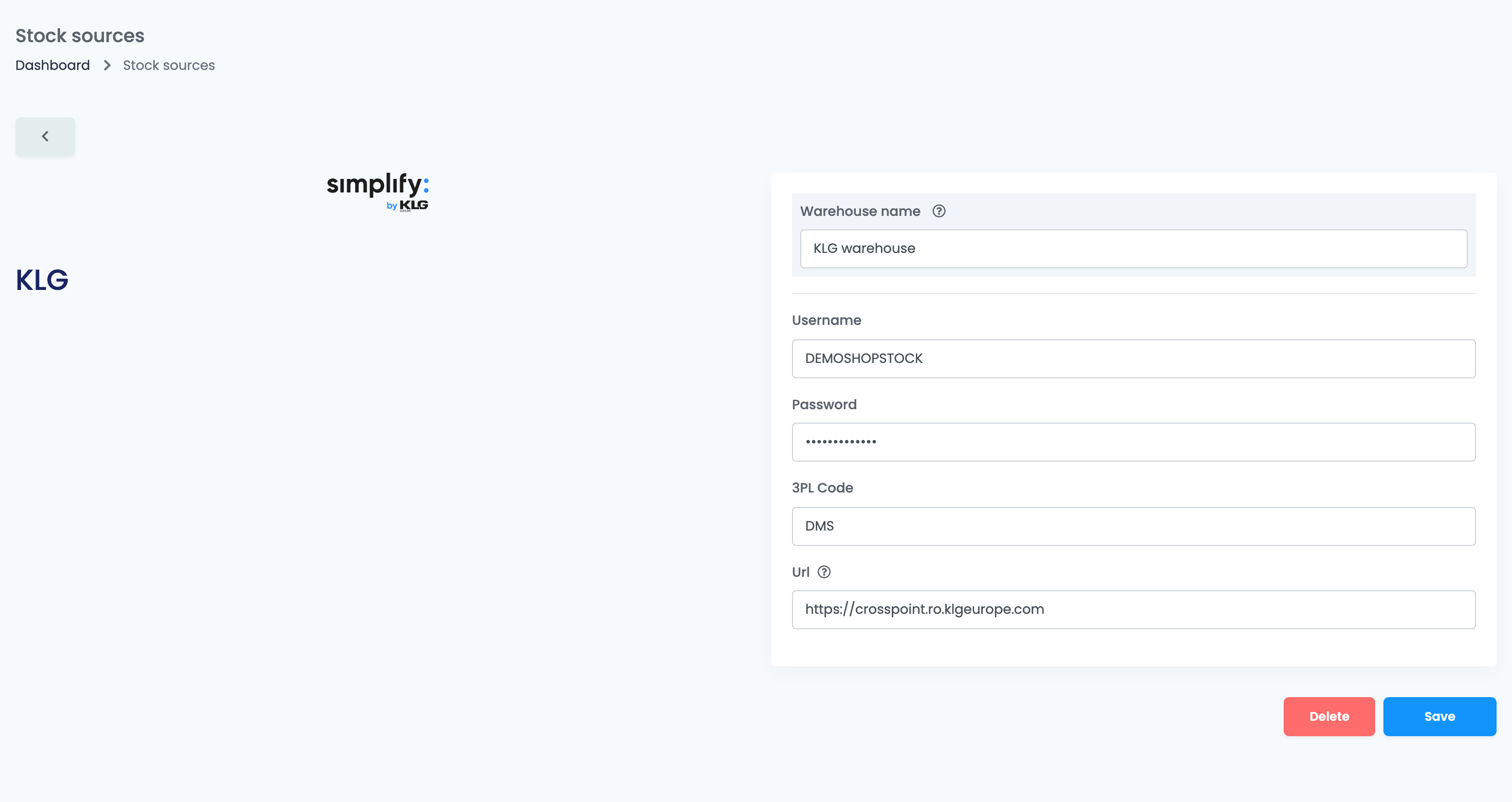
| Field | What goes in it |
|---|---|
| Warehouse name | A name you will recognise. |
| Username, Password, 3PL Code | The stock login KLG gives you, and your client code. |
| Url |
KLG's base address only, for example https://crosspoint.ro.klgeurope.com.
|
Then use this stock source for an advanced warehouse under Advanced warehouses. easySales reads KLG's stock every 30 minutes and matches each product by its Stock code. Stock only comes from KLG; easySales never changes stock at KLG.
When something does not work
| Message or symptom | What to do |
|---|---|
| Connection failed. | Check the User ID, Password, 3PL Code and Url with KLG, then press Save again. |
| Unable to connect. Reason: SOAP-ERROR: Parsing WSDL: Couldn't load from '…' |
The stock source has the order address in Url. Enter only KLG's base address, for example https://crosspoint.ro.klgeurope.com.
|
| An e-mail says: The webhook for https://…/CallBack has been automatically disabled after multiple consecutive failed requests. | Go to the Webhooks page (easy-sales.com/webhooks), switch the KLG entry back on, then mark the affected orders for KLG again. |
| KLG does not have an order | Check that the order is marked for KLG — a rule only applies to orders that arrive after it is saved. Then mark the order for KLG again. |