Invoices for private individuals in KSeF, and buyers with no NIP
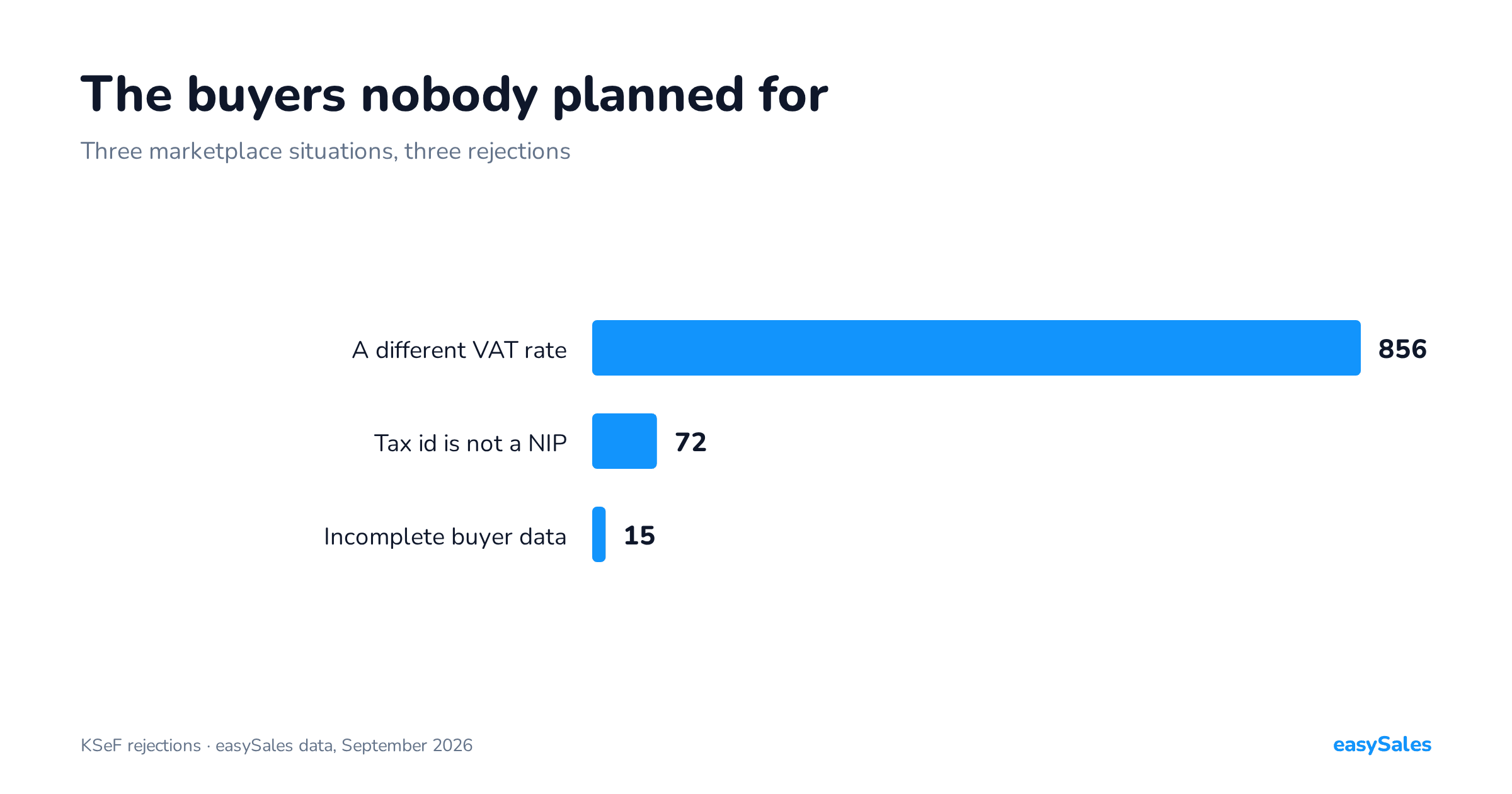
A private individual with no number, a Czech buyer with an IČO, a customer at a different VAT rate. Three everyday marketplace situations that end in a KSeF rejection.
The KSeF structure provides for an invoice to a buyer inside the EU and outside it — there are separate fields for their country code and number.
What is excluded are documents issued under the OSS, IOSS and SME procedures: those cannot be filed in KSeF even voluntarily.
Whether a particular sale falls under one of those procedures is your accountant's call. Schema validation does not check it and does not replace that decision.
This piece is about the invoice that is meant to reach KSeF — and about why, on cross-border sales, what stops it is usually not the buyer but the VAT rate.
Across the 1,190 failed submissions we analysed, 858 were rates outside the Polish list.

How KSeF identifies a foreign buyer
This is the question that comes up most, so it is worth settling first: the schema has a separate variant for every kind of buyer.
The buyer identification block accepts a Polish tax id, a country code with an EU VAT number, a country code with a non-EU identifier, or a marker saying there is none.

Enter the VAT number with its country prefix
The prefix decides which identification variant lands on the invoice. Without one, the software has to infer the country from the address, and that does not always give the same answer.

Greece shows why. In an address that country carries the code GR, but its EU VAT number prefix is EL — and the two dictionaries are not interchangeable.
Our integration recognises the prefixes FA(3) permits, including EL for Greece and XI for Northern Ireland, and separates the prefix from the rest of the number.
A number given without a prefix falls into the non-EU identifier variant instead. The document will pass validation, but it will describe the buyer differently from what you intended.
So where the buyer comes from is rarely the cause of a rejection. The problem starts one level down — on the invoice line, at the tax rate.
Guides about structured invoices are written from an accountancy perspective, where a person who knows the counterparty fills the document in.
On a marketplace it is the reverse: the data is typed by a buyer you will never meet, and the invoice is generated from it automatically.
Three situations that follow are completely normal in selling and completely unacceptable to validation.

The scale of the problem in numbers — our own data
Before the individual cases, it helps to see the proportions. The figures below come from invoices sent to KSeF by sellers using easySales since 15 May 2026. We publish them in aggregate, with no breakdown by account.
Invoices accepted with a KSeF number: 6,132. Failed submissions: 1,190. Here is what stopped them:
- A VAT rate outside the schema's Polish list — 858 submissions (72.1%). By far the most common cause, and the subject of the first case below.
- The session could not be opened — 218 submissions (18.3%). This is not an invoice rejection at all, and confusing the two costs more time than anything else when hunting for a cause.
- The tax-id field is not a NIP — 72 submissions (6.1%). Prefixes typed into the number field, and foreign company numbers.
- An incomplete buyer identification block — 15 submissions (1.3%). Most often a missing name on a consumer sale.
- Everything else — 27 submissions (1.6%). Contact field, duplicates, issue date, EU VAT number and scattered one-offs.
One methodological note, because without it these numbers mislead: we count submissions, not error entries. A failed submission is retried and appends another entry each time — those 1,190 submissions carry over five thousand error records between them.
Count entries instead of submissions and you get a picture four times worse than reality.
Three reasons an invoice does not get through
Each one is an ordinary selling situation that the FA schema simply does not provide for in that shape.
1. A buyer at a different VAT rate
Counted in failed submissions this is the largest problem on the list — 858 out of 1,190 in our own data.
Field P_12, where the FA schema expects the tax rate, draws on a closed dictionary of values used in Poland. A line at 19, 20, 21 or 27 fails validation before anyone looks at the document's content.
Where do they come from? Cross-border selling: an order from a foreign platform, or a shipment to a buyer in another EU country, carries the rate that applies there.
The billing system copies it faithfully, because that is what it should do, and schema validation stops it, because P_12 does not provide for that value.
For the EU OSS procedure the FA(3) structure has a separate P_12_XII field. Our integration fills P_12 only, so sales settled under OSS cannot be filed through it.
Why correcting the rate does not help
It is to stop those invoices being sent. Narrow the flow to documents that genuinely belong there — a scoping decision, not a workaround.
A rate outside the Polish list accounts for 72% of all our rejections. It is neither an invoice fault nor an integration fault — it is a document sent somewhere the schema will not take it.
If you sell abroad, this single scoping decision removes most of the problem before it appears.

How to narrow the sending scope in practice
Since the most common cause of rejection is documents that should never have been sent, it is worth saying exactly how to filter them out. This is configuration, not development.
Sending is driven by a rule, so the question is: how do you recognise a document that should go? Three conditions work in practice, usually combined:
- Sales channel. The simplest and most effective criterion. If foreign sales run through a separate account or channel, limiting the rule to domestic channels is enough.
- Buyer country or delivery country. Useful when one channel serves both kinds of sale — then the address decides rather than the order source.
- VAT rate on the lines. A fallback condition catching whatever the first two missed. It works as a safety net, not as the main criterion.
Two things worth remembering. First, narrowing the scope does not mean those invoices stop existing — they are created normally in your accounting program, carry a number and go into your accounts.
All that changes is that they are not sent somewhere the schema will not take them.
Second, set the scope before the first submission rather than after a run of rejections.
Rejected documents stay in the queue and every retry adds more entries — and the longer that goes on, the harder it is to tell old cases from new ones.
2. An invoice for a private individual — a buyer with no NIP
An invoice for a private individual is everyday marketplace business, and the buyer identification block has to be complete — including when the buyer has no NIP.
The problem is not the missing number itself — that is provided for — but that on orders from individuals the buyer's name sometimes does not arrive either.
The document looks fine in the panel and fails validation.
This is the only case on the list where you genuinely have to look at the specific order rather than at settings: the data is already missing on the way in.
An invoice for a private individual in KSeF — what has to line up
Since this is the most common document type in marketplace selling, it is worth taking apart.
An invoice for a private individual is fully provided for — the schema does not require every buyer to have a tax identification number.
The problem is not the missing number but what has to be in its place.
The buyer identification block has to be complete as a whole. On a consumer sale that means, above all, the buyer's name.
And that is precisely the field that sometimes fails to arrive with a marketplace order:
- the buyer placed the order with a name field that is empty or shortened to an initial;
- the order was imported from a file that simply had no name column;
- the shipping recipient details are complete, but the buyer details — the ones that go on the invoice — are not.
The effect is misleading: the document looks correct in the panel, because you can see the shipping address and the line items, and yet it fails validation.
This is the one case on the whole list where you have to look at the specific order rather than at the flow settings — the data is already missing on the way in, and no amount of configuration will invent it.
A practical tip: if an invoice for a private individual comes back rejected, open the order and compare the buyer details against the shipping details.
Nine times out of ten the difference is right there.
Filling in the name and resubmitting settles it — and if such orders arrive regularly, it is worth adding a rule that populates the buyer name from the recipient details before the document is created at all.
Having no tax id on a consumer sale is normal and provided for. The schema does not require every buyer to have one.
Rejections in this category come from a missing buyer name, not a missing number — which is why you look for them in the order data rather than in the settings.
3. A foreign buyer entering their own number
A Czech or Slovak buyer types an IČO or DIČ into the tax identifier field.
From their point of view that is a valid company number — because it is. From the schema's point of view it is not a NIP, and the document comes back.
The domestic variant of the same thing: a buyer types NIP: 1234567890 instead of the number alone and the prefix travels with it.
On a marketplace nothing validates that field along the way — the customer fills it in.
The fix: clean identification data during order processing, before the invoice exists. Stripping prefixes and rejecting wrongly formatted numbers is trivial before the document is issued and expensive afterwards.
Once you have found the cause, the fix is usually simpler than expected.
You do not need a new invoice
Fill in the missing name or clean up the identification number, then resubmit the same document.
It is worth knowing that automatic retrying fixes nothing by itself. A document with a rate outside the list will be rejected every time until you change the sending scope or the data.
The fourth cause nobody writes about: the session
Almost one in five failed submissions in our data — 218 out of 1,190 — is not a rejected invoice. It is a failure to open a session with the system.
The distinction matters, because you look for them in a completely different place.
A rejected invoice is a document that arrived and was judged not to match the schema.
A failed session means the document never left — no connection was established, so the invoice content has nothing to do with it.
You could fix rates and buyer details all evening and change nothing.
The usual causes sit with permissions and tokens: the token expired, was generated for a different permission scope, or for a different entity than the one you are submitting for.
It also happens that permissions were granted correctly but did not cover issuing invoices.
How to recognise them: failed sessions arrive in runs. If nothing goes through for a stretch, however different the documents are, it is almost certainly the session rather than the content.
Schema rejections behave the opposite way — they hit individual invoices sharing a common trait, such as the same VAT rate.
This distinction is the first thing to check on any "KSeF is down" report. "Nothing works" and "some of it works" lead to two different places.
Duplicates: when a rejection is not a problem

A separate category that looks alarming and usually is not an error: a duplicate notice.
The system detects that a given invoice has already been accepted and sends back that information along with the original document's number.
If the document it points to is the same invoice — and in most cases it is — everything is fine and there is nothing to fix.
The number and the confirmation attach to the document you already have. The resubmission simply landed on something sent earlier, for instance during a retry after a brief connection problem.
The one case that deserves attention is the opposite: when the duplicate notice points at a different invoice.
That means two distinct documents share the same number in your series — a real problem, but one that lives in your accounting program rather than in the integration.
How to check your own data before switching sending on

Every cause above can be caught in advance. The review takes fifteen minutes and saves a week of rejections.
A fifteen-minute review before you switch sending on
- Filter for orders with rates outside the Polish list. If there are any, decide the sending scope before you switch it on — not after the first rejections.
- Check for orders with no buyer name. That is the same list which later produces identification-block rejections.
- Review the tax-id field for prefixes and foreign numbers. Searching for values containing letters catches most cases.
- Verify the token's permission scope on a single test document before you release a whole day of sales.
- Decide what happens to corrections — they travel a different path from original invoices and are configured separately.
The common thread
In all three cases the invoice is correct in accounting terms. Nobody got the amount, the rate or the date wrong.
The rejection happens because the data came from outside — from the buyer, from the platform, sometimes from another country — and schema validation does not forgive that.
Which is why, for marketplace sellers, preparing for structured invoicing is mostly work on order data quality rather than on invoicing.
Treat it as an accounting topic and you will be looking for the fault in the wrong place.
There is a positive conclusion in this too. Every one of these causes is a one-off. A rate outside the list is a scoping decision, made once.
A prefix in the number field is a cleaning rule, set once. A missing buyer name is a data gap whose fix also improves your labels and your correspondence with buyers.
Put differently: this is not monthly work. It is a week of tidying order data, after which submission stops needing attention.
Our own numbers bear that out — 6,132 accepted documents against 1,190 failed submissions means that with tidy data this path runs quietly, and rejections cluster exactly where data arrives from outside and nobody checks it on the way in.
Step-by-step setup is in the guide: KSeF and structured invoices. The connection itself: the KSeF integration.