How to connect shopGold with easySales: connector setup
Connect your shopGold shop to easySales: upload the two-file connector with your API Key, map order statuses, catalogue numbers and what syncs each way.
What the shopGold connection does
shopGold is a Polish online-shop software that runs on your own server. Connecting it to easySales brings your shop's products and orders into easySales, keeps the shop's stock up to date from easySales, and sends order statuses back to the shop.
Three things to know before you begin:
- The connection is a small connector you upload to your shop. You download two files from easySales, paste your API Key into one of them, and upload both to your shop's root folder, next to
index.php. - Every product and variant needs its catalogue number (Nr katalogowy). easySales identifies products by it. A product without one is not imported, and an order with such a product is refused.
- Map your order statuses after you connect. shopGold statuses are your own, so easySales needs to know which one means new, completed or cancelled. Until you map them, every order stays New.
Before you start
Access to your shop's files
Through FTP or your hosting's file manager, to upload two files.
A catalogue number on every product
Nr katalogowy on each product, and on each variant.
A plain-text editor
Such as Notepad, to paste the API Key into the connector.
Step 1 — Add the shop in easySales
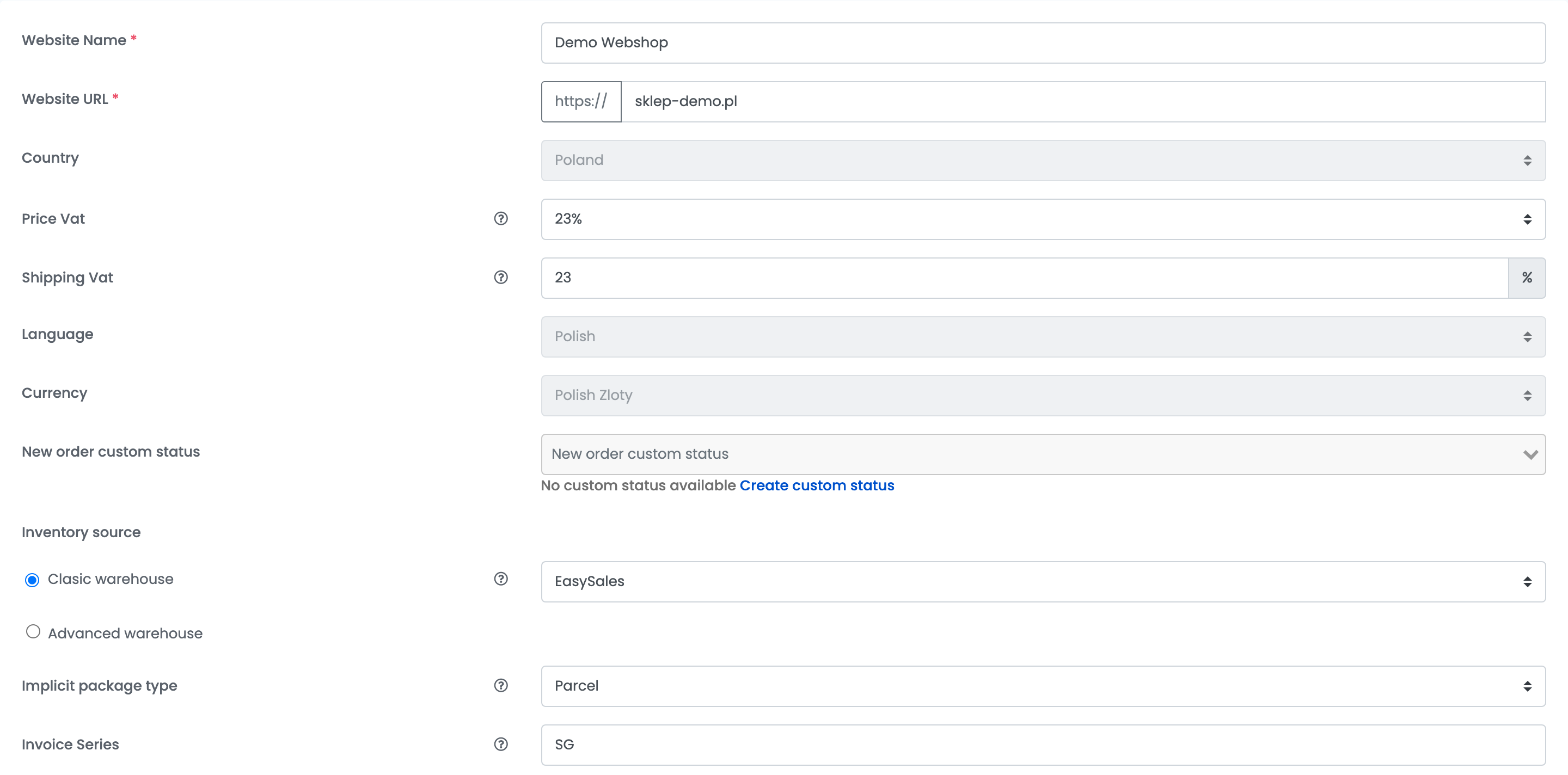
Go to Integrations → Websites and press Connect a Website. Fill in the shop's details:
| Field | What goes in it |
|---|---|
| Website Name | A name for the shop, used inside easySales. |
| Website URL |
Your shop's address exactly as it opens in the browser — the same https:// and the same www. or none. easySales does not follow redirects.
|
| Country | The shop's country, Poland. |
| Price Vat | The VAT rate included in your shop's prices, usually 23%. |
| Shipping Vat | The VAT rate of shipping. |
| Language, Currency | The shop's language and currency. |
| New order custom status | Optional: the custom status new shopGold orders get in easySales. |
| Inventory source | Where the shop's stock is kept: Clasic warehouse with a source such as EasySales, or Advanced warehouse. |
| Implicit package type | The package type new orders get, used when you create their AWBs. |
| Invoice Series | The series of the invoices you issue for this shop's orders. |
Step 2 — Upload the connector to your shop
Below the details, choose the shopGold tile, then the ShopGold version. The Details tab shows the setup steps, the Download Module button and your API Key.
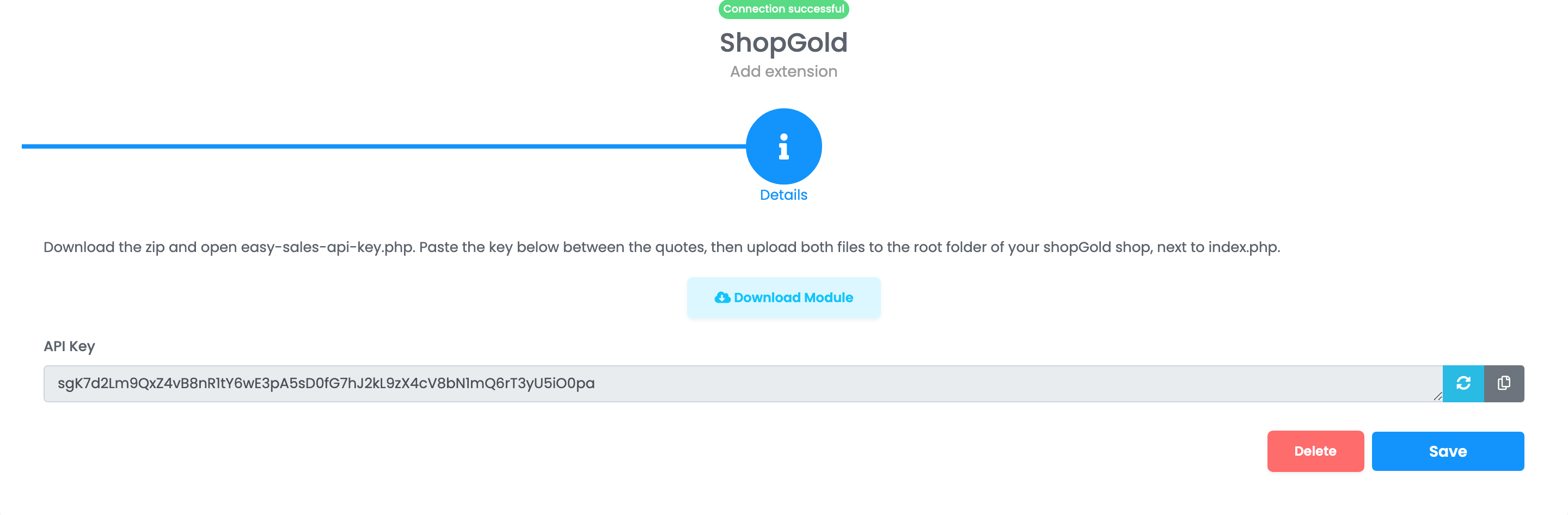
- Press Download Module and unzip the file. It holds
easy-sales-api.phpandeasy-sales-api-key.php. - Open
easy-sales-api-key.phpin a plain-text editor, such as Notepad, and paste the API Key between the quotes. Keep the quotes straight — a word processor changes them and breaks the file. - Upload both files to your shop's root folder, next to
index.php. - Back in easySales, press Save. easySales tests the connection and loads your shop's order statuses and payment methods.
Step 3 — Map your order statuses
Open the shop again and choose Preferences.
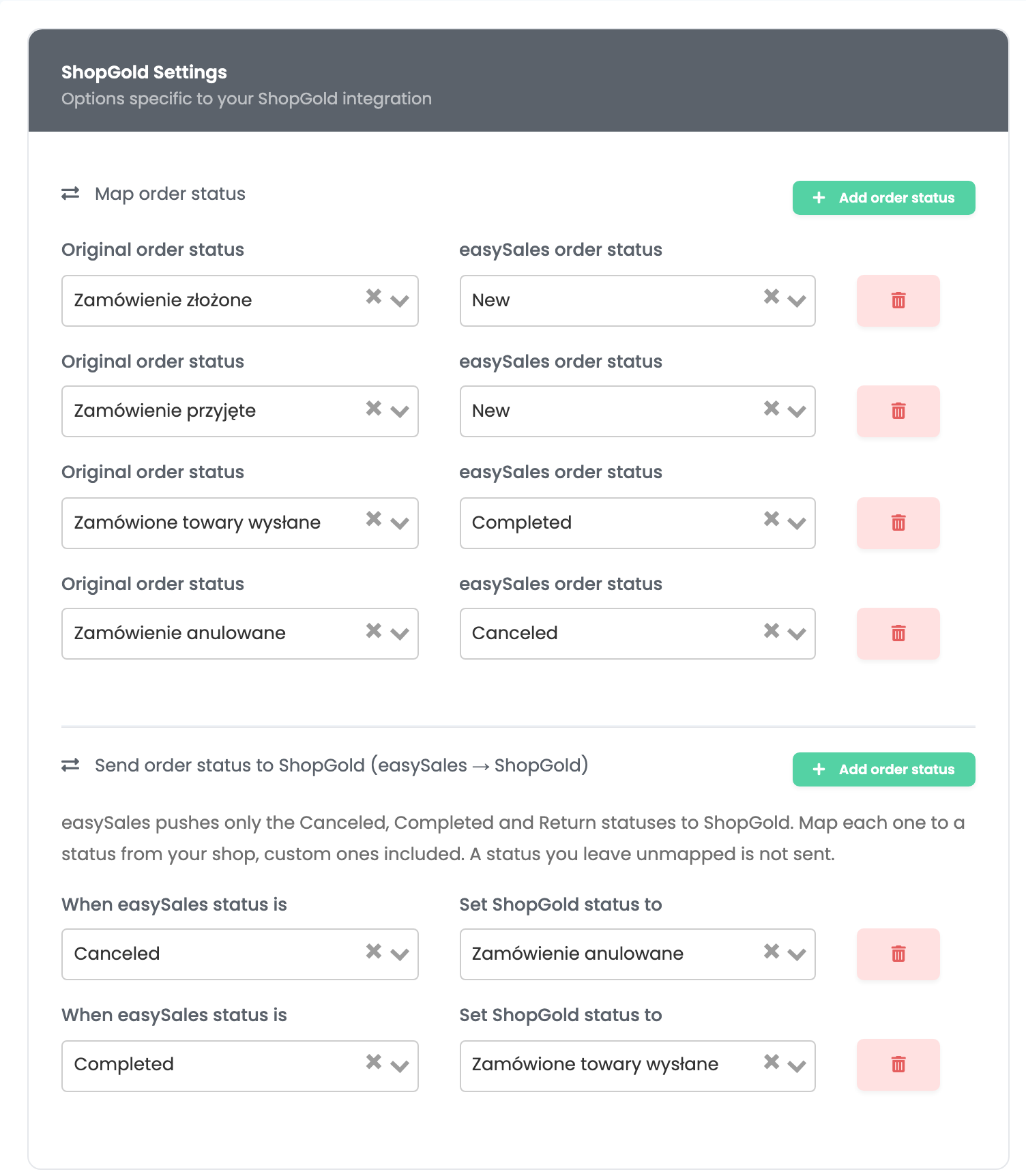
- Map order status: for each shopGold status, choose the easySales status it means — for example, an order your shop marks as shipped is Completed in easySales. A status you do not map comes in as New.
- Send order status to ShopGold: choose the shopGold status an order gets when you complete, cancel or return it in easySales. Only these three are sent; a status you leave unmapped is not sent.
Press Save.
What syncs
| From shopGold to easySales | From easySales to shopGold |
|---|---|
| Categories and products, with prices, images, descriptions and attributes | Stock |
| New and updated orders, with their pickup point when the buyer chose one | The order status, when you complete, cancel or return an order |
| Tracking numbers, with Get documents from website turned on | The tracking number of the AWB you create |
- Orders start arriving right after you connect. Products are read every few hours, so give the first import time before you work with new orders: an order line that arrives before its product exists stays without a product and reserves no stock.
- Stock: with the shop's stock source set to EasySales, easySales sends the shop the stock of each product whenever it changes. With the source set to the website, easySales reads the shop's stock every 30 minutes.
- Tracking numbers: when an order gets an AWB in easySales, its tracking number is sent to the shop. To bring in the tracking numbers you enter in shopGold, turn on Get documents from website in Preferences.
- Prices are read from the shop. Change them in shopGold.
Updating the connector
When easySales releases a new connector, replace only easy-sales-api.php in your shop. Keep easy-sales-api-key.php as it is — the key inside it stays valid. If you press the refresh button next to the API Key, paste the new key into easy-sales-api-key.php again.
When something does not work
| Message | What to do |
|---|---|
| Connection failed. Make sure easySales module is properly configured. If you need assistance, please contact us. |
Check that both files are in the shop's root folder, that the key is pasted in easy-sales-api-key.php, and that the Website URL matches the shop's address exactly.
|
| Set your easySales key in easy-sales-api-key.php | The key file is still empty. Paste the API Key between the quotes and upload the file again. |
| easy-sales-api-key.php was changed. Upload a clean copy from the release zip and paste the key again. | The key file was damaged while editing. Take it again from the zip, paste the key in a plain-text editor and upload it. |
| Shop configuration not found. Upload this file inside your shopGold directory, or fill in the database settings at the top of it. |
The files are not in the shop's root folder. Move them next to index.php.
|
| The product.sku field is required. | The product has no catalogue number in shopGold. Fill in Nr katalogowy, for the product and for each of its variants. |
| order.order_products.1.sku jest obowiązkowe. | A product in the order has no catalogue number. Fill it in shopGold; the order comes in at the next check. |