How to refer a friend to easySales and get account credit
Share your referral link, follow the accounts that sign up through it, and see how the credit you earn lowers your subscription.
How the referral programme works
Recommend easySales to another online seller and get account credit when they start paying. Open it from Settings → Account → Referrals. Only the account owner sees this page.
- You create your referral link.
- Your friend opens the link and creates their easySales account.
- When your friend pays their easySales subscription by card, you receive credit worth one month of their plan.
- The credit lowers your own subscription payments.
Three things to know first:
- Your friend must sign up straight from the link. The referral is recorded only if they open your link and create their account right away, in the same browser. If they sign up later, on another device or in another browser, the referral is not recorded and cannot be added afterwards.
- You receive credit, not money. It is used for your easySales subscription.
- Your friend pays their plan as usual. The programme rewards you, not the account you refer.
Create and share your link
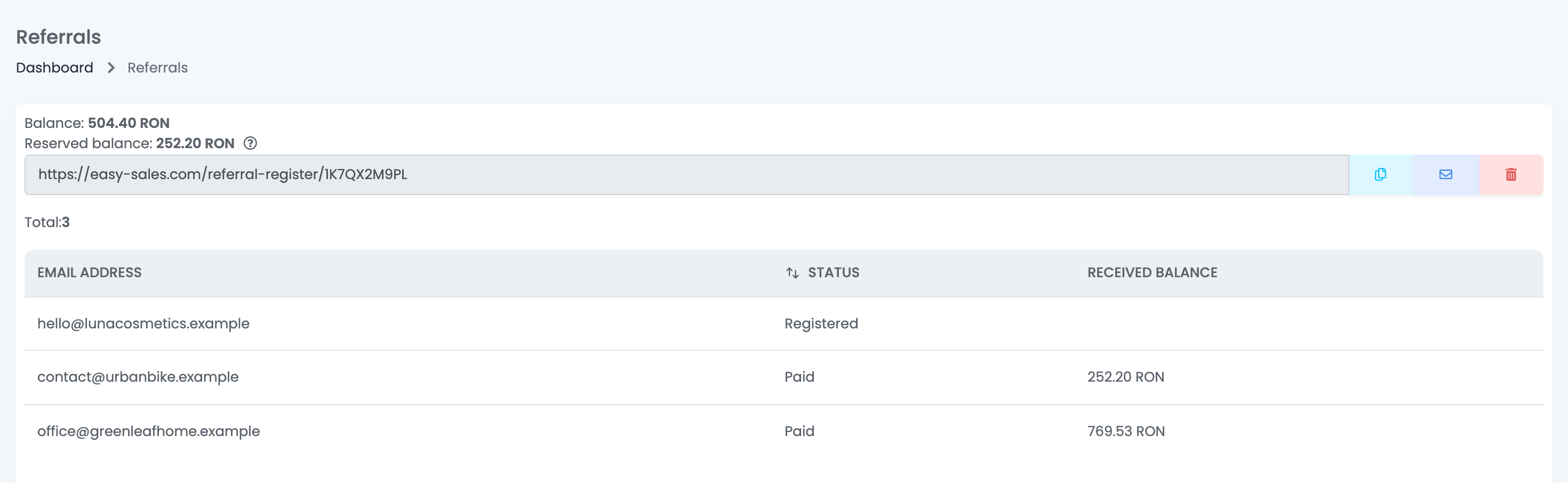
- Press Create referral code. The page shows your link.
- Share it: copy it with the first button, or send it by e-mail with the envelope button.
- The bin deletes the code.
Accounts still in their free trial cannot create a referral code. The button works once your subscription is paid.
Follow your referrals
The table lists every account that signed up through your link:
| Status | Meaning |
|---|---|
| Registered | Your friend created their account through your link but has not paid by card yet. |
| Paid | Your friend paid their subscription by card. Received balance shows the credit you got. |
How the credit is used
- Balance is the credit you have collected and not used yet.
- Reserved balance is credit already set aside for your next subscription payment. Your next card payment is lowered by that amount.
- The invoice of that payment shows your full plan and a Referral discount line for the credit used.
- If you have more credit than one payment, the rest stays in Balance for the next ones.
📖
Read next
How to manage your easySales subscription: plans, card payments, invoices and cancelling
Choose or change your easySales plan, keep your card up to date, find your invoices, and see what happens when a payment fails or you cancel.
→
When something does not look right
| Symptom | What to do |
|---|---|
| My friend signed up but is not in my list | They did not create the account straight from your link in the same browser. The referral cannot be added afterwards. |
| My friend is Registered but I did not get any credit | The credit comes when your friend pays their subscription by card. |
| "Users in free trials can't create referral code" | Pay your subscription first, then create the code. |
| My old link no longer works | The code was deleted. Create a new code and share the new link. |
| My card was charged the full amount | Check Reserved balance: only the reserved part lowers the next payment, and only for card subscriptions. |
| A team member cannot find Referrals | Only the account owner sees the page. |