Structured invoices rejected by KSeF — the 8 reasons
Eight repeatable failure patterns from 1,190 failed KSeF submissions — what triggers them when the invoice comes from a marketplace order, and how to prevent each one.
A structured invoice is an invoice issued in KSeF as XML, conforming to the FA logical structure. Once it passes verification the system assigns it a KSeF number. If verification fails the document comes back with a message — and when you look at those cases in real traffic, they are not random. They fall into a handful of repeatable patterns.
One qualification first: sending a document and having it accepted are not the same moment. After submission a document may still be processing, and only the final status settles whether it was accepted or rejected. The KSeF number and the UPO appear once verification succeeds. What a structured invoice is and how it works in KSeF is covered in our KSeF guide.
We went through 1,190 failed KSeF submissions processed by easySales, alongside 6,132 accepted documents that received a KSeF number. We say "failed submissions" rather than "rejected invoices" because they are not the same thing: some are document validation failures, and some are sessions that never opened, where KSeF never saw the invoice at all.
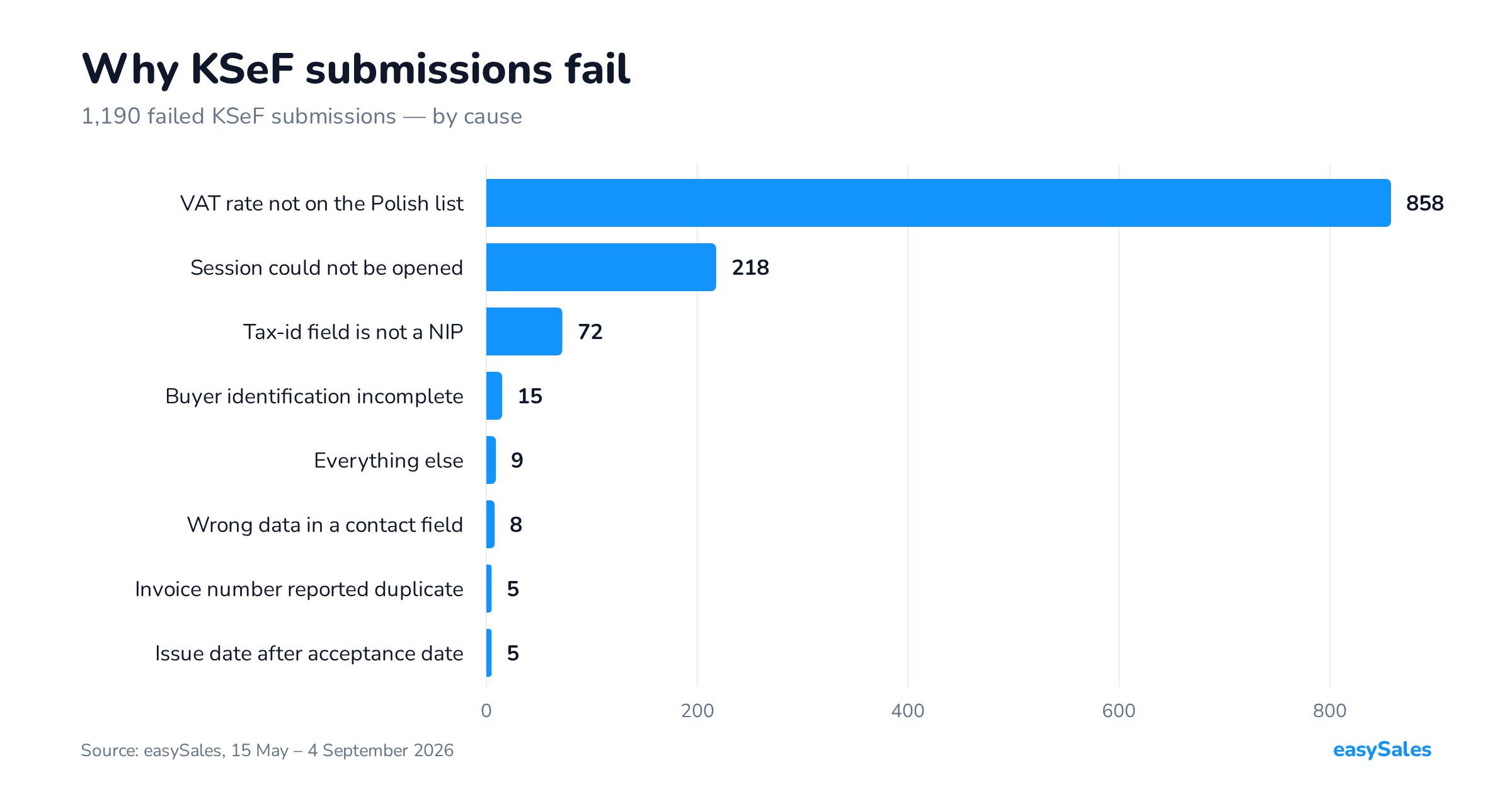
The headline finding: two causes account for 90% of all failed submissions — an invalid VAT rate (858) and a session that did not open (218). The remaining six patterns come to 114 cases between them.
| Cause | Cases | Share |
|---|---|---|
| VAT rate not on the Polish list | 858 | 72.1% |
| Session could not be opened | 218 | 18.3% |
| Tax-id field holds something that is not a NIP | 72 | 6.1% |
| Buyer identification block incomplete | 15 | 1.3% |
| Contact field carrying the wrong kind of data | 8 | 0.7% |
| Invoice number reported as a duplicate | 5 | 0.4% |
| Issue date later than acceptance date | 5 | 0.4% |
| Everything else | 9 | 0.8% |
| Total | 1,190 | 100% |
One thing stands out immediately: almost none of these are accounting errors. They are data errors — and they happen because the invoice was generated automatically from a marketplace order rather than filled in by a person. That is why guides written for accountancy firms do not describe them.
1. A VAT rate that is not on the Polish list
858 cases — by far the most common cause, close to four times the next one.
The FA schema accepts only the rates used in Poland in the tax-rate field. If an invoice line carries 19, 20, 21 or 27, the document fails schema validation before anyone looks at its content.
Where do those rates come from on a Polish seller's invoice? Cross-border orders. Selling on foreign platforms, or shipping to buyers in other EU countries, can put the rate that applies there — not in Poland — onto the order. The billing system copies it onto the document, the document goes to KSeF, and it fails validation.
What to do: work out which orders produce non-Polish rates and stop sending those invoices to KSeF through the same flow. In easySales the Billing software condition in automation does exactly that — it narrows which invoices are sent at all. This is a decision about submission scope, not a way around validation. How a particular cross-border transaction should be treated is a question for your accountant; what we describe here is only what schema validation does.
2. The session could not be opened
218 cases.
This is the one item on the list that is not an invoice rejection. Submission is not a single request: a session is opened first, the document travels inside it, and then the verdict is polled. If the session does not open, KSeF never sees the document — there is nothing to validate.
The usual cause is token permissions. The token needs both the right to issue invoices and the right to read status — because the verdict has to be polled. A token with only the issuing right looks correct when you save it and stops working the moment a result is needed.
What to do: check the token's permission scope before looking for a problem in the invoice data. This error says nothing about the document's content.
3. The tax-id field holds something that is not a NIP
72 cases.
Two variants, both straight from what the buyer typed. First: the buyer enters NIP: 1234567890 instead of the number alone, and the prefix travels with it. Second: a Czech or Slovak buyer enters an IČO or DIČ — a perfectly valid identifier, just not a Polish NIP.
On a marketplace this field is filled in by the customer, not the seller, and nothing validates it along the way.
What to do: clean identification data during order processing, before the invoice exists — strip prefixes and reject numbers that do not match the Polish NIP format. Fixing it on a finished document costs considerably more.
4. The buyer identification block is incomplete
15 cases.
The buyer identification block has to be complete, and it is its absence that stops the document at validation. This should not be confused with an empty buyer name: an invoice for a private individual with no tax identifier is accepted and registered by KSeF, just without a name — a separate matter, and not a rejection reason. What counts here is an incomplete identification block, where a document that looks fine in the panel fails validation.
What to do: this is one of the few cases worth investigating in the specific order rather than in settings. The data is usually already missing on the way in.
5. A contact field carrying the wrong kind of data
8 cases.
A company name occasionally lands in the phone field. It sounds like a one-off and in volume terms it is, but it illustrates the rule: invoice fields inherit exactly what arrived on the order, mess included.
6. The invoice number is reported as a duplicate
5 cases.
KSeF enforces uniqueness of the document number and reports a collision with code 440, naming the KSeF number of the document already registered. A collision is not always an error: if the document it names is the same invoice, easySales adopts its KSeF number and UPO rather than sending it twice. It becomes a failure when a different invoice is registered under that number — then the document is not registered at all.
What to do: make sure the numbering sent to KSeF is shared across every channel and every system issuing documents for that seller. Separate series that reset are exactly what produces this collision.
7. Issue date later than acceptance date
5 cases.
A document cannot be accepted from the future — the issue date cannot run ahead of the moment it is received. This shows up with forward dating and with time-zone differences.
8. Everything else
9 cases spread across individual, non-repeating situations — among them an invalid EU VAT number, no invoice to send, and a request-rate limit. In practice that means the seven patterns above explain almost everything we see.
What this means for structured invoices from a marketplace
Line the numbers up once more: 858 are a VAT rate, 218 are token permissions, 114 are order data quality. Not one of these reasons is about whether the invoice was issued correctly in accounting terms.
That is the difference between marketplace selling and the invoicing that tax guides describe. There, a person who knows the counterparty fills in the invoice. Here, the invoice is generated from an order that arrived from a platform, with data typed by the buyer, sometimes in another country and at another rate. Schema validation does not forgive that — and there is no reason it should.
The good news is that all of these are repeatable, so they can be solved once: with flow scope, token permissions, and cleaning data on the way in. We cover the step-by-step setup in the guide: KSeF and structured invoices. To see the connection itself: the KSeF integration.
Methodology
The data covers invoice submissions to KSeF processed by easySales between 15 May 2026 and 4 September 2026, from production. We count submissions, not error messages: a failed submission is often retried and records several messages when it is, so counting messages would overstate the "session could not be opened" row in particular. Each submission is attributed to a single cause — the one it finally ended on. Submissions skipped because the invoice was already registered in KSeF, and documents still processing, are excluded.