Product Updates August 2026
In August we released 37 updates in easySales. The biggest is a physical store you run from the same account as your online sales, alongside a redesigned left menu, 22 new ABOUT YOU country channels and a JPK_VAT export for Polish sellers.
Below you will find the most important updates, explained simply: what they do, how they help and where to find them in the platform.
In short, the most important launches
- easySales now has a physical store You can sell at the counter, issue fiscal receipts, run cash register operations and close the fiscal day, without leaving easySales.
- A new left menu The menu is now a rail of sections with a panel beside it, instead of one long scrolling column.
- ABOUT YOU, across Europe We added 22 more ABOUT YOU country channels, from Poland and Romania to Sweden and Portugal.
- JPK_VAT export for Polish sellers Your easySales invoices export as a JPK_VAT XML file for your accountant's VAT register.
- PulseAI writes offers on 14 more marketplaces Automatic category and characteristic completion now covers FashionDays, Vivre, eBay, Amazon and ten more channels.
Sell at the counter, not just online
August's biggest release is a whole new area of the platform: a physical store you run from the same account as your online sales.
easySales now has a till
The physical store is a dedicated area with its own section in the left menu: an overview, a sale screen, cash register operations, your fiscal receipts, store reports and store settings.
You turn it on yourself from Modules, and you can turn it off again at any time. Your settings and history are kept.
Where to find it: Settings → Modules
Set it up without reading a manual
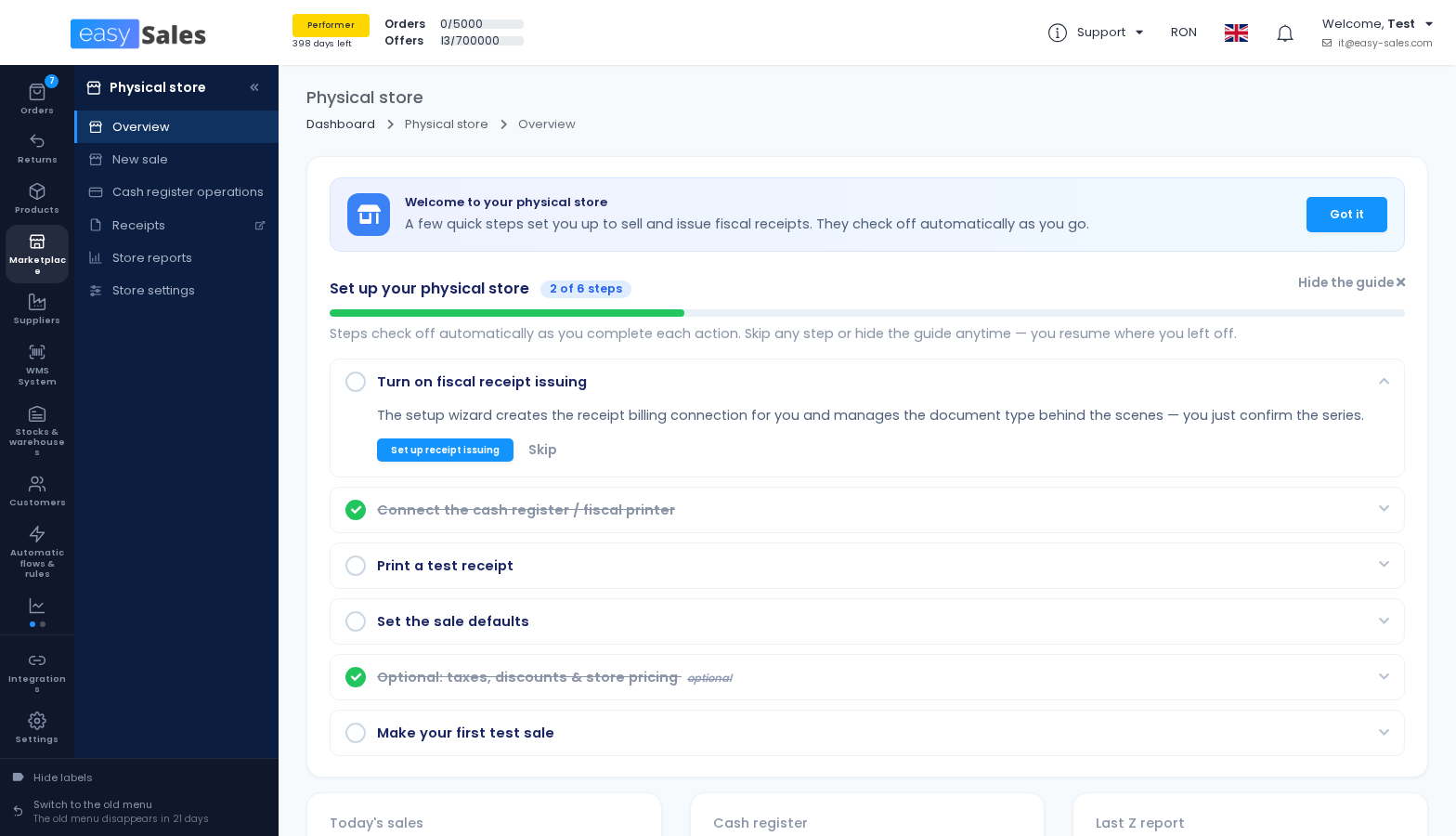
A setup guide walks you through the whole chain: turning on receipt issuing, connecting the cash register, printing a test receipt, setting the sale defaults and making a first test sale.
Each step checks itself off as you complete it, and you can skip a step or hide the guide and pick up where you left off. The receipt connection is created for you by a wizard, so you never have to learn which document type to choose.
Where to find it: Physical store → Overview
Close the fiscal day from easySales
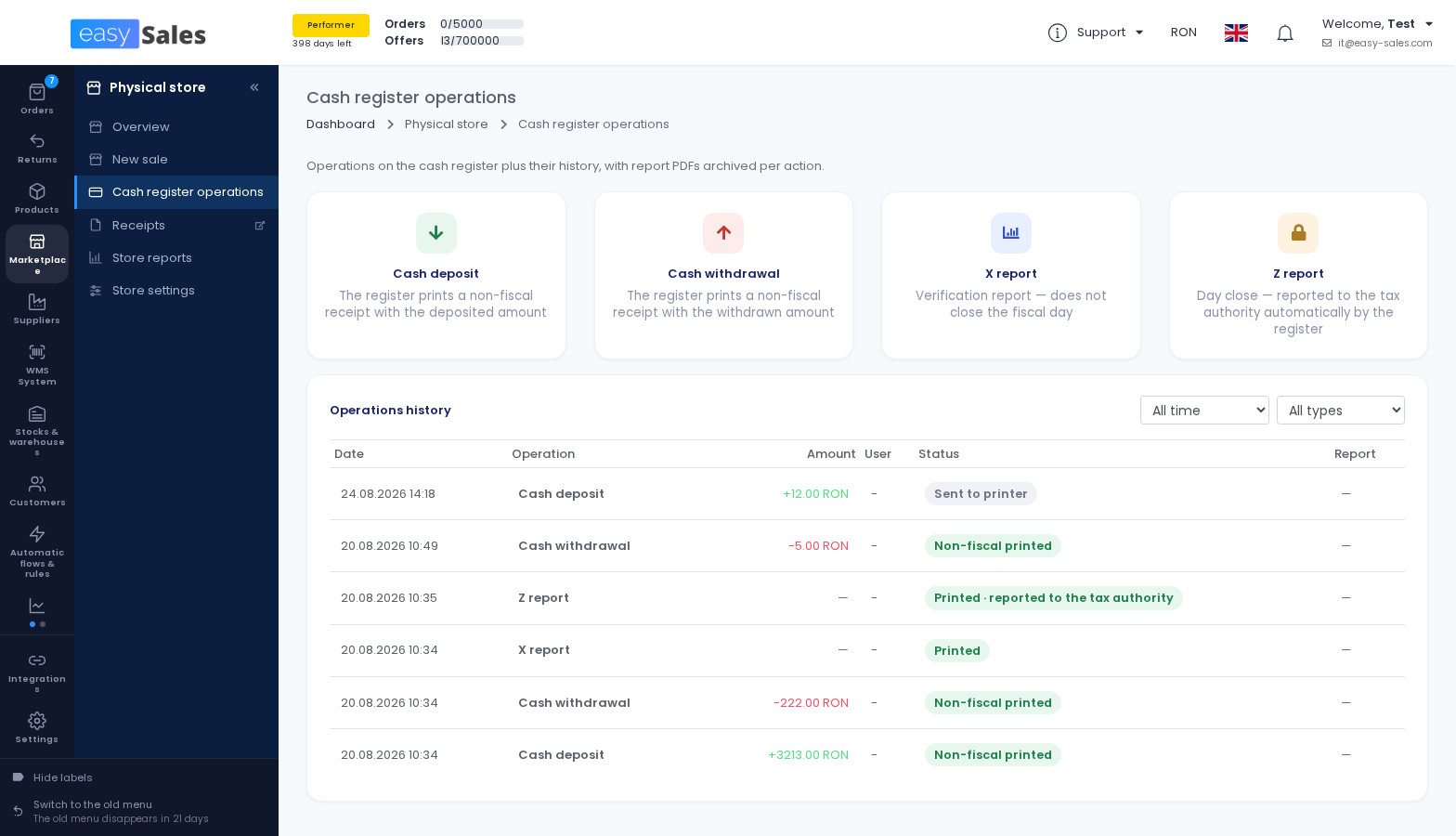
You can run an X report, which is a verification report that does not close the fiscal day, and a Z report, which closes it. The register prints the Z report and reports it to the tax authority automatically.
The operations run through the easySales Fiscal agent, the small desktop app installed on the computer connected to your register. The agent supports three fiscal printer protocols, and you pick yours when you connect the register: FiscalNet, Posnet and Novitus.
Where to find it: Physical store → Cash register operations
Every cash movement is on record
You can register a cash deposit or a cash withdrawal, and the register prints a non-fiscal receipt with the amount.
Every operation lands in an operations history that shows what was done, by whom, when and how it ended, with an archive PDF you can download for each one.
Where to find it: Physical store → Cash register operations → Operations history
Two daily reports for your accountant
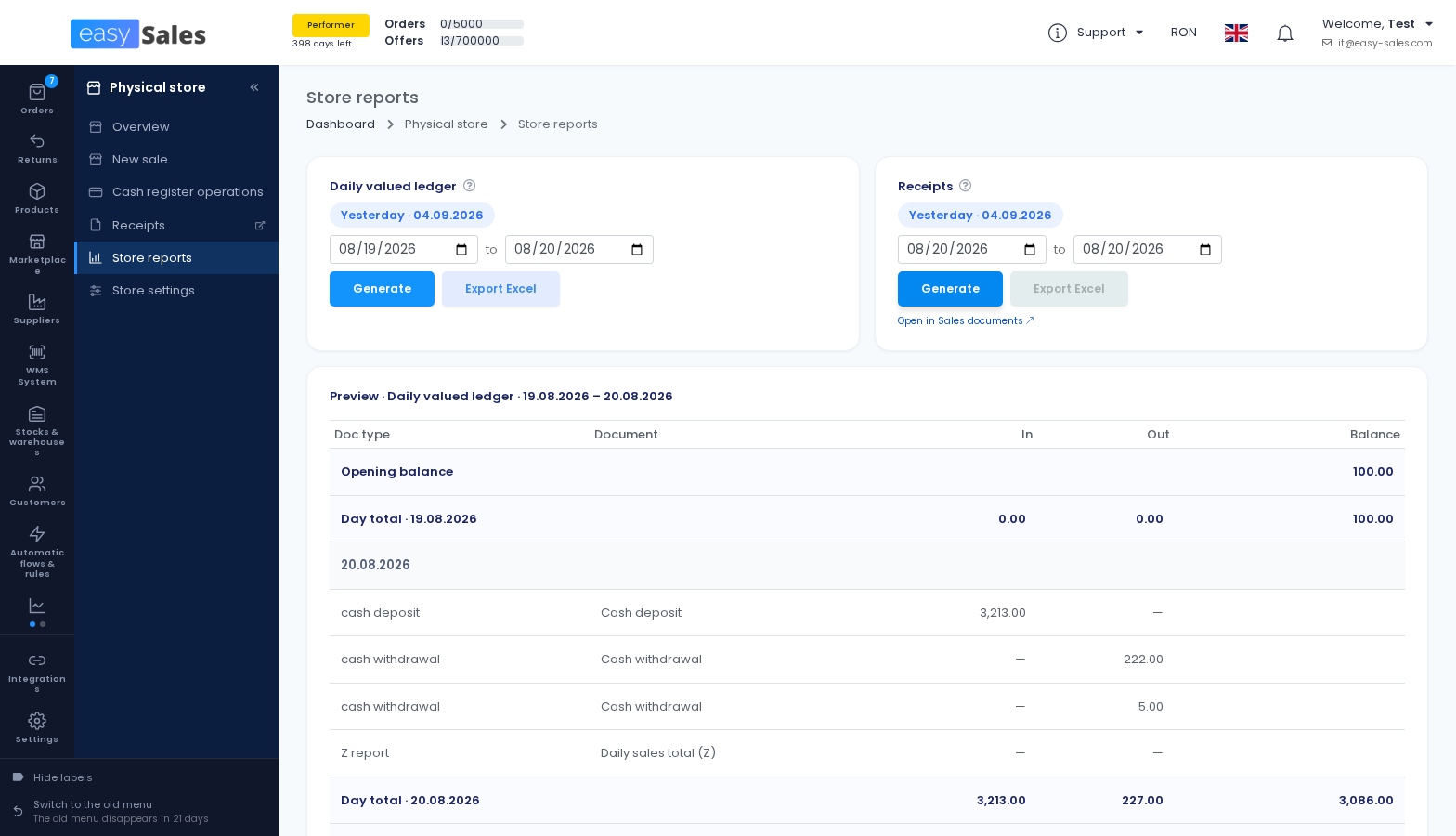
The receipts report gives you one row per fiscal receipt issued in the period you choose, with an Excel export.
The daily valued ledger is a day-by-day in, out and balance register built from the fiscal receipts issued through easySales, together with cash deposits and withdrawals. You set an opening balance the first time, and each day is anchored to the register's own Z total, so a difference between the two is visible instead of hidden.
Where to find it: Physical store → Store reports
A new left menu
The menu had grown to roughly 60 entries in a single scrolling column. It is now organised differently.
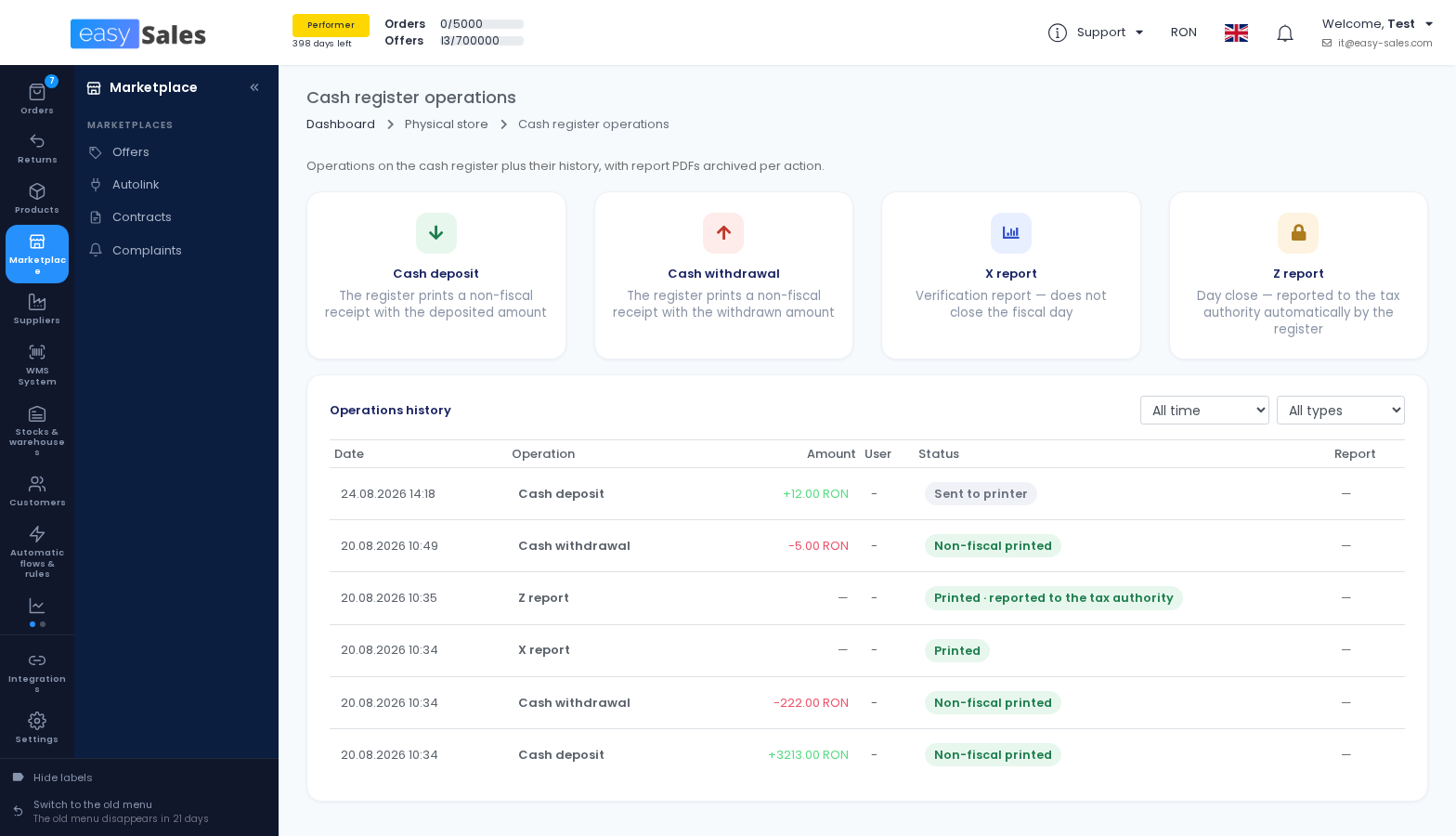
Sections on the left, pages in a panel beside them
The menu is a rail of top-level sections, and selecting one opens a panel with the pages inside it. Custom statuses no longer replace the whole menu, so getting to one and back out again takes fewer clicks.
This is a restyle, a reorder and a regroup of the navigation only. Every page that existed before still exists and still works, and the menu now behaves properly on smaller screens.
The old menu is still available, until 26 September
The new menu is on by default and you can switch back to the old one while you get used to it. The old menu is retired on 26 September 2026, after which the preference no longer applies.
Unread customer messages show in the menu
When a customer writes to you, the menu tells you before you go looking: a count appears on Tickets and a discreet mark on the section that holds it.
Where to find it: Customers → People → Tickets
New channels and connections
We added sales channels and connections that you manage from the same easySales account.
ABOUT YOU, across Europe
ABOUT YOU was available for Austria and Germany. We added every remaining country channel that sellers can use: Poland, Romania, Belgium, Croatia, Cyprus, the Czech Republic, Denmark, Estonia, Finland, France, Greece, Hungary, Italy, Latvia, Lithuania, Luxembourg, the Netherlands, Portugal, Slovakia, Slovenia, Spain and Sweden.
That is 22 new country channels, listed and managed from easySales like any other marketplace.
Where to find it: Integrations → Sales channels → Marketplaces
Odoo as a stock source
If you keep your inventory in Odoo, easySales can now read stock from it. You connect it with your Odoo address, database, user and an API key generated in Odoo.
You choose whether stock is read from a single Odoo warehouse or summed across all of them.
Where to find it: Integrations → Billing & systems → Stock sources
Send your orders to Nexus ERP, WooCommerce and UNAS
Three more destinations can now receive the orders centralised in easySales, through Order Submissions, with a manual resend when you need one.
For Nexus ERP the orders arrive as client orders and the invoice stays in the ERP, which assigns the invoice number when the order is closed.
Where to find it: the order page → Send order, or a Flow
Create your Virtual Shop products in your online store
Products you keep in the Virtual Shop can now be created directly in a connected Shopify store, in bulk, as active products or as drafts.
Products that already exist in the destination store are skipped automatically, so you can run it again without creating duplicates.
Where to find it: Products → Virtual Shop → Products → Create in website
Ceneo: make your offers buyable
You can now mark your Ceneo offers as buyable through Kup Teraz, and set a dispatch time per offer, from within 24 hours to made to order.
When an offer is not marked as buyable, it appears in the price comparison but cannot be ordered through Ceneo.
Where to find it: Marketplace → Marketplaces → Offers
Buying from suppliers
B2B Connect, the area where you import a supplier's catalog or publish your own, got its third version in August.
Your catalog gets a business profile
A catalog you publish now carries a business profile: business name, country, county, city and a B2B contact email and phone that buyers can see.
The profile goes through a review before it is listed in the buyer directory. If you edit it later, your catalog stays listed with the last approved values while the change is reviewed.
Let buyers look before they connect
Whether buyers can browse your catalog is now a separate decision from how they connect to it.
You can let them browse your products, and optionally your list prices, before connecting, while still requiring a connection code or your own approval. Personalised prices are never shown before connecting.
A discount per buyer
On top of the general discount applied to the whole catalog, you can now set a percentage per buyer on their connection. A negative value prices above your catalog price.
Changing a discount does not re-price what a buyer has already imported. Use Resend all offers to apply it to the whole catalog.
Search every catalog at once
You can search products and categories across all the supplier catalogs you can browse, in one search, instead of opening each supplier in turn.
Where to find it: Suppliers → B2B Connect
Invoicing and fiscal
Invoicing became more country-specific this month, with work aimed at Polish sellers in particular.
JPK_VAT export for Polish sellers
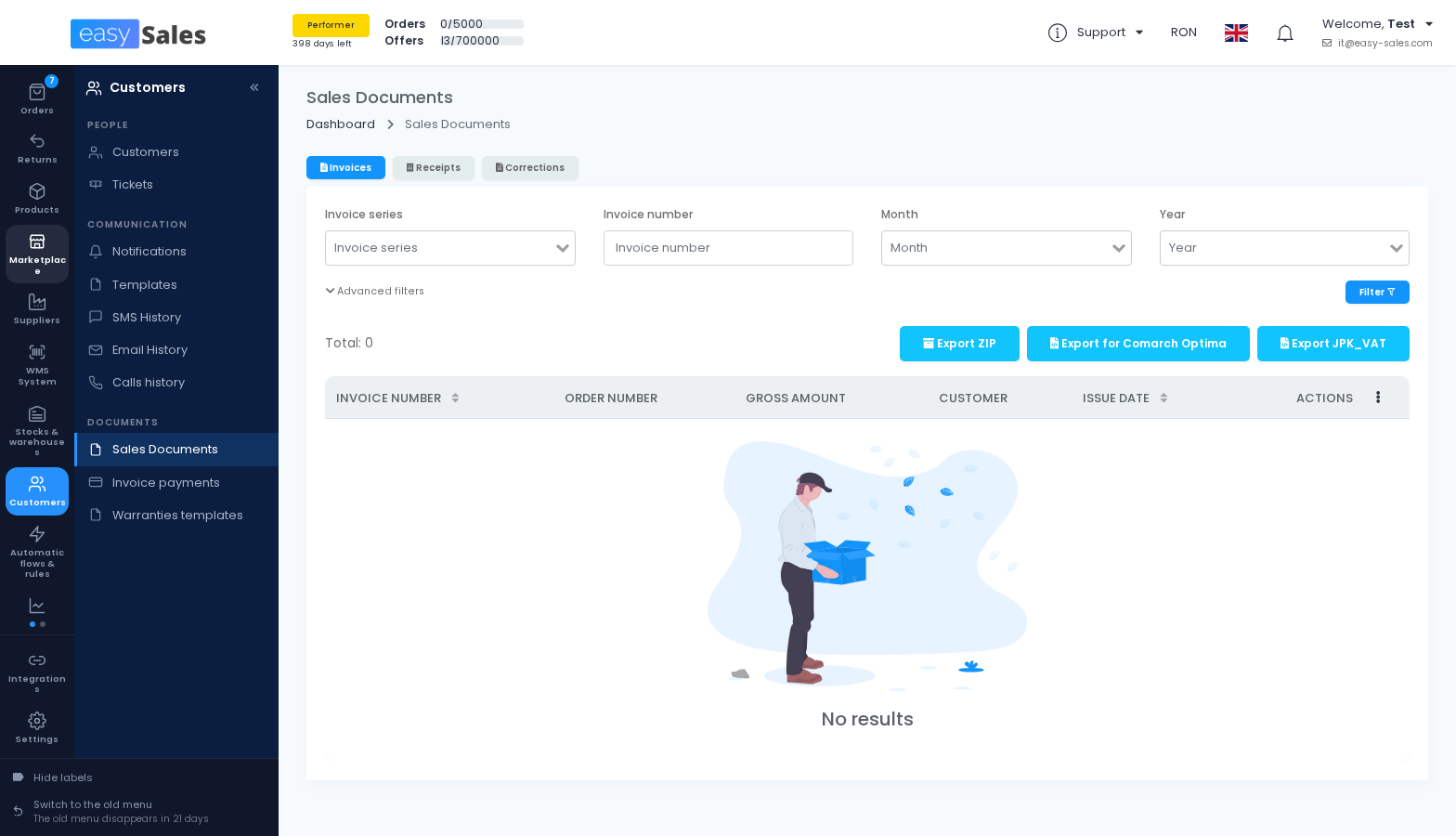
Invoices and corrections issued through the easySales invoicing system can now be exported for a chosen month as a JPK_VAT XML file.
The file is built for your accountant's VAT register, for example the import into Comarch ERP Optima, and not for submission to the tax authority. Amounts are in PLN, converted at the NBP table A mid rate of the last working day before the issue date.
Where to find it: Customers → Documents → Sales Documents → Export JPK_VAT
Corrections that restate the order instead of reversing it
A correction can now do one of two things: reverse the sale, with negative amounts and the goods returned to stock, or restate the corrected details, with the amounts as they are on the order and no stock movement.
You set the behaviour you want as the default on the connection, and you can still choose the other one for an individual correction.
Where to find it: Integrations → Billing & systems → Billing Software
Fakturownia: the WZ warehouse document, with the invoice
When an invoice is issued, easySales can also create the matching WZ warehouse release document in Fakturownia, in the warehouse you select, with the same products and quantities, linked to the invoice.
Leave the option off if Fakturownia already generates WZ documents for you.
Fakturownia: name the delivery line, or issue it as a service
You can now decide what the delivery line on the invoice is called: keep the name that came from the marketplace, use a fixed text of your own, or take it from the order's delivery notes.
You can also issue the delivery as a service, linked to a Fakturownia service product, and create that product from easySales if you do not have one yet.
Nexus ERP: an accounting account per charge
Instead of one account for every charge, you can now map an accounting account to each charge name, with the fee account kept as the fallback.
Where to find it: Integrations → Billing & systems → ERP systems
Listing and automation
We extended automatic listing to more marketplaces and gave Flows two new ways to work.
PulseAI writes your offers on 14 more marketplaces
Autofill with PulseAI, which reads what you already know about a product and picks the marketplace category, the characteristics and their values for you, now covers 14 more channels.
FashionDays, Vivre, eBay and Amazon join first, followed by BazarulOnline, Empik, Erli, Pigu, LV220, Kaup24, Hobbyhall, Cdiscount, ABOUT YOU Austria and InPostBuy.
Where to find it: Marketplace → Marketplaces → Offers → edit an offer
A flow that runs only when you say so
There is a new trigger, Manual order execution, in its own Manual group. A flow built on it never runs by itself: it runs only when you launch it on an order with Run flow.
The picker also got more useful. When you open Run flow on an order, manual flows are listed only if that order actually satisfies their conditions, so you are not offered a flow that would do nothing.
Where to find it: Automatic flows & rules → Flows
Build internal characteristics from the ones you already have
A new flow action creates internal characteristics from your existing ones, by rule: when a characteristic has a given value, the internal characteristic you name gets the value you choose.
You decide what happens when the internal characteristic already has a value, keeping it or replacing it.
Erli has a ready-made feed
Erli joins the ready-made feeds. You save the feed, copy its URL from the feed card and send it to Erli, who import your catalogue from it.
Prices are exported in PLN with VAT included. Products without stock and products without images are left out, and you can exclude categories and product tags of your own.
Where to find it: Products → Online Shops → Feed
Marketplaces, day to day
Smaller changes to the channels you work in every day.
Read and reply in your own language
Buyer messages, including Allegro chat, can now be shown to you translated into the language you read and write in, and your replies are translated back into the buyer's language before they are sent.
The original text is always one click away. Translation runs on easySales for free, or through a connected provider with your own API key if you prefer.
Where to find it: Customers → People → Tickets
Allegro claims arrive whole
When a buyer opens a claim on Allegro, the ticket now carries the whole case: the conversation, the attachments and the timestamps, instead of a notification that sends you back to Allegro to read it.
eMAG repricing: a cooldown after you win the Buy Button
You can now set how long the repricer waits, after winning the Buy Button, before it starts raising the price again.
Price increases and price decreases are also counted separately, so a limit on one no longer consumes the other.
Where to find it: Marketplace → Marketplaces → eMAG → autoprice settings
Trendyol takes a video on the offer
You can add a video URL and a video title to a Trendyol offer, in bulk through import and export, and filter your offers by whether they have a video.
The link points to an externally hosted .mp4 or .mov file between 8 and 120 seconds. easySales does not host or convert the file.
Skroutz stock and price through the Products API
Stock and price updates for Skroutz can now go through the Skroutz Products API instead of waiting for the feed, so a change reaches the channel sooner.
Shipping and returns
More automation around labels, and more visibility on where a return has been sent.
Four labels on one A4 sheet, whatever the courier
Tiling small labels four to an A4 sheet used to depend on a list of couriers we had approved for it. It now works from the PDF itself: any label small enough to fit an A4 quadrant qualifies, whoever produced it.
A label that would have to be shrunk too far is refused rather than scaled down, so barcodes stay scannable.
Bulk AWB generation runs in the background
Generating AWBs for many orders at once no longer holds up the page. The work is queued and each order updates as soon as its AWB is ready.
Where to find it: Orders → select orders → generate AWB
FAN Fulfillment accepts your own AWB and invoice
If the shipping label and the invoice for an outbound order are generated outside easySales, they can now be sent to FAN Fulfillment on that order rather than regenerated.
See where a return was sent, and send it again
Returns now have their own submissions panel, like orders: you can see which connected systems a return was sent to, what happened to each send, and send it again when one fails.
There is also a Send return action for Flows, and filters on the return submission status.
Where to find it: Returns → open a return → Return submissions
Small things you will feel
Two short ones that remove a daily irritation.
Type a price with a comma
Price fields now accept the comma as a decimal separator, so a price typed the way it is written in most of our markets is understood correctly instead of rejected.
Your printer's real paper formats
When you connect a printer, easySales now discovers the paper formats the printer itself reports, so you choose from what the device actually supports rather than from a generic list.
Where to find it: Integrations → Delivery → Printers