How to connect Okazii shipping with easySales: Delivery Guarantee AWBs
Ship Okazii Delivery Guarantee orders with Okazii's own AWB from easySales: the token, your pickup address, creating AWBs and Okazii's messages.
What Okazii shipping gives you
When a buyer chooses Livrare garantată (Delivery Guarantee) on Okazii, the order must ship with an AWB from Okazii. Okazii shipping creates that AWB from easySales: you send the parcel's weight and your pickup address, Okazii chooses the courier, and you print the label from the order.
Three things to know before you begin:
- It is only for Delivery Guarantee orders. These orders show Delivery guarantee: Yes, and for them easySales offers only Okazii shipping. Other orders ship with your own couriers.
- Delivery Guarantee orders must ship with Okazii's AWB. Okazii refuses the tracking number of any other courier for them.
- The Token is your Okazii API token — the same one as on your Okazii marketplace connection.
Before you start
Your Okazii account connected to easySales
Under Integrations → Marketplaces.
Your Okazii API token
The same token as on the marketplace connection.
Your pickup address
Where the courier collects the parcels.
Step 1 — Connect Okazii shipping
Go to Integrations → Couriers, search for okazii and press Connect on the Okazii card. The button is active once your Okazii marketplace connection exists.
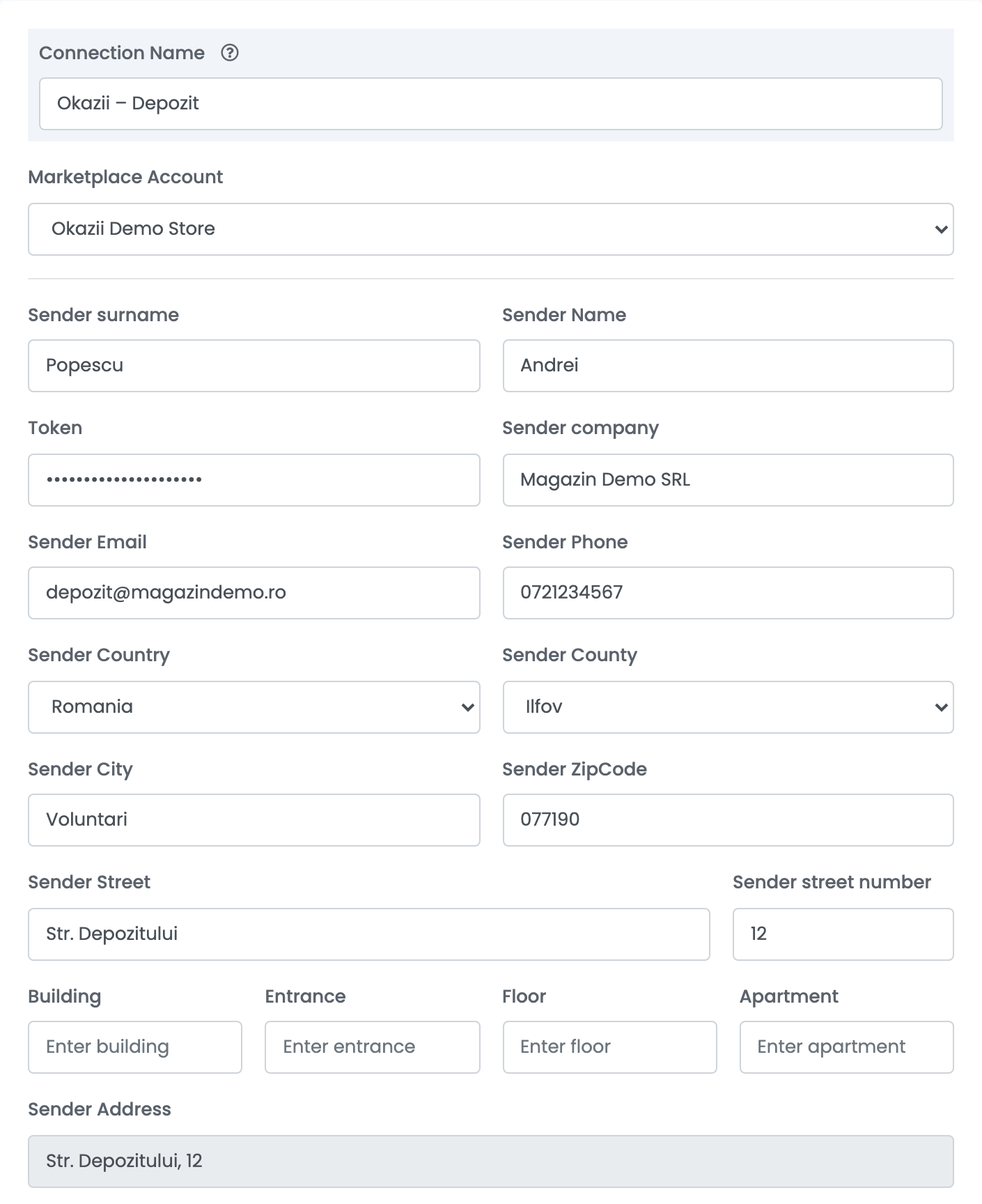
| Field | What goes in it |
|---|---|
| Connection Name |
A name you will recognise, for example Okazii – Depozit.
|
| Marketplace Account | Your Okazii marketplace connection. |
| Sender surname and Sender Name | The name of the person who hands over the parcels. |
| Token | Your Okazii API token — the same one as on your Okazii marketplace connection. |
| Sender company | Your company name. |
| Sender Email and Sender Phone | The contact the courier calls or writes to. |
| Sender Country and Sender County | Romania, and the county of your pickup address. |
| Sender City, Sender ZipCode, Sender Street and Sender street number | Your pickup address. Building, entrance, floor and apartment are optional. |
Press Save.
Creating AWBs
- Quick create: in the orders list, choose Quick Create → Okazii in the AWB column of a Delivery Guarantee order.
- From the order: in the order's Awbs section, press Create AWB and choose Okazii. There you can set the weight of each parcel.
The parcel's weight is the order's weight, rounded up to whole kilograms and at least 1 kg — or the weight of the order's size template. Okazii chooses the courier and returns the AWB, and the order moves to Finalized. Follow the delivery in your Okazii account.
When something does not work
| Message | What to do |
|---|---|
| This order cannot have a AWB generated by Okazii.ro | The order was not bought with Delivery Guarantee. Ship it with your own courier. |
| Unable to upload awb: The order is not eligible for update. | A Delivery Guarantee order was shipped with another courier, and Okazii refused that tracking number. Delivery Guarantee orders must ship with Okazii shipping. |
| Cannot find any eligible bids or document already generated | Okazii found nothing to ship on this order, or its AWB was already made in Okazii. Check the order in your Okazii account. |
| Failed to create AWB. Reason: … | Okazii did not accept your pickup address. Check the address fields on the connection and save. |
| … Localitate nevalida … | The buyer's locality is not recognised by the courier. Check the shipping address on the order. |
| Cannot delete AWBs from Okazii.ro | Okazii AWBs cannot be deleted from easySales. Handle the parcel in your Okazii account. |