How to connect Lajumate with easySales: a complete setup guide

Publish your products as Lajumate ads from easySales: the vendor account, email and password, ad location, category mapping, ad slots and common refusals.
What connecting Lajumate gives you
lajumate.ro is a Romanian classifieds site. Connected to easySales, it receives your products as ads: easySales publishes an ad for each Lajumate offer, updates the ad when the product changes and takes it down when you disable the offer.
Three things to know before you begin:
- Your Lajumate account must be a vendor account. easySales connects only Lajumate accounts set up as a company, with your CUI. A private account is refused when you save the connection.
- Every product needs a Lajumate category. Map your categories to Lajumate's before you send products — an offer without a Lajumate category is not published.
- Buyers contact you on Lajumate. Lajumate ads bring no orders into easySales: you agree each sale with the buyer on Lajumate.
Before you start
A Lajumate vendor account
Set up as a company, with your CUI.
Your Lajumate email and password
The ones you sign in to lajumate.ro with.
Categories mapped to Lajumate
Each product you advertise needs a Lajumate category.
Step 1 — Connect Lajumate in easySales
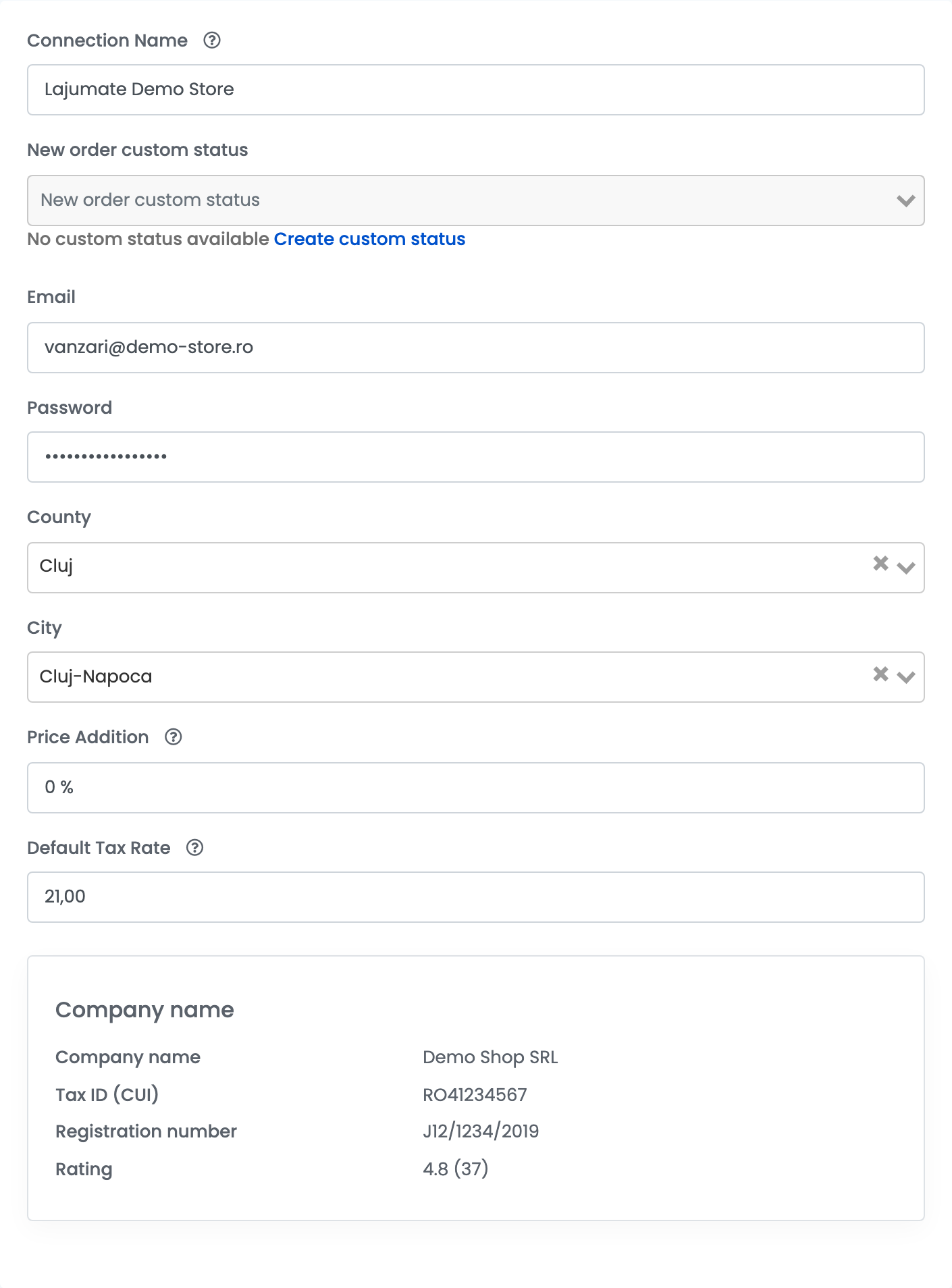
Go to Integrations → Marketplaces, search for lajumate and press Connect on the Lajumate card — or Edit, if you have connected it before. Fill in the Main settings tab:
| Field | What goes in it |
|---|---|
| Connection Name |
A name you will recognise, for example Lajumate Demo Store.
|
| Email, Password | The email and password you sign in to lajumate.ro with — those of your vendor account. |
| County, City | Where your ads are located. For Bucharest, choose the county Bucuresti-Ilfov, then the city. |
| Price Addition | A percentage added to your product prices on Lajumate. Leave 0 to advertise at your easySales prices. |
| Default Tax Rate |
The VAT rate used for products without their own, for example 21. Set 0 if you are not a VAT payer.
|
| New order custom status | Not used by Lajumate: leave it empty. |
Press Save. easySales signs in to Lajumate with your email and password and checks that the account is a vendor account. Once connected, the form shows your company's details from Lajumate: Company name, Tax ID (CUI), Registration number and Rating.
Step 2 — Additional settings
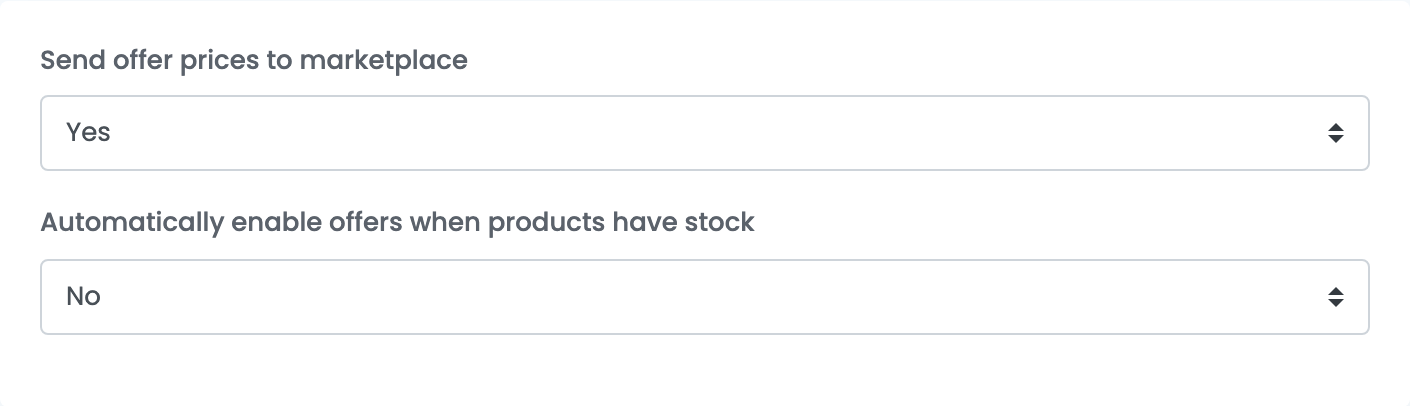
- Send offer prices to marketplace: with Yes, a price change in easySales updates the price of the ad. With No, the price is sent only when the ad is created.
- Automatically enable offers when products have stock turns your Lajumate offers back on by themselves when their product is in stock again.
Step 3 — Map your categories to Lajumate
- Go to Categories and choose Map categories for each category you sell on Lajumate.
- Choose the Lajumate category on the Lajumate tab — the last level of Lajumate's category tree.
- For the Lajumate fields marked with a red asterisk, choose the characteristic of your products that holds the value. The values must be ones Lajumate accepts, for example a size Lajumate lists.
Step 4 — Send your products to Lajumate
- Go to Products, select the products you want to advertise and choose Add offer(s) on → Lajumate.
- Follow the offers in Marketplaces → Offers, on the Lajumate tab.
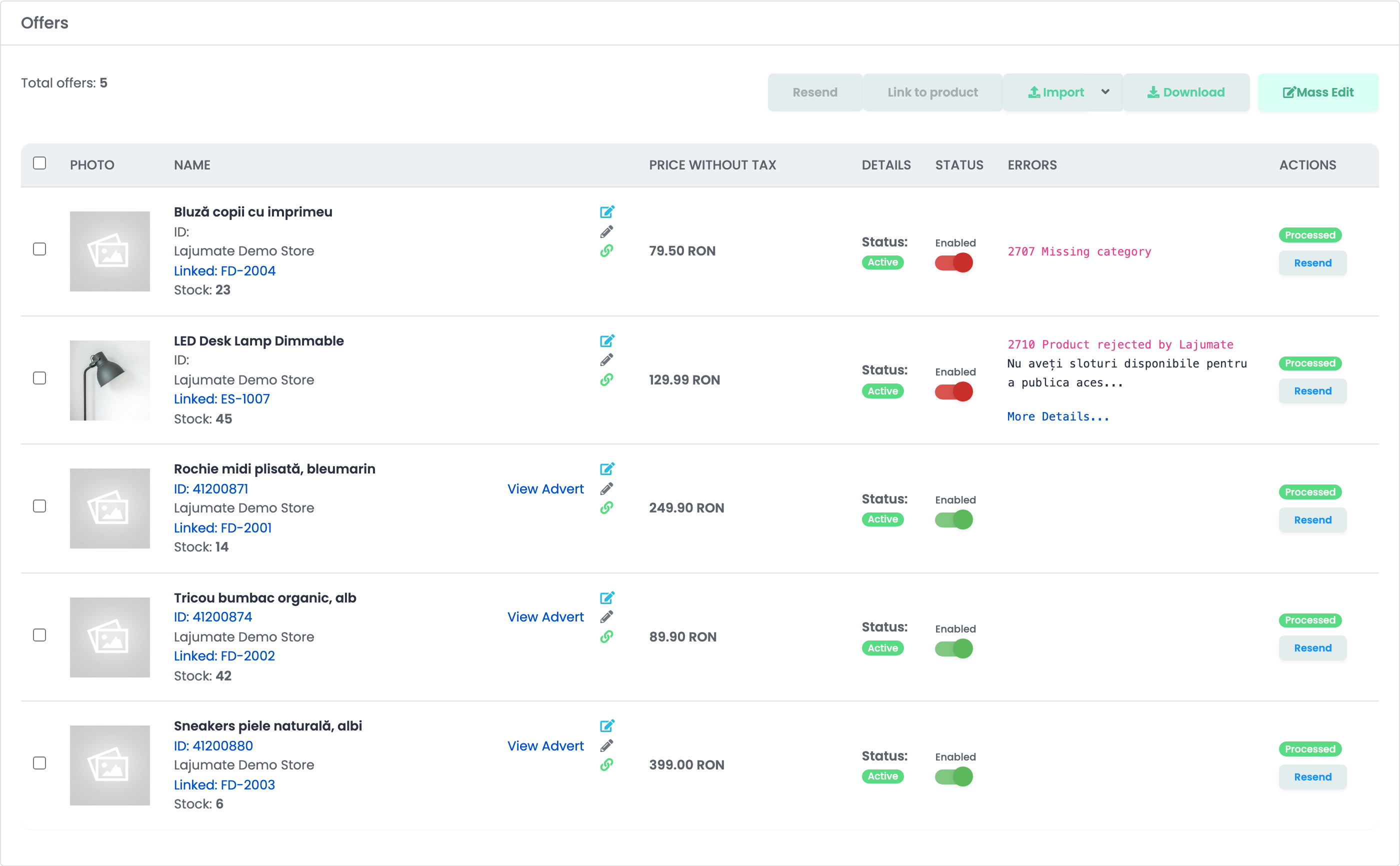
Lajumate checks each new ad before publishing it. Once the ad is published, its ID and a View Advert link appear on the offer.
How your ads are kept up to date
- Product changes — name, description, images, characteristics and, with Send offer prices to marketplace on Yes, the price — are sent to the ad.
- Price: your product price plus the Price Addition, with VAT — the product's VAT rate, or the Default Tax Rate if the product has none.
- Location: every ad uses the County and City of the connection.
- Stock: Lajumate ads have no stock. An ad stays up when the product runs out of stock; disable the offer to take the ad down.
When something does not work
| Problem | What to do |
|---|---|
| Invalid Lajumate email or password. | Check the email and password you sign in to lajumate.ro with, then press Save again. |
| This Lajumate account is a private (non-vendor) account. Only vendor accounts can publish through easySales. | Ask Lajumate to turn your account into a vendor account with your company's CUI, then save again. |
| 2707 Missing category | The product's category has no Lajumate category. Map it under Categories, then press Resend. |
| 2706 Mandatory characteristics missing | Map the Lajumate fields marked with a red asterisk to your characteristics, and give the product a value for each. |
| 2708 Invalid characteristics values | A value is not one Lajumate accepts. Change it to a value from Lajumate's list, then press Resend. |
| 2710 Product rejected by Lajumate — Nu aveți sloturi disponibile pentru a publica acest anunț | Your account has no free ad slots. Buy an ad package on Lajumate, then press Resend. |
| 2710 Product rejected by Lajumate — ad_id: The selected ad id is invalid. | The ad is still waiting for Lajumate's approval. Wait until it is published, then press Resend. |
| 2711 Lajumate Ad has expired | Press Resend to publish the ad again. |