Custom Product Feed Examples: 7 Real B2B Exports easySales Sellers Build
Seven real-world Dynamic feed setups easySales sellers build for distributors, partners, ERPs, and multi-shop sync — with columns, formats, and tips.
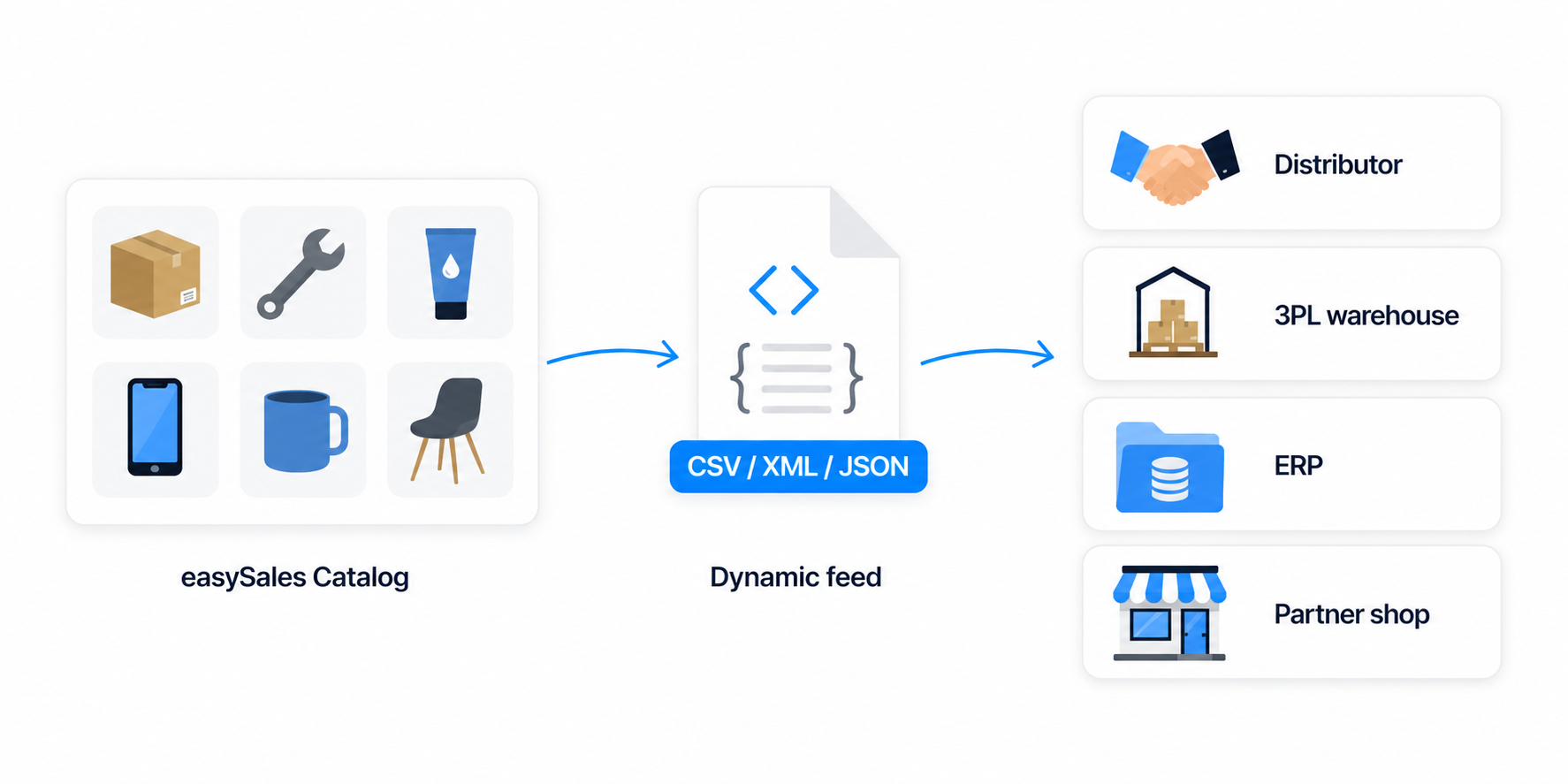
Most easySales sellers think of feeds as something for shopping engines — Google Shopping, Skroutz, Glami, Pepita. But the Dynamic feed is for everything else: a CSV your distributor pulls every morning, an XML your ERP consumes, a stock file your 3PL refreshes hourly. It's the open builder you reach for when no channel-specific template fits.
This guide collects seven real Dynamic feed setups that easySales merchants build day-to-day for partners, distributors, ERPs, and multi-shop sync. Each recipe shows what to put in it and why — adapt them to your own partner's spec.
Why merchants build custom Dynamic feeds
A new partner rarely accepts your existing Google Shopping XML. They want their column names, their price format, their delivery method. A distributor expects code, barcode, stock, partner_price in a tidy CSV at a fixed URL. An ERP wants a full XML catalog with images and characteristics. A second storefront — your Hungarian shop, say — needs your Romanian shop's stock file refreshed every hour to stay in sync.
The Dynamic feed in easySales handles all of these without writing code. You pick your columns, choose your format, set your filters, and easySales republishes the file on a schedule at a fixed URL your partner reads.
How a Dynamic feed works in easySales
Every Dynamic feed is built from four pieces. Open Feeds → Add feed → Dynamic to see them:
Output Format
CSV, JSON, or XML — pick what your partner's import accepts.
Columns
Drag-and-drop the product fields you want in the file: stock, price, EAN, images, characteristics, per-warehouse stock, and more.
Feed Rules
Filter products in or out, transform values, build formula columns. The same Feed Rules engine the channel feeds use.
Schedule
Hourly by default. The file is published at a fixed URL your partner reads on their cadence.
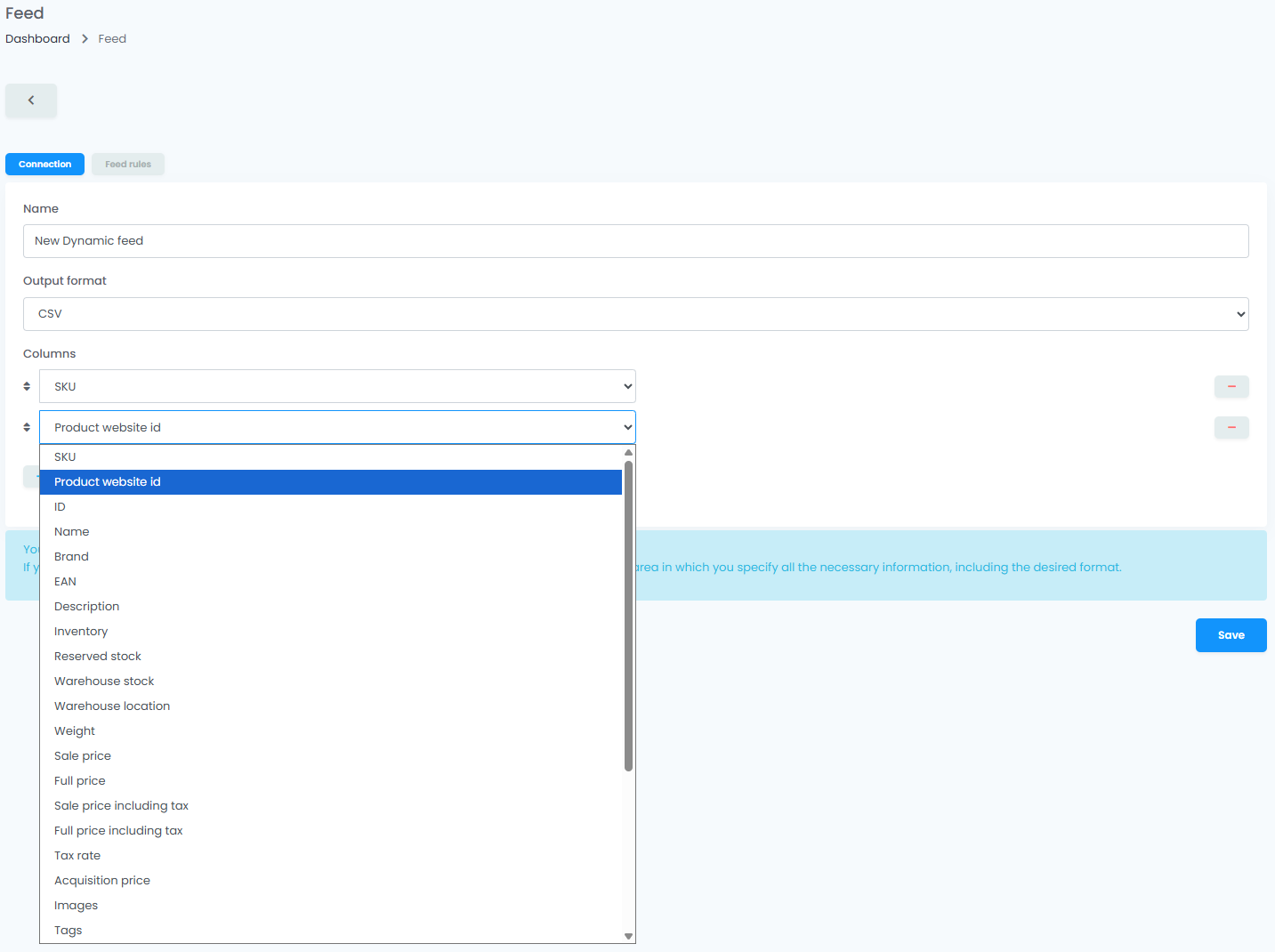
That's the entire surface. The hard part is deciding what your partner needs, not how to express it.
7 real-world Dynamic feed examples
Each of these is a setup easySales sellers run today. Use them as starting points — your partner's exact column names will differ, but the shape is the same.
1. Distributor catalog with stock and B2B price groups
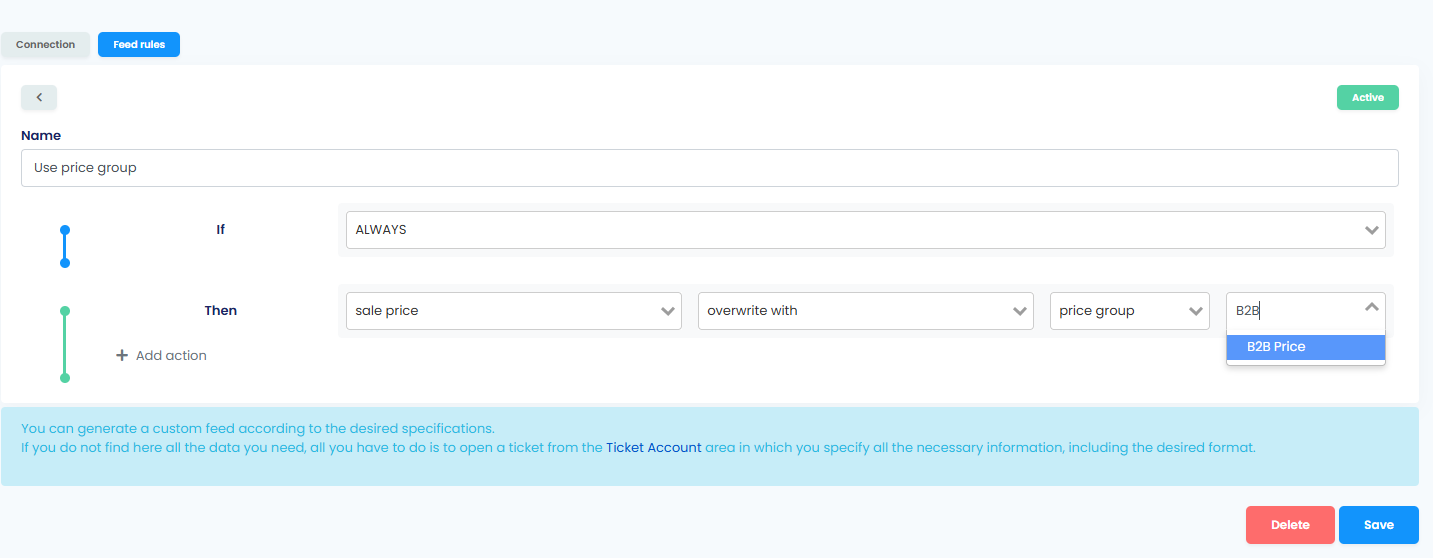
A distributor or franchise carrying your products needs a recurring file with everything they sell on your behalf — but at your wholesale prices, not the retail prices on your site. easySales has Price groups for exactly this: define a B2B price list once in Settings → Price groups, and the Dynamic feed can output that price in place of sale_price.
Columns: sku, ean, name, brand, categories, partner_price (formula column resolved from a Price group), stock, images.
Format: CSV is the most common ask, but XML works equally well — pick whatever your distributor's import process expects.
Tip: add a Feed Rule with an overwrite action on the partner_price column, then drop in the Price group formula chip and pick your distributor's group. Update the Price group in Settings → Price groups and the next regeneration reflects the new prices automatically — you never touch the feed itself.
2. Stock-only feed for a 3PL or secondary shop
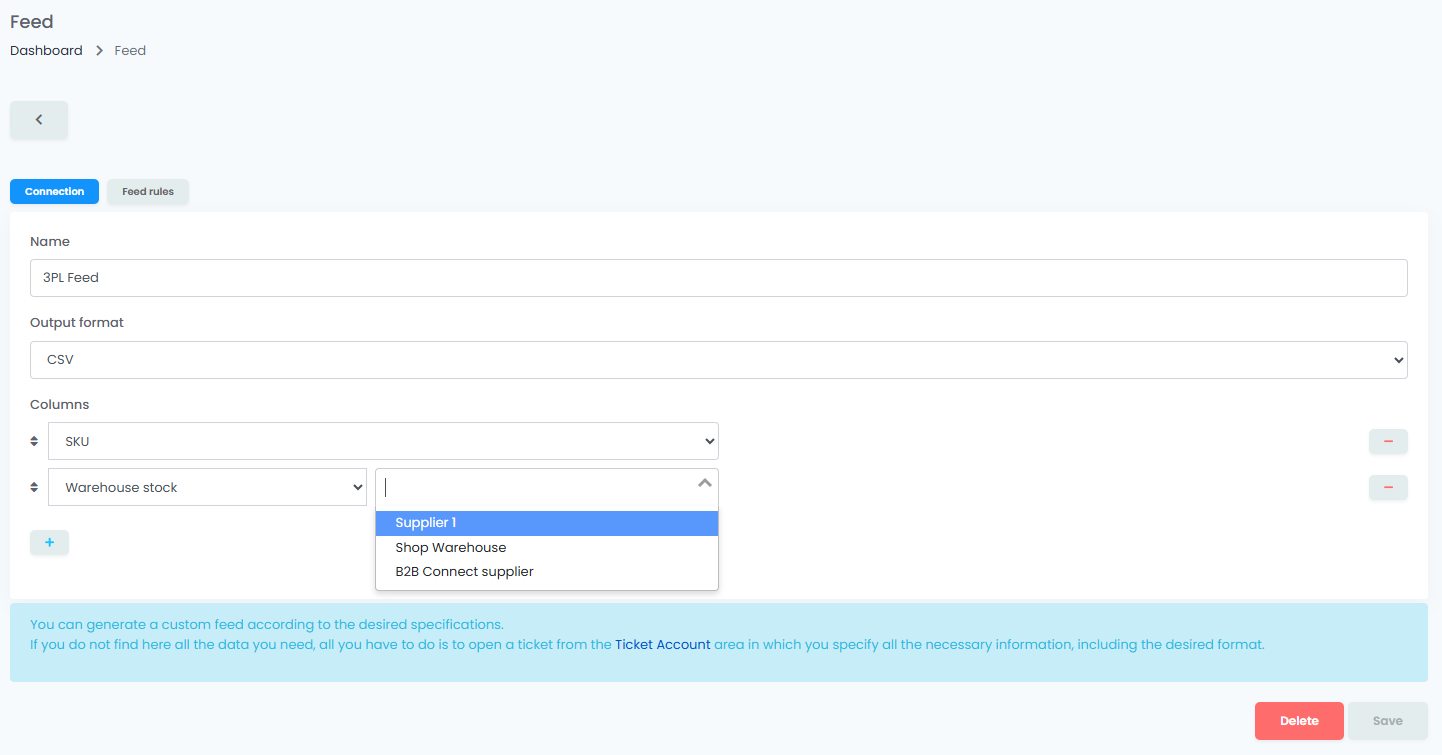
A 3PL warehouse system, a secondary online shop, or an external stock-sync tool only needs two columns: identifier and stock level. Nothing else.
Columns: sku, stock (or warehouse_stock if your 3PL handles a specific warehouse).
Format: CSV works for everything. Some 3PLs prefer JSON.
Tip: if you hold inventory across multiple warehouses, use the per-warehouse warehouse_stock column so each warehouse only sees its own numbers.
3. Multi-country sync with category exclusions
Running two shops on the same catalog — Romanian + Hungarian, two PrestaShop installs, a Shopify alongside another platform — usually means stock and pricing flow from a master shop to a secondary. The catch: the secondary rarely sells every product the master does. Country-specific assortments, regulatory carve-outs, ranges you haven't rolled out yet.
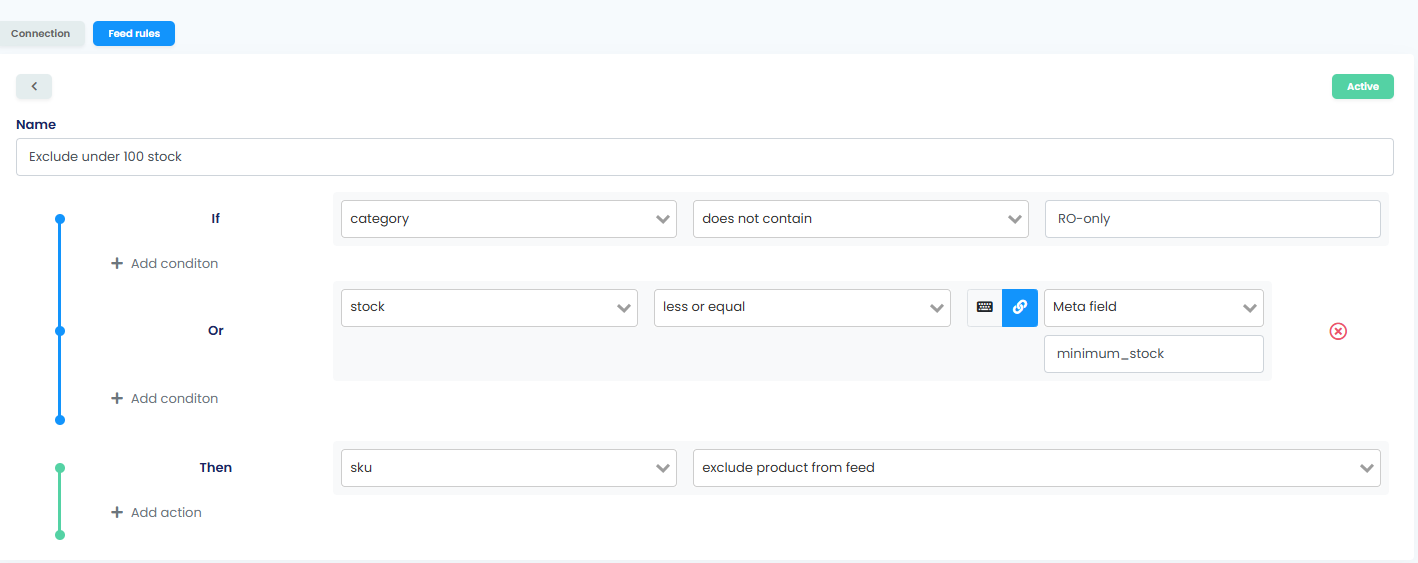
The Dynamic feed handles both halves at once: sync the columns the secondary needs, and use Feed Rules to exclude what doesn't belong.
Columns: sku, stock, optionally sale_price if pricing is shared.
Format: XML or CSV depending on what the secondary platform's import accepts.
Filter: add Feed Rules that exclude by category (category contains "RO-only"), by tag (tag is not "rollout-pending"), by brand, or by any other criterion the rule builder supports. Rules re-evaluate on every regeneration, so the secondary always reads the current cut — no stale exclusion lists.
Tip: if the second shop is also on easySales, you don't need a feed at all — talk to support about cross-shop sync.
4. Reserved-stock (available-to-promise) feed
If you sell the same product on two channels and they don't talk to each other (your own webshop and an off-platform partner site, say), you risk overselling whenever an order lands. A Dynamic feed with reserved stock subtracts open orders from the displayed quantity, so your partner sees what's actually available — not what's on the shelf.
Columns: sku, reserved_stock.
Format: CSV or XML.
Tip: combine reserved_stock with a Feed Rule that excludes products in transit or with long handling times, depending on your fulfillment SLAs.
5. Cross-border partner feed with currency conversion
A B2B partner or distributor outside your home market wants prices in their currency. A Romanian merchant exporting to Hungary needs HUF; a Polish merchant supplying a German partner needs EUR. The Dynamic feed converts on the fly — you don't keep a parallel price list per market.
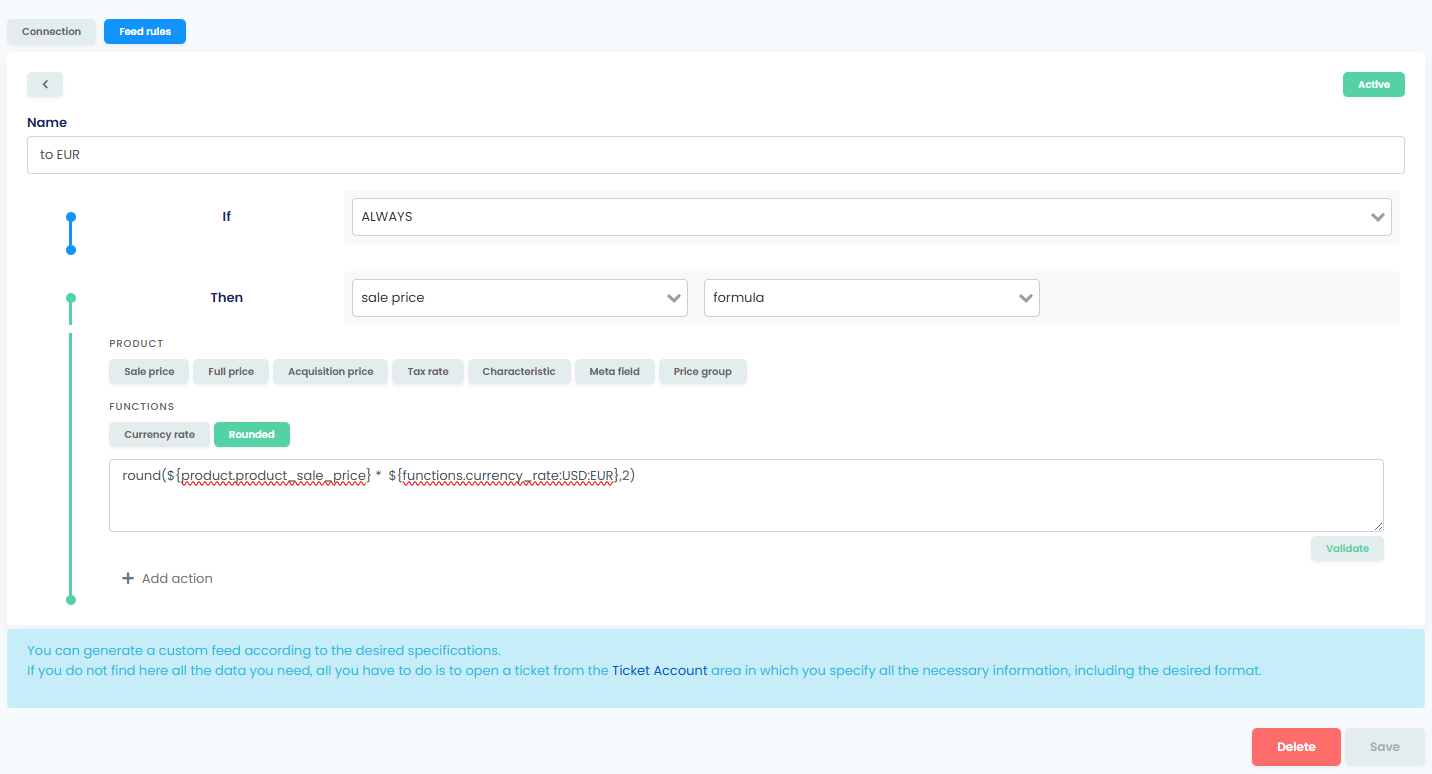
Columns: sku, ean, name, eur_price (formula column → sale_price × currency_rate(RON:EUR)), stock.
Format: anything your partner accepts.
Tip: Feed Rules expose a currency_rate formula chip with from/to currency dropdowns — pick the pair you need (RON → EUR, PLN → EUR, whatever) and the feed multiplies your base price by the live rate. easySales refreshes rates daily; if your partner needs a stable rate for a contracted period, set a custom rate on the currency in Settings → Currencies and the feed will use yours instead of the live one.
6. ERP catalog with product characteristics
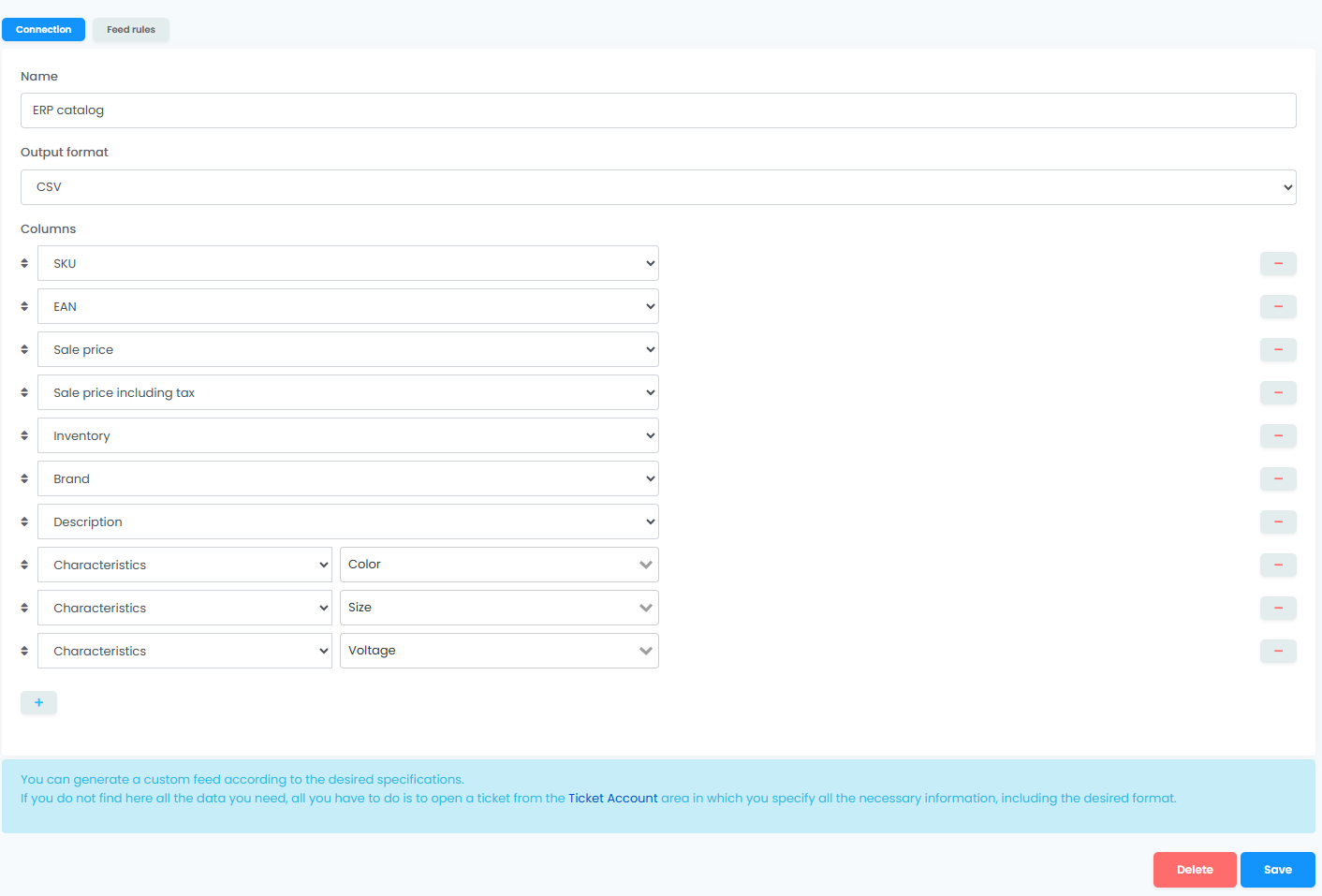
In-house ERPs and accounting systems usually want the full product picture pulled into their own database — including the characteristics that describe each product (colour, size, material, voltage, country of origin, and so on). The Dynamic feed exports characteristics in two shapes: a single block containing every characteristic you've defined, or one column per characteristic when the ERP expects a fixed schema.
Columns: generous — id, sku, name, description, brand, ean, categories, images, weight, height, width, length, tax_rate, full_price_including_tax, plus either a single characteristics column or per-characteristic columns (Colour, Size, Voltage, ...).
Format: XML if your ERP has an XML import; otherwise CSV.
Tip: pick the per-characteristic shape when your ERP expects stable column names — one column for Colour, one for Size, one for Voltage. Pick the single characteristics block when the ERP can parse free-form data; it's faster to set up and survives new characteristics being added without re-mapping the feed. Either way, characteristics flow in from your product data, so keep them maintained on the products themselves and the feed picks up the latest values automatically.
7. Affiliate or coupon partner feed
Affiliate networks, coupon sites, niche bloggers, and shopping aggregators that don't have a dedicated builder in easySales still want a curated feed of your products to promote. They typically want full product data, both list and sale prices (so they can show a discount %), images, and — crucially — only the products that are actually in stock and priced for the campaign.
Columns: sku, name, full_price (list price), sale_price (discounted), images, brand, categories, description.
Format: XML or CSV. Most affiliate networks accept either.
Filter: exclude out-of-stock products (so partners don't promote unavailable items) and add a Feed Rule on acquisition_price versus sale_price if you want to skip low-margin SKUs that would lose you money on commission.
Tip: if the partner is one we already ship a dedicated builder for — 2Performant, BlueWinston, Glami, Favi, Compari — use that builder instead; it's pre-validated for the channel. The Dynamic feed is for the affiliate partners we don't have a template for yet.
Choosing the output format
The Dynamic feed exports as CSV, JSON, or XML. Your partner's import process picks for you:
- CSV — the safe default. Every system reads it. Use it unless someone tells you otherwise.
- XML — more verbose but self-documenting. ERPs, older B2B partners, and ecommerce platform imports usually want XML.
- JSON — modern APIs and some 3PLs prefer it. Easier to parse if your partner is writing custom code.
Don't agonise over the choice. Ask your partner what they want and pick that.
Filtering, scheduling, and access control
Most partners don't want your entire catalog — they want a slice.
- Filtering is done with Feed Rules. Include only certain categories, exclude certain tags, restrict by warehouse, or apply any other rule the rule builder supports. Rules apply on every regeneration, so the file your partner reads always reflects the current filter.
- Scheduling is hourly by default. The feed regenerates only when your partner reads it, so dormant feeds don't waste cycles.
- Access control — the URL is public unless you ask. If your partner needs IP whitelisting, basic auth, or a token-protected URL, support can configure it. Mention it in your onboarding email and you won't have to chase it later.
When NOT to use a Dynamic feed
Two situations are not what Dynamic feed is for, even though the word "feed" might steer you here:
- Shopping engines and channel-specific templates — Google Shopping, Skroutz, Glami, Pepita, Compari, Pazaruvaj, Favi, Arukereso, ShopMania, BlueWinston, 2Performant, and the rest each have their own feed templates with channel-validated columns. Use those, not the Dynamic feed. They handle channel quirks for you. See What Is a Product Feed? for the channel-feed primer.
- Inbound supplier imports — if you want to receive product data from a supplier into easySales (not the other way around), that's the Advanced Warehouse import flow, not a Dynamic feed. Different feature, different audience.
If you're not sure which one you need, support can confirm in two minutes.
Build a feed your partners actually accept
Open Feeds → Add feed → Dynamic in easySales and ship a partner-ready feed in minutes. New here? Try easySales free for 14 days, no credit card needed.